
Kindle Comic Converter - X 64-bit Download
Popular x64 Tags
- image x64 download
- design x64 download
- size x64 download
- color x64 download
- graphics x64 download
- gif x64 download
- panorama x64 download
- photoshop x64 download
- software x64 download
- jpeg x64 download
- photo x64 download
- utility x64 download
- plugin x64 download
- cover x64 download
- tool x64 download
- rgb x64 download
- png x64 download
- jpg x64 download
- pictures x64 download
- images x64 download
- vanderlee x64 download
- bmp x64 download
- photos x64 download
- vdl x64 download
- picture x64 download
- scanner x64 download
- screen x64 download
- video x64 download
- scan x64 download
- dust x64 download
Kindle Comic Converter 9.4.2
Sponsored links:
license: Open Source
downloads: 57
size: 85.50 MB
updated: 2026-01-23
tags: Kindle Comic Converter, download Kindle Comic Converter, Kindle Comic Converter free download, Comics Converter, Comics Generator, EPUB Creator, Comics, Kindle, EPUB, MOBI
Add to Basket

Ciro Mattia Gonano, Paweł Jastrzębski

**Kindle Comic Converter: A Seamless Solution for Comic Enthusiasts**
Kindle Comic Converter (KCC) is an innovative and highly efficient software developed by Ciro Mattia Gonano and Paweł Jastrzębski. It is designed to transform comic book files into formats that are perfectly optimized for e-readers, particularly Kindle devices. This tool stands out in the market for its user-friendly interface, robust functionality, and the ability to handle a wide array of comic book formats.
**Key Features and Functionality**
1. **Wide Format Support**: KCC supports a variety of comic book formats including CBR, CBZ, CB7, CBT, PDF, and EPUB. This extensive compatibility ensures that users can convert virtually any comic book file they possess.
2. **Optimized Output**: The software excels in converting files into formats that are specifically optimized for Kindle devices, such as MOBI and EPUB. This ensures that the comics are displayed with the highest quality, maintaining the integrity of the original artwork and text.
3. **Panel View**: One of the standout features of KCC is its ability to create Kindle Panel Views. This feature enhances the reading experience by allowing users to view comics panel by panel, making it easier to read on smaller screens.
4. **Batch Conversion**: For users with extensive comic book collections, KCC offers a batch conversion feature. This allows multiple files to be converted simultaneously, saving time and effort.
5. **Customization Options**: KCC provides a range of customization options, enabling users to tailor the conversion process to their specific needs. This includes adjusting image quality, resizing, and selecting the desired output format.
6. **Cross-Platform Compatibility**: The software is available for Windows, macOS, and Linux, making it accessible to a wide range of users regardless of their operating system.
**User Experience**
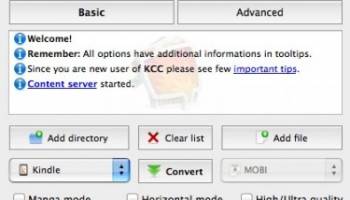
KCC is designed with the user in mind. Its intuitive interface ensures that even those with limited technical expertise can navigate the software with ease. The conversion process is straightforward: users simply select the files they wish to convert, choose their desired output settings, and let KCC handle the rest. The software also provides detailed logs, allowing users to monitor the conversion process and troubleshoot any issues that may arise.
**Performance**
In terms of performance, KCC is both fast and reliable. It handles large files and batch conversions with ease, delivering high-quality output without compromising on speed. The software is regularly updated by its developers, ensuring that it remains compatible with the latest devices and formats.
**Conclusion**
Kindle Comic Converter is an indispensable tool for comic book enthusiasts who wish to enjoy their collections on Kindle devices. Its wide format support, optimized output, and user-friendly interface make it a top choice for anyone looking to convert their comic book files. Whether you are a casual reader or a dedicated collector, KCC offers a seamless and efficient solution for all your comic book conversion needs.
Kindle Comic Converter (KCC) is an innovative and highly efficient software developed by Ciro Mattia Gonano and Paweł Jastrzębski. It is designed to transform comic book files into formats that are perfectly optimized for e-readers, particularly Kindle devices. This tool stands out in the market for its user-friendly interface, robust functionality, and the ability to handle a wide array of comic book formats.
**Key Features and Functionality**
1. **Wide Format Support**: KCC supports a variety of comic book formats including CBR, CBZ, CB7, CBT, PDF, and EPUB. This extensive compatibility ensures that users can convert virtually any comic book file they possess.
2. **Optimized Output**: The software excels in converting files into formats that are specifically optimized for Kindle devices, such as MOBI and EPUB. This ensures that the comics are displayed with the highest quality, maintaining the integrity of the original artwork and text.
3. **Panel View**: One of the standout features of KCC is its ability to create Kindle Panel Views. This feature enhances the reading experience by allowing users to view comics panel by panel, making it easier to read on smaller screens.
4. **Batch Conversion**: For users with extensive comic book collections, KCC offers a batch conversion feature. This allows multiple files to be converted simultaneously, saving time and effort.
5. **Customization Options**: KCC provides a range of customization options, enabling users to tailor the conversion process to their specific needs. This includes adjusting image quality, resizing, and selecting the desired output format.
6. **Cross-Platform Compatibility**: The software is available for Windows, macOS, and Linux, making it accessible to a wide range of users regardless of their operating system.
**User Experience**
KCC is designed with the user in mind. Its intuitive interface ensures that even those with limited technical expertise can navigate the software with ease. The conversion process is straightforward: users simply select the files they wish to convert, choose their desired output settings, and let KCC handle the rest. The software also provides detailed logs, allowing users to monitor the conversion process and troubleshoot any issues that may arise.
**Performance**
In terms of performance, KCC is both fast and reliable. It handles large files and batch conversions with ease, delivering high-quality output without compromising on speed. The software is regularly updated by its developers, ensuring that it remains compatible with the latest devices and formats.
**Conclusion**
Kindle Comic Converter is an indispensable tool for comic book enthusiasts who wish to enjoy their collections on Kindle devices. Its wide format support, optimized output, and user-friendly interface make it a top choice for anyone looking to convert their comic book files. Whether you are a casual reader or a dedicated collector, KCC offers a seamless and efficient solution for all your comic book conversion needs.
OS: Windows 11, Windows 10 64 bit
Add Your Review or 64-bit Compatibility Report
Top Other 64-bit downloads


Topaz DeNoise 6.0.1
A Photoshop plugin that can help you remove digital image noise
Trialware | $79.99

PDF Writer for Windows 2022 1.02
Server-based solution for deploying PDF creation ability across your company
Shareware | $700.00
tags: pdf, server, writer, print, printer, windows2022, win2022, printing, driver, feature, secure, password, vector, concurrent, client, virtual, server2022, windows, 2022, windows server 2022


iWisdom 0.0.0+2107~ga0785ce1
An application which helps you store small bits of wisdom, such as quotations
Open Source


Just Color Picker 6.2
Free portable colour picker and editor for web-designers and digital artists.
Freeware

Blue Cat's Protector x64 2.31
0dB stereo brickwall limiter with adjustable dynamics response
Demo | $99.00

Topaz DeJPEG 4.1.0
Gives you the ability to improve the quality of your JPEG images
Trialware | $29.99
Members area
Top 64-bit Downloads
-
cPicture (x64 bit) 4.1
x64 freeware download -
HyperCam (x64 bit) 2.29.00
x64 freeware download -
PhotoFiltre 11.6.1
x64 freeware download -
VanceAI 1.0.0.7
x64 shareware download -
Adobe Photoshop Elements 2024.3
x64 trialware download -
PDF Writer for Windows
2022 1.02
x64 shareware download -
Gimp for x64 Windows 2.10.38
x64 open source download -
ICO file format x64 2.1f1
x64 open source download -
Portable PhotoFiltre 11.6.1
x64 freeware download -
Blue Cat's Protector x64 2.31
x64 demo download
Top Downloads
-
CorelDRAW X5 2025 26.2.0.29
trialware download -
Fotosizer 3.21.0.594
freeware download -
CorelDRAW X6 16.4.0.1280
trialware download -
Scanahand 8.0.0.320
demo download -
MSU Subtitle Remover
VirtualDub plugin 3.0beta2
freeware download -
TinyPDF 3.00
freeware download -
cPicture (x64 bit) 4.1
freeware download -
PhotoFiltre 11.6.1
freeware download -
WinScan2PDF 9.55
freeware download -
PDF24 Creator 11.17.0
freeware download -
VanceAI 1.0.0.7
shareware download -
ReaConverter Standard 8.200
demo download -
FreeFotoWorks 2026 26.0.9
freeware download -
Anim8or 1.00
freeware download -
HyperCam (x64 bit) 2.29.00
freeware download