
loginTimer - X 64-bit Download
Popular x64 Tags
- internet x64 download
- delete x64 download
- cookies x64 download
- password x64 download
- lock x64 download
- hide x64 download
- keylogger x64 download
- shredder x64 download
- history x64 download
- wipe x64 download
- security x64 download
- clean x64 download
- cache x64 download
- files x64 download
- protect x64 download
- data x64 download
- erase x64 download
- secure x64 download
- lost password x64 download
- software x64 download
- utility x64 download
- file x64 download
- privacy x64 download
- recovery x64 download
- forgotten password x64 download
- shred x64 download
- erase history x64 download
- remove x64 download
- registry repair programs x64 download
- evidence x64 download
loginTimer 9.3.8.23
Sponsored links:
license: Demo ($400.00)
downloads: 37
size: 6.50 MB
updated: 2023-05-25
tags: Y2K, Y2K38, Year 2038, Windows login, logintimer, satheeshsoft, discovery, inventions, invention, technology invention, technology discovery, computer login date time number of login, 2038, y2k y2k38 technology invented software, y2k38 invention
Add to Basket

Satheesh.S

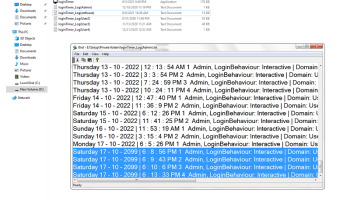
Name: loginTimer About: Y2K38 technology discovery. loginTimer is powerful software that automatically scans computer login times and secretly stores them for you in a private text file, in addition to all users' login date, time, total logins each day/user, admin actions, login behavior (local and remote) and saves them continuously, one by one, in a private log file. This makes it easy for you to identify any suspicious activity on your computer and take appropriate action if necessary. It included the first successful discovery of Y2K38 technology. It works up to 2099 or after, with no Y2K year limitations. Portable in computer drive. Works in any of your personal folder in computer other than Windows system drive. (This works only in the computer hard drive. Do not run this software from any other external hard drives or pendrives.) Place the loginTimer folder in any drive (Eg: E:\your folderloginTimer) or inside sub folders you choose. (Eg:E:\your folderloginTimer not in C:\ drive or Windows installed drive). Also it should be any of the folders, not to place directly in drive because privacy you only knows where the program location. You can rename loginTimer folder name to any name. First time you must activate Run as administrator, loginTimer.exe. See the log file. Log file including login statistics will be created regarding current User Account whenever the computer login happens. Another new entries will become next automatically. Apply Run as administrator, if you changed the folder. Logs represent: Date (day, month, year) and Time, Total logins each day, Admin actions, Login behavior. Specification: English. Log file is read only attribute, do not manually change/update the log file. Requirement recommended 64 bit: Windows 11/10/8/Server, 32/64 bit or Windows 7 Ultimate 64 SP1-IE11(updated and .NET). License: Trial 30 days.
OS: Win2000, Windows XP, Windows 7 x32, Windows 7 x64, Windows 8, Windows 10, WinServer, WinOther, Windows Vista, Windows Vista x64
Requirements: Windows 11/10/8/Server, 32/64 bit or Windows 7 Ultimate 64 SP1-IE11(updated and .NET).
Add Your Review or 64-bit Compatibility Report
Top Other 64-bit downloads


IPVanish 4.3.9.1
Secure and fast VPN service with user-friendly interface and robust features.
Shareware

Process Magic 2.0
Command-line Tool to Hide any Windows Process or Launch New Process in Invisible
Freeware

O&O SafeErase Server x64 18.4.611
Deletes sensitive data so securely that a reconstruction
Trialware | $199.00

Windows Defender Definition Updates March 20, 2026

Essential security updates for Windows Defender.
Freeware

2FAGuard 1.7.2
Secure your accounts effortlessly with 2FAGuard's intuitive two-factor authentication.
Open Source

Members area
Top 64-bit Downloads
-
OpenVPN x64 2.6.11
x64 open source download -
VSCryptoHash 64-bit 2.5.3.509
x64 freeware download -
O&O SafeErase Server
x64 18.4.611
x64 trialware download -
Prevent Restore 119.00
x64 freeware download -
Microsoft Standalone
System Sweeper (x64 bit) 1.0.856.0 Beta
x64 freeware download -
Trend Micro Internet
Security Pro 2010 (x64
bit)
x64 trialware download -
Hash Suite 4.0
x64 shareware download -
Secret Disk 320.00
x64 freeware download -
Romaco Timeout x64 3.1.4.0
x64 freeware download -
Trend Micro HouseCall
64bit 1.62.1.1162
x64 freeware download
Top Downloads
-
OpenVPN x64 2.6.11
open source download -
ClamWin Portable 0.103.2.1
open source download -
CmosPwd 5.0
freeware download -
Aiseesoft Android
Unlocker 1.1.16
shareware download -
Video Padlock 1.20
demo download -
NordVPN 7.56.2.0
demo download -
OSV-Scanner 2.3.3
open source download -
WebPost Tools 1.0.0.412
freeware download -
CRYPTO! Build 9695
freeware download -
GhostVolt 1.3.3.0
demo download -
SymlexVPN 3.1.7
shareware download -
abylon KEYSAFE 23.60.1
shareware download -
Portable SafeInCloud 24.14.1
freeware download -
Mime Tool 2.2.8.11
freeware download -
VSCryptoHash 64-bit 2.5.3.509
freeware download