
Macrium Reflect Server Edition - X 64-bit Download
Popular x64 Tags
- windows x64 download
- backup x64 download
- files x64 download
- data x64 download
- file backup x64 download
- file recovery x64 download
- file x64 download
- zip x64 download
- transfer x64 download
- restore x64 download
- outlook x64 download
- mail x64 download
- ftp x64 download
- office x64 download
- address x64 download
- data recovery x64 download
- backup software x64 download
- disk x64 download
- data backup x64 download
- contacts x64 download
- synchronize x64 download
- bookmarks x64 download
- storage x64 download
- save x64 download
- offsite backup x64 download
- express x64 download
- book x64 download
- outlook backup x64 download
- online backup x64 download
- remote backup x64 download
You are here: X-64-bit Download
\ System Utilities
\ Backup & Restore \ Macrium Reflect Server Edition
Macrium Reflect Server Edition 8.1 B8017
Sponsored links:

Paramount Software UK Ltd

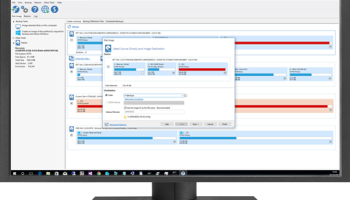
Macrium Reflect Server Edition is a reliable software created to help users to backup files and drives, as well as disk image files. Protect your personal documents, photos, music and emails. Upgrade your hard disk or try new operating systems in the safe knowledge that everything is securely saved in an easily recovered backup file.
Backup files and folders and mount them as a virtual drive in Windows Explorer. Macrium Reflect supports backup to local, network and USB drives as well as burning to all DVD formats.
Using Macrium Reflect Server Edition you can backup whole partitions or individual files and folders into a single compressed mountable archive file. This can then be used to create an exact image of partitions on a hard disk for easy hard disk upgrade or system recovery.
FEATURES:
Drag and drop user interface:
· New, more intuitive user interface supports drag and drop of partitions when backing up or restoring. With easy to use intuitive wizards and fast access to key functions, backing up and restoring is now easier then ever.
WinPE 3.1 rescue environment:
· Includes the latest version of the Microsoft Windows Preinstallation Environment offering support for more devices along with USB 3.0 support.
Direct disk cloning:
· Directly copy one hard disk to another without creating an image file first. Partitions can be ordered and resized during this process.
Reorder & resize partitions:
· Change the order and size of partitions as they are restored
Restore multiple partitions:
· Restore whole disks or multiple partitions in a single operation
Backup destination rotation:
· Easily rotate backup destinations by specifying a list of alternate backup locations
File & Folder backup NTFS permissions:
· Include NTFS access control lists (permissions) as part of a file and folder backup, these permissions can then be restored.
Server ReDeploy:
· Restore your Windows server operating systems to new hardware using ReDeploy for Servers which features a clean, simple and intuitive user interface
WinPE driver support:
· Adding driver support to Microsoft WinPE has never been easier, Macrium Reflect will prompt to add drivers for unsupported devices in WinPE.
UEFI Support:
· Support for the latest UEFI motherbboards with GPT booting.
Integrated email component:
· Send backup completion status email notifications with the new integrated email component.
Disk imaging:
· Create images of whole disks or selected partitions allowing you to restore operating systems or data volumes without the need to reinstall
Incremental & differential backups:
· Create incremental and differential backups from a full backup forming a working backup set and taking less time than a full backup
File & folder backup:
· Backup multiple collections of files and folders from different volumes
File & folder masks:
· Specify multiple inclusion and exclusion masks for a file & folder backup to ensure only the data you require is included in the backup
AES Encryption & password protection:
· Use industry Advanced Encryption Standard to encrypt backups, choose between 128, 192 and 256 bit strength for increasing levels of encryption. Password protect backups to prevent unauthorised access
Password protection:
· Add further password protection to a backup to prevent unauthorised access to your data
Disk space management:
· Manage the amount of disk space used by specifying how many backup sets to retain
Image verification:
· Verify backups as they are either created or at a later date to ensure backups are in working order
Backup definitions:
· Store common backup tasks in definition files so that they can be executed in script, as scheduled tasks or from desktop shortcuts
Scheduled backups:
· Run backup definitions as Windows Tasks on daily, weekly or monthly cycles for unattended backup operations
Scripting support:
· Use backup definitions in VBScript or MS-DOS batch files to include them in your own workflow process
Backup files and folders and mount them as a virtual drive in Windows Explorer. Macrium Reflect supports backup to local, network and USB drives as well as burning to all DVD formats.
Using Macrium Reflect Server Edition you can backup whole partitions or individual files and folders into a single compressed mountable archive file. This can then be used to create an exact image of partitions on a hard disk for easy hard disk upgrade or system recovery.
FEATURES:
Drag and drop user interface:
· New, more intuitive user interface supports drag and drop of partitions when backing up or restoring. With easy to use intuitive wizards and fast access to key functions, backing up and restoring is now easier then ever.
WinPE 3.1 rescue environment:
· Includes the latest version of the Microsoft Windows Preinstallation Environment offering support for more devices along with USB 3.0 support.
Direct disk cloning:
· Directly copy one hard disk to another without creating an image file first. Partitions can be ordered and resized during this process.
Reorder & resize partitions:
· Change the order and size of partitions as they are restored
Restore multiple partitions:
· Restore whole disks or multiple partitions in a single operation
Backup destination rotation:
· Easily rotate backup destinations by specifying a list of alternate backup locations
File & Folder backup NTFS permissions:
· Include NTFS access control lists (permissions) as part of a file and folder backup, these permissions can then be restored.
Server ReDeploy:
· Restore your Windows server operating systems to new hardware using ReDeploy for Servers which features a clean, simple and intuitive user interface
WinPE driver support:
· Adding driver support to Microsoft WinPE has never been easier, Macrium Reflect will prompt to add drivers for unsupported devices in WinPE.
UEFI Support:
· Support for the latest UEFI motherbboards with GPT booting.
Integrated email component:
· Send backup completion status email notifications with the new integrated email component.
Disk imaging:
· Create images of whole disks or selected partitions allowing you to restore operating systems or data volumes without the need to reinstall
Incremental & differential backups:
· Create incremental and differential backups from a full backup forming a working backup set and taking less time than a full backup
File & folder backup:
· Backup multiple collections of files and folders from different volumes
File & folder masks:
· Specify multiple inclusion and exclusion masks for a file & folder backup to ensure only the data you require is included in the backup
AES Encryption & password protection:
· Use industry Advanced Encryption Standard to encrypt backups, choose between 128, 192 and 256 bit strength for increasing levels of encryption. Password protect backups to prevent unauthorised access
Password protection:
· Add further password protection to a backup to prevent unauthorised access to your data
Disk space management:
· Manage the amount of disk space used by specifying how many backup sets to retain
Image verification:
· Verify backups as they are either created or at a later date to ensure backups are in working order
Backup definitions:
· Store common backup tasks in definition files so that they can be executed in script, as scheduled tasks or from desktop shortcuts
Scheduled backups:
· Run backup definitions as Windows Tasks on daily, weekly or monthly cycles for unattended backup operations
Scripting support:
· Use backup definitions in VBScript or MS-DOS batch files to include them in your own workflow process
OS: Windows XP, Windows Vista, Windows Vista x64, Windows 7, Windows 7 x64, Windows 8, Windows 8 x64, Windows 10, Windows 10 x64, Windows 11
Add Your Review or 64-bit Compatibility Report
Top Backup & Restore 64-bit downloads


AnyMP4 Data Recovery 1.5.12
Recover or rescue data from computer, flash media drive and other devices
Shareware | $24.50

Software to Data Recovery 5.8.4.1
Download Software to Data Recovery for instant salvage of lost memorable snaps
Shareware | $79.00

PCtransfer 1.0.0.1033
the best free, secure and portable transfer assistant for Windows XP/Vista/7/8
Freeware

EaseUS Key Finder 4.1.6 Build 20240910
Effortlessly recover lost product keys for software and operating systems.
Demo


GRBackPro Server Backup x64 11.2.0
Server Backup Software, fast data back-up for Windows Server 2022/2019/2016/2012/2008 x64
Shareware | $199.00

Free Android Mobile Manager for Windows 1.0.4
The free software to sync android mobile's data while android connected with PC.
Freeware


GoodSync 12.9.26
Backup and synchronization software for all your important files and folders
Freeware

QuickMirror 1.71
QuickMirror provides quick updating of backups, synchronization, and mirroring.
Shareware | $25.00

Backup4all Monitor 1.2.292
Realtime and historical monitoring for Backup4all backups and other actions.
Shareware | $4.99
Members area
Top 64-bit Downloads
-
HWiNFO64 6.28 B4200
x64 freeware download -
GRBackPro Server Backup
x64 11.2.0
x64 shareware download -
Windows 7 x64
x64 trialware download -
EasyTune6 B24.0119.1
x64 freeware download -
XtraTools Professional
x64 26.2.1
x64 shareware download -
SoftPerfect RAM Disk 26.2
x64 shareware download -
BusDog x64 0.2
x64 freeware download -
PhotoRenamer 4.1
x64 freeware download -
DBX Converter 2.0
x64 shareware download -
HWMonitor (64-bit) 1.53
x64 freeware download
Top Downloads
-
Open Files from XLSX to
XLS 5.2
shareware download -
FMDiff 4.0.5
demo download -
Vim 9.2.0198
open source download -
Shell Tools 2.0.1
freeware download -
WinFindr 1.8
shareware download -
Caffeine 1.98
freeware download -
AnyMP4 Data Recovery 1.5.12
shareware download -
Software to Data
Recovery 5.8.4.1
shareware download -
Clipstory 1.0
shareware download -
Tags4Docs 1.1
shareware download -
Nomad.NET 3.2.0.2890
freeware download -
FileMyster 1.2.5
freeware download -
Music Collection 3.9.7.0
freeware download -
File Compression 1.0
commercial download -
NirLauncher 1.30.22
freeware download