
Makesoft DuplicateFinder - X 64-bit Download
Popular x64 Tags
- files x64 download
- file manager x64 download
- zip x64 download
- tool x64 download
- software x64 download
- ntfs x64 download
- remove x64 download
- disk x64 download
- free x64 download
- duplicate x64 download
- copy x64 download
- folder x64 download
- utility x64 download
- data recovery software x64 download
- undelete x64 download
- erase x64 download
- directory x64 download
- backup x64 download
- file x64 download
- hard x64 download
- data recovery x64 download
- delete x64 download
- recovery x64 download
- find x64 download
- file recovery x64 download
- unerase x64 download
- recover x64 download
- mp3 x64 download
- space x64 download
- search x64 download
You are here: X-64-bit Download
\ System Utilities
\ File & Disk Management \ Makesoft DuplicateFinder
Makesoft DuplicateFinder 1.2.6
Sponsored links:
license: Freeware
downloads: 75
size: 4.20 MB
updated: 2024-10-01
tags: data cleanup, download Makesoft DuplicateFinder, Makesoft DuplicateFinder free download, find duplicate, file management, software tool, duplicate, finder, search, Makesoft DuplicateFinder, searcher, duplicate finder, duplicate file finder, organization
Buy Now
Add to Basket

Makesoft


**Makesoft DuplicateFinder: Streamline Your Digital Space with Precision**
In today's digital age, managing files efficiently is paramount. Makesoft DuplicateFinder, developed by the innovative team at Makesoft, emerges as a robust solution designed to help users declutter their digital environments by identifying and removing duplicate files with unparalleled accuracy.
**User-Friendly Interface**
Makesoft DuplicateFinder boasts an intuitive and user-friendly interface that caters to both novice and advanced users. The software’s clean design ensures that users can navigate through its features effortlessly, making the process of finding and eliminating duplicate files straightforward and hassle-free.
**Advanced Scanning Algorithms**
At the heart of Makesoft DuplicateFinder lies its advanced scanning algorithms. These algorithms are engineered to perform deep scans across various storage locations, including internal drives, external storage devices, and network drives. The software meticulously compares file contents, ensuring that even duplicates with different filenames are detected.
**Customizable Search Parameters**
One of the standout features of Makesoft DuplicateFinder is its customizable search parameters. Users can tailor the search criteria based on file type, size, and date, allowing for a more targeted and efficient duplicate search. This flexibility ensures that users can focus on specific file categories, such as documents, images, or videos, thereby optimizing their file management process.
**Comprehensive Reporting and Management**
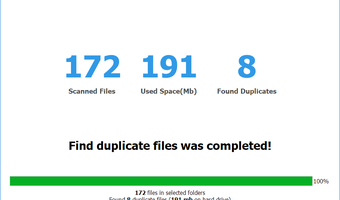
Upon completing a scan, Makesoft DuplicateFinder provides a comprehensive report detailing the duplicate files found. The software categorizes duplicates, making it easy for users to review and decide which files to keep and which to delete. Additionally, the software offers options to move duplicates to a specific folder, delete them permanently, or replace them with symbolic links, providing users with multiple management options.
**Safety and Reliability**
Safety is a key concern when dealing with file deletion. Makesoft DuplicateFinder incorporates robust safety measures to prevent accidental data loss. The software includes a preview feature that allows users to view files before deletion, and it supports a backup option to ensure that users can restore files if needed.
**Performance and Efficiency**
Makesoft DuplicateFinder is optimized for performance, ensuring that scans are conducted swiftly without compromising accuracy. The software’s efficient use of system resources means that it can run seamlessly in the background, allowing users to continue their work without interruption.
**Cross-Platform Compatibility**
Understanding the diverse needs of its users, Makesoft has ensured that DuplicateFinder is compatible with multiple operating systems, including Windows and macOS. This cross-platform compatibility ensures that a wider audience can benefit from its powerful features.
**Conclusion**
Makesoft DuplicateFinder stands out as a reliable and efficient tool for managing duplicate files. Its advanced scanning capabilities, customizable search parameters, and user-friendly interface make it an indispensable asset for anyone looking to optimize their digital storage. Whether you are a professional managing large volumes of data or a casual user looking to free up space on your device, Makesoft DuplicateFinder offers a comprehensive solution that combines precision, safety, and ease of use.
In today's digital age, managing files efficiently is paramount. Makesoft DuplicateFinder, developed by the innovative team at Makesoft, emerges as a robust solution designed to help users declutter their digital environments by identifying and removing duplicate files with unparalleled accuracy.
**User-Friendly Interface**
Makesoft DuplicateFinder boasts an intuitive and user-friendly interface that caters to both novice and advanced users. The software’s clean design ensures that users can navigate through its features effortlessly, making the process of finding and eliminating duplicate files straightforward and hassle-free.
**Advanced Scanning Algorithms**
At the heart of Makesoft DuplicateFinder lies its advanced scanning algorithms. These algorithms are engineered to perform deep scans across various storage locations, including internal drives, external storage devices, and network drives. The software meticulously compares file contents, ensuring that even duplicates with different filenames are detected.
**Customizable Search Parameters**
One of the standout features of Makesoft DuplicateFinder is its customizable search parameters. Users can tailor the search criteria based on file type, size, and date, allowing for a more targeted and efficient duplicate search. This flexibility ensures that users can focus on specific file categories, such as documents, images, or videos, thereby optimizing their file management process.
**Comprehensive Reporting and Management**
Upon completing a scan, Makesoft DuplicateFinder provides a comprehensive report detailing the duplicate files found. The software categorizes duplicates, making it easy for users to review and decide which files to keep and which to delete. Additionally, the software offers options to move duplicates to a specific folder, delete them permanently, or replace them with symbolic links, providing users with multiple management options.
**Safety and Reliability**
Safety is a key concern when dealing with file deletion. Makesoft DuplicateFinder incorporates robust safety measures to prevent accidental data loss. The software includes a preview feature that allows users to view files before deletion, and it supports a backup option to ensure that users can restore files if needed.
**Performance and Efficiency**
Makesoft DuplicateFinder is optimized for performance, ensuring that scans are conducted swiftly without compromising accuracy. The software’s efficient use of system resources means that it can run seamlessly in the background, allowing users to continue their work without interruption.
**Cross-Platform Compatibility**
Understanding the diverse needs of its users, Makesoft has ensured that DuplicateFinder is compatible with multiple operating systems, including Windows and macOS. This cross-platform compatibility ensures that a wider audience can benefit from its powerful features.
**Conclusion**
Makesoft DuplicateFinder stands out as a reliable and efficient tool for managing duplicate files. Its advanced scanning capabilities, customizable search parameters, and user-friendly interface make it an indispensable asset for anyone looking to optimize their digital storage. Whether you are a professional managing large volumes of data or a casual user looking to free up space on your device, Makesoft DuplicateFinder offers a comprehensive solution that combines precision, safety, and ease of use.
Homepage: Makesoft DuplicateFinder
OS: Windows 11, Windows 10 32/64 bit, Windows 8 32/64 bit, Windows 7 32/64 bit, Windows Vista, Windows XP 32/64 bit, Windows 2K

Add Your Review or 64-bit Compatibility Report
Top File & Disk Management 64-bit downloads


Open Files from XLSX to XLS 5.2
Convert XLSX to XLS with Open files from XLSX to XLS program
Shareware | $29.00

Pitara 4.0.9566.34157

Pitara: Your all-in-one solution for seamless project management and collaboration.
Open Source


WinFindr 1.8
Effortlessly locate files and folders with WinFindr's intuitive search.
Shareware | $23.00

AnyMP4 DVD Creator 7.3.28
Create and customize DVDs from videos with AnyMP4 DVD Creator.
Trialware | $39.96

tail for Windows 2.1
tail for Windows is a UNIX/Linux like tail DOS Command for Windows.
Shareware | $29.99


WinFR 5.60 S Build 2031
Windows tool used for efficient renaming of several files in one step
Trialware | $9.90

GainTools OST to PST Converter 1.0.1
GainTools OST to PST Converter Tool to Convert OST file into Other Formats
Shareware | $49.00
Members area
Top 64-bit Downloads
-
EasyTune6 B24.0119.1
x64 freeware download -
HWMonitor (64-bit) 1.53
x64 freeware download -
7z SFX Builder x64 2.1
x64 freeware download -
PhotoRenamer 4.1
x64 freeware download -
XtraTools Professional
x64 26.2.1
x64 shareware download -
Windows 7 x64
x64 trialware download -
Disk Pulse Pro x64 16.1.28
x64 trialware download -
HWiNFO64 6.28 B4200
x64 freeware download -
Areca Backup x64 7.5
x64 open source download -
PKZIP 64-bit 14.40.0028
x64 trialware download
Top Downloads
-
Open Files from XLSX to
XLS 5.2
shareware download -
AnyMP4 Data Recovery 1.5.12
shareware download -
EaseUS Key Finder 4.1.6 Build 20240910
demo download -
Pitara 4.0.9566.34157
open source download -
Office 365 Backup 3.0
shareware download -
DRevitalize 4.10
demo download -
WinFindr 1.8
shareware download -
Vim 9.2.0140
open source download -
Cursor 0.45.12
demo download -
WriterClassic 10.8.0
open source download -
Caffeine 1.98
freeware download -
FMDiff 4.0.5
demo download -
SyncBreeze 17.8.26
freeware download -
GoodSync 12.9.26
freeware download -
AnyMP4 DVD Creator 7.3.28
trialware download