
MICR E13B Match font - X 64-bit Download
Popular x64 Tags
MICR E13B Match font 6.2.0
Sponsored links:

Match Software

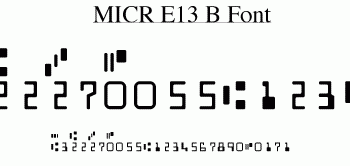
This MICR e13b font (also often called MICR font, or E-13B font) is necessary to print numbers and special symbols at the bottom of checks so they can be recognized by the OCR/magnetic ink reader systems used by banks in North America (US and Canada). To install a font, double click on it, and in the window that appears, click Install. Because applications may be looking for different font names, there are three different font files : MICREBMatch MICRE13B MICR You may install all files or only the one you need. They are technically identical, but the name will differ in the font menu. To create the proper magnetic stripe, you need numbers, and separator symbols. The separators are ABCD. For compatibility with some programs, you can also use single quote, sharp, dollar and percent. Below is an example of the data one would enter in a plain font, to get the same as the bottom of a check : 9 '#$% 0123456789 10 '#$% 0123456789 #122000661#0545'03739'19299% #322270055#0148202801% 12 '#$% 0123456789 Here is how it looks, when the MICR E13B Match font is used (the font must be installed to show the result) : 9 '#$% 0123456789 10 '#$% 0123456789 #122000661#0545'03739'19299% #322270055#0148202801% 12 '#$% 0123456789 (12, This is is the proper size) If you need Unicode encoded separator characters, they are supported as well, compliant to Unicode page U2440 homepage MICR (Magnetic Ink Character Recognition) strips are used by U.S. bank systems to automate check processing, around 68 Billion last year. The MICR techology has been invented around the mid-fifties to help processing the growing number of checks that took much too long to handle by hand. The MICR E13B Match font has been created with extremely accurate positioning, and tested with the finest benchmark systems. It is used daily by major corporations, as well as regional and national banks.
OS: Win2000, Windows XP, Windows 7 x32, Windows 7 x64, Windows 8, Windows 10, WinServer, WinOther, Windows Vista, Windows Vista x64
Requirements: Standard font
Add Your Review or 64-bit Compatibility Report
Top Cursors & Fonts 64-bit downloads


CursorFX 4.03
Create great-looking cursors with this easy to use and handy application
Trialware | $6.99


MICR Font Suite 4.06
MICR Calibration Wizard with 15 MICRE13B fonts and 18 Secure fonts.
Demo | $99.99


Members area
Top 64-bit Downloads
-
Persclock 2.0
x64 freeware download -
bbLean (x64bit) 1.17.1
x64 freeware download -
Pixelscope 8
x64 freeware download -
Save.me x64 2.4.0
x64 freeware download -
TrayCD x64 1.2
x64 open source download -
KillKeys x64 1.2
x64 open source download -
VSLogonScreenCustomizer
64-bit 1.15.3.297
x64 freeware download -
magayo World Time
Weather (64-bit) 1.0.2.1
x64 freeware download -
Vanga Rengi Mangaro 1.2.7.875
x64 trialware download -
WMP12 - BLUE Theme X64
x64 freeware download
Top Downloads
-
Bonzi Buddy 1.7.0
freeware download -
Cloks and Time 2.0
demo download -
CoordiPoint 1.0
freeware download -
MouseScribe 1.4
trialware download -
Limages 2.0
shareware download -
uWidgets 0.6.0 Beta
open source download -
Persclock 2.0
freeware download -
IconPackager 10.03
trialware download -
f.lux 4.104
freeware download -
Sim Aquarium FREE! 3.7.55
freeware download -
iPadian 10.1
freeware download -
PictureRiver 1.7.4.2
shareware download -
EarthTime 6.32.1
trialware download -
Desktops 2.01
freeware download -
Hot Alarm Clock 6.4.4.1
trialware download