
Microsoft Power BI Desktop - X 64-bit Download
Popular x64 Tags
- office x64 download
- microsoft x64 download
- importing x64 download
- exporting x64 download
- acrobat x64 download
- xls x64 download
- printer x64 download
- pdf x64 download
- pdf converter x64 download
- software x64 download
- word x64 download
- outlook x64 download
- excel x64 download
- powerpoint x64 download
- tool x64 download
- ppt x64 download
- adobe x64 download
- convert x64 download
- spreadsheet x64 download
- text x64 download
- create x64 download
- doc x64 download
- printing x64 download
- files x64 download
- add in x64 download
- open x64 download
- document x64 download
- data x64 download
- export x64 download
- saving x64 download
Microsoft Power BI Desktop 2.150.2455.0
Sponsored links:
license: Demo ($14.00)
downloads: 624
size: 836.00 MB
updated: 2026-02-13
tags: Microsoft Power BI Desktop, download Microsoft Power BI Desktop, Microsoft Power BI Desktop free download, business intelligence, analyze data set, report creator, Power BI, report, visualize, analyze
Add to Basket

Microsoft

**Microsoft Power BI Desktop: Unleashing the Power of Data Visualization**
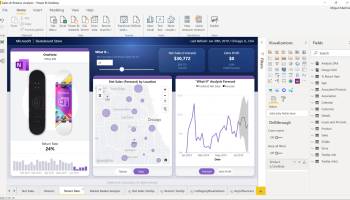
Microsoft Power BI Desktop is a robust data visualization and business intelligence tool designed to transform raw data into insightful, interactive reports and dashboards. Developed by Microsoft, this software stands out for its user-friendly interface, extensive data connectivity options, and powerful analytical capabilities, making it an indispensable tool for data professionals and business analysts.
**Key Features:**
1. **Intuitive Interface:**
Power BI Desktop boasts a clean, intuitive interface that simplifies the process of data analysis. Users can easily drag and drop data fields, create visualizations, and customize reports without needing extensive technical expertise.
2. **Extensive Data Connectivity:**
One of the standout features of Power BI Desktop is its ability to connect to a wide variety of data sources. Whether it's Excel spreadsheets, cloud-based databases, on-premises data warehouses, or online services like Google Analytics and Salesforce, Power BI Desktop can seamlessly integrate and consolidate data from multiple sources.
3. **Advanced Data Modeling:**
The software provides robust data modeling capabilities, allowing users to clean, transform, and enrich their data. With features like DAX (Data Analysis Expressions) and Power Query Editor, users can perform complex calculations, create relationships between different data sets, and prepare their data for in-depth analysis.
4. **Interactive Visualizations:**
Power BI Desktop offers a rich library of visualizations, including bar charts, line graphs, scatter plots, maps, and more. These visualizations are highly interactive, enabling users to drill down into data, filter results, and gain deeper insights with just a few clicks.
5. **Custom Visuals:**
For those who need more than the standard visualizations, Power BI Desktop supports custom visuals. Users can create their own visuals or download additional ones from the Microsoft AppSource marketplace, providing endless possibilities for data representation.
6. **Collaboration and Sharing:**
Collaboration is seamless with Power BI Desktop. Users can publish their reports to the Power BI service, share them with colleagues, and collaborate in real-time. The software also supports embedding reports into other applications, making it easier to disseminate insights across the organization.
7. **AI and Machine Learning Integration:**
Power BI Desktop leverages AI and machine learning to enhance data analysis. Features like Quick Insights, AI visuals, and integration with Azure Machine Learning allow users to uncover hidden patterns and make predictive analyses with ease.
8. **Security and Compliance:**
Microsoft ensures that Power BI Desktop adheres to the highest security and compliance standards. With features like row-level security, data encryption, and compliance with global standards like GDPR, users can trust that their data is secure.
**Conclusion:**
Microsoft Power BI Desktop is a powerful, versatile tool that empowers users to turn data into actionable insights. Its combination of ease of use, extensive connectivity, advanced analytics, and robust security makes it a top choice for businesses looking to harness the power of their data. Whether you're a seasoned data analyst or a business user looking to make data-driven decisions, Power BI Desktop provides the tools you need to succeed in today's data-driven world.
Microsoft Power BI Desktop is a robust data visualization and business intelligence tool designed to transform raw data into insightful, interactive reports and dashboards. Developed by Microsoft, this software stands out for its user-friendly interface, extensive data connectivity options, and powerful analytical capabilities, making it an indispensable tool for data professionals and business analysts.
**Key Features:**
1. **Intuitive Interface:**
Power BI Desktop boasts a clean, intuitive interface that simplifies the process of data analysis. Users can easily drag and drop data fields, create visualizations, and customize reports without needing extensive technical expertise.
2. **Extensive Data Connectivity:**
One of the standout features of Power BI Desktop is its ability to connect to a wide variety of data sources. Whether it's Excel spreadsheets, cloud-based databases, on-premises data warehouses, or online services like Google Analytics and Salesforce, Power BI Desktop can seamlessly integrate and consolidate data from multiple sources.
3. **Advanced Data Modeling:**
The software provides robust data modeling capabilities, allowing users to clean, transform, and enrich their data. With features like DAX (Data Analysis Expressions) and Power Query Editor, users can perform complex calculations, create relationships between different data sets, and prepare their data for in-depth analysis.
4. **Interactive Visualizations:**
Power BI Desktop offers a rich library of visualizations, including bar charts, line graphs, scatter plots, maps, and more. These visualizations are highly interactive, enabling users to drill down into data, filter results, and gain deeper insights with just a few clicks.
5. **Custom Visuals:**
For those who need more than the standard visualizations, Power BI Desktop supports custom visuals. Users can create their own visuals or download additional ones from the Microsoft AppSource marketplace, providing endless possibilities for data representation.
6. **Collaboration and Sharing:**
Collaboration is seamless with Power BI Desktop. Users can publish their reports to the Power BI service, share them with colleagues, and collaborate in real-time. The software also supports embedding reports into other applications, making it easier to disseminate insights across the organization.
7. **AI and Machine Learning Integration:**
Power BI Desktop leverages AI and machine learning to enhance data analysis. Features like Quick Insights, AI visuals, and integration with Azure Machine Learning allow users to uncover hidden patterns and make predictive analyses with ease.
8. **Security and Compliance:**
Microsoft ensures that Power BI Desktop adheres to the highest security and compliance standards. With features like row-level security, data encryption, and compliance with global standards like GDPR, users can trust that their data is secure.
**Conclusion:**
Microsoft Power BI Desktop is a powerful, versatile tool that empowers users to turn data into actionable insights. Its combination of ease of use, extensive connectivity, advanced analytics, and robust security makes it a top choice for businesses looking to harness the power of their data. Whether you're a seasoned data analyst or a business user looking to make data-driven decisions, Power BI Desktop provides the tools you need to succeed in today's data-driven world.
OS: Windows 11, Windows Server 2019, Windows Server 2016, Windows 10 64 bit
Add Your Review or 64-bit Compatibility Report
Top Office Suites & Tools 64-bit downloads


Quite Imposing Plus 6.0b
Effortlessly create and manage complex impositions for PDF documents.
Demo | $949.00


Microsoft Power BI Desktop 2.150.2455.0

Power BI Desktop: Transform data into actionable insights with ease.
Demo | $14.00


VeryUtils DWG and DXF Converter SDK 2.7
VeryUtils DWG and DXF Converter SDK is a DLL Library for Windows developers.
Shareware | $895.00

Paratext 9.5.110.1
Paratext: A powerful tool for collaborative Bible translation and editing.
Freeware

Scribus 1.6.2
Scribus: Professional desktop publishing software for creating stunning layouts.
Open Source

QueueExplorer Standard 5.0.70
Streamline message queue management with QueueExplorer Standard's intuitive tools.
Trialware | $149.00

Microsoft Office 2021 v2311
Powerful new tools to express your ideas and connect with people
Demo | $149.99

Microsoft Office 2013 x64 15.0.4420.1017 RTM
Powerful new tools to express your ideas and connect with people
Trialware
Members area
Top 64-bit Downloads
-
Hl7Spy 24.1.227
x64 trialware download -
Microsoft Office 2021 v2311
x64 demo download -
Microsoft Office 2013
x64 15.0.4420.1017 RTM
x64 trialware download -
mbFXWords 2.80
x64 freeware download -
Bluebeam PDF Revu
Standard Edition x64 21.0.30
x64 trialware download -
CSV2IIF Portable 5.0.060
x64 demo download -
ABCpdf x64 13.1.0.1
x64 trialware download -
ViewCompanion Premium
x64 15.20
x64 trialware download -
HippoEDIT x64 1.60.46
x64 trialware download -
PDFill PDF and Image
Writer x64 15.0 Build 2
x64 freeware download
Top Downloads
-
Quite Imposing Plus 6.0b
demo download -
Telist Pro 6.0.29
demo download -
GSA Website Contact 6.18
shareware download -
Microsoft Power BI
Desktop 2.150.2455.0
demo download -
Odoo 19.0.20260212
demo download -
KS-ProjectPlanner 2010 4.0.5
freeware download -
VeryUtils DWG and DXF
Converter SDK 2.7
shareware download -
Paratext 9.5.110.1
freeware download -
Hl7Spy 24.1.227
trialware download -
AmiBroker 6.93.0
demo download -
ezPower Restaurant 14.493
demo download -
Barcode Maker for
Warehousing 8.3.0.1
shareware download -
Scribus 1.6.2
open source download -
QueueExplorer Standard 5.0.70
trialware download -
Microsoft Office 2021 v2311
demo download