
MJ Registry Watcher - X 64-bit Download
Popular x64 Tags
- regedit x64 download
- windows tweak x64 download
- registry repair x64 download
- registry fixer x64 download
- cleaner x64 download
- fix registry errors x64 download
- windows error x64 download
- files x64 download
- xp registry cleaner x64 download
- restore x64 download
- optimize x64 download
- fix registry x64 download
- registry cleaner x64 download
- registry fix x64 download
- windows cleaner x64 download
- error x64 download
- fix x64 download
- hard disk cleaner x64 download
- pc registry cleaner x64 download
- errors x64 download
- registry tools x64 download
- clean x64 download
- registry x64 download
- registry optimizer x64 download
- windows x64 download
- repair x64 download
- free x64 download
- file x64 download
- clean registry x64 download
- system maintainance x64 download
MJ Registry Watcher 1.2.8.8
Sponsored links:
license: Freeware
downloads: 56
size: 4.30 MB
updated: 2023-08-14
tags: Registry Watcher, registry monitor, startup monitor, registry, watcher, monitor, MJRegistry Watcher
Add to Basket

Mark Jacobs

MJ Registry Watcher is a simple registry, file and directory hooker/poller, that safeguards the most important startup files, registry keys and values, and other more exotic registry locations commonly attacked by trojans. It has very low resource usage, and is set to poll every 30 seconds by default, although you can adjust this to anywhere between 0 and 9999. A configuration file stores all your settings for future use. MJRW not only polls the system, but it also hooks it, so that most changes to keys, files and directories are reported instantaneously. Key deletions are still caught by the polling loop though, since they cannot be hooked. Exactly which keys and files are protected can be completely configured by the user, although the sets I supply with MJRW will cover most standard PCs.
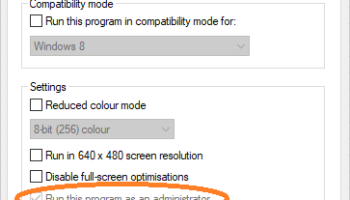
To install it, extract the files with pathnames, and you'll have a self-contained .exe file with a small help text file, the keys and files lists, and a couple of exclusion files in the MJRegWatcher directory. Create a shortcut to C:MJRegWatcherRegWatcher.exe and launch it. Then, use the Options, Settings, Automatic Startup Options screen to install it either just for the current user, or for all users. From this screen, you can also choose which key set to start it up with, or even uninstall it. Please note that under Vista, MJRW will need to be configured with Administrator privilege to write to the registry. To do this, go to the RegWatcher.exe file in Explorer, right-click to Properties, and go to the Compatibility tab. Check the admin box. Whenever the Vista PC is restarted, you will have to OK MJRW to start with admin rights. Unless you disable UAC, the only way round this is to use the task scheduler to launch MJRW with administrator rights and set it to run at log on.
If a trojan attempts to change your startup settings, you will be alerted, and you can prevent any changes being made. You can also configure MJRW to email the alert details to, for example, an administrator. It is fully configurable as to what keys and files are monitored, so, if you have a vested interest in protecting your file association for the mailto protocol (your default emailer), so that your preferred app loads them, and something else is trying very hard to undermine this association (Outlook for example), this will popup, offering to stop a new association attempt, after Outlook had loaded, say. The key that stores this association is hkey_lmussoftwareclassesmailtoshellopencommand, and you could protect other associations by changing "mailto" to the desired type, for example, "jpegfile".
It assumes write access and directory create rights for the path the .exe file sits in (ie. wherever you installed it). The default set of keys and files should ensure that nothing gets run at startup without you knowing about it, and important boot up files don't get changed behind your back. When monitoring, keys are opened in Read-Only mode, and the application only needs Write Registry access when it has detected a change. It keeps a log of any suspect activity, and displays any such information for the current session in the bottom panel. A log file has this appended to it and can be viewed by pressing the Log button. The file keeps a complete history of alerts.
To install it, extract the files with pathnames, and you'll have a self-contained .exe file with a small help text file, the keys and files lists, and a couple of exclusion files in the MJRegWatcher directory. Create a shortcut to C:MJRegWatcherRegWatcher.exe and launch it. Then, use the Options, Settings, Automatic Startup Options screen to install it either just for the current user, or for all users. From this screen, you can also choose which key set to start it up with, or even uninstall it. Please note that under Vista, MJRW will need to be configured with Administrator privilege to write to the registry. To do this, go to the RegWatcher.exe file in Explorer, right-click to Properties, and go to the Compatibility tab. Check the admin box. Whenever the Vista PC is restarted, you will have to OK MJRW to start with admin rights. Unless you disable UAC, the only way round this is to use the task scheduler to launch MJRW with administrator rights and set it to run at log on.
If a trojan attempts to change your startup settings, you will be alerted, and you can prevent any changes being made. You can also configure MJRW to email the alert details to, for example, an administrator. It is fully configurable as to what keys and files are monitored, so, if you have a vested interest in protecting your file association for the mailto protocol (your default emailer), so that your preferred app loads them, and something else is trying very hard to undermine this association (Outlook for example), this will popup, offering to stop a new association attempt, after Outlook had loaded, say. The key that stores this association is hkey_lmussoftwareclassesmailtoshellopencommand, and you could protect other associations by changing "mailto" to the desired type, for example, "jpegfile".
It assumes write access and directory create rights for the path the .exe file sits in (ie. wherever you installed it). The default set of keys and files should ensure that nothing gets run at startup without you knowing about it, and important boot up files don't get changed behind your back. When monitoring, keys are opened in Read-Only mode, and the application only needs Write Registry access when it has detected a change. It keeps a log of any suspect activity, and displays any such information for the current session in the bottom panel. A log file has this appended to it and can be viewed by pressing the Log button. The file keeps a complete history of alerts.
OS: Windows 2000, Windows 2003, Windows XP, Windows Vista, Windows Vista x64, Windows 7, Windows 7 x64, Windows 8, Windows 8 x64, Windows 10, Windows 10 x64, Windows 11
Add Your Review or 64-bit Compatibility Report
Top Registry Tools 64-bit downloads


WinTools.net Premium 26.3.1
Suite of tools for increasing MS Windows operating system performance.
Shareware | $39.99

WinTools.net Pro 26.3.1
Suite of tools for increasing MS Windows operating system performance.
Shareware | $34.95

WinTools.net Professional 26.3.1
Suite of tools for increasing MS Windows operating system performance.
Shareware | $34.95

Vit Registry Fix Pro 14.9.3
A powerful program for cleaning the registry of errors and outdated data
Demo | $9.95

Reg Organizer 9.91
Powerful tool for optimizing and cleaning your Windows registry efficiently.
Trialware | $25.00


Members area
Top 64-bit Downloads
-
HWiNFO64 6.28 B4200
x64 freeware download -
Windows 7 x64
x64 trialware download -
GRBackPro Server Backup
x64 11.2.0
x64 shareware download -
EasyTune6 B24.0119.1
x64 freeware download -
XtraTools Professional
x64 26.2.1
x64 shareware download -
BusDog x64 0.2
x64 freeware download -
PhotoRenamer 4.1
x64 freeware download -
Laplink DiskImage
Professional x64 10.0.71
x64 trialware download -
CIB pdf brewer 4.20.0
x64 freeware download -
Windows 10 x64 22H2
x64 trialware download
Top Downloads
-
FreeCommander XE
Portable 2026 Build 941
freeware download -
FMDiff 4.0.5
demo download -
Open Files from XLSX to
XLS 5.2
shareware download -
FURY CTRL 2.0.65.0
freeware download -
Shell Tools 2.0.1
freeware download -
Vim 9.2.0235
open source download -
AnyMP4 Data Recovery 1.5.12
shareware download -
PCtransfer 1.0.0.1033
freeware download -
Software to Data
Recovery 5.8.4.1
shareware download -
EaseUS Key Finder 4.1.6 Build 20240910
demo download -
Music Collection 3.9.7.1
freeware download -
WinFindr 1.9
shareware download -
File Compression 1.0
commercial download -
windows_exporter 0.31.5
open source download -
Caffeine 1.98
freeware download