
Monitorian - X 64-bit Download
Popular x64 Tags
- cpu x64 download
- performance x64 download
- windows x64 download
- driver updates x64 download
- driver update x64 download
- cleaner x64 download
- system x64 download
- defrag x64 download
- drivers update x64 download
- tune x64 download
- tweak x64 download
- registry cleaner x64 download
- security x64 download
- video driver update x64 download
- optimizer x64 download
- registry x64 download
- uninstall x64 download
- speed x64 download
- boost x64 download
- faster x64 download
- system utilities x64 download
- utility x64 download
- optimize x64 download
- driver update software x64 download
- startup x64 download
- disk cleaner x64 download
- clean disk x64 download
- clean x64 download
- vista x64 download
- disk x64 download
Monitorian 4.9.1
Sponsored links:
license: Open Source
downloads: 31
size: 481 kB
updated: 2024-11-18
tags: Monitorian, download Monitorian, Monitorian free download, adjust brightness, control brightness, change brightness, brightness, monitor, display, adjust
Add to Basket

emoacht

Monitorian, developed by emoacht, is a sleek and efficient utility designed to simplify the management of multiple monitors. This lightweight software provides users with a streamlined interface to adjust the brightness of all connected monitors, directly from the Windows taskbar.
One of Monitorian's standout features is its ability to control the brightness of external monitors, a task that can often be cumbersome with traditional monitor controls. By leveraging the DDC/CI (Display Data Channel Command Interface) protocol, Monitorian allows users to synchronize the brightness levels across different screens, ensuring a consistent visual experience without the hassle of manually adjusting each monitor.
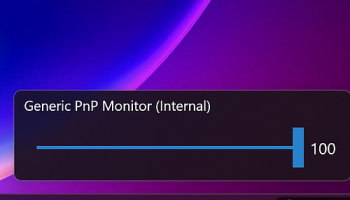
The user interface is minimalist and intuitive, making it accessible even for those who are not tech-savvy. Once installed, Monitorian integrates seamlessly into the system tray, where it can be accessed with a simple click. The main window displays sliders for each connected monitor, allowing for precise adjustments. Users can also name their monitors for easier identification, which is particularly useful in multi-monitor setups.
Monitorian supports both individual and collective adjustments. Users can tweak the brightness of each monitor independently or apply changes to all monitors simultaneously. This flexibility is particularly beneficial for professionals who require different brightness levels for various tasks, such as graphic design, coding, or video editing.
Another noteworthy aspect of Monitorian is its compatibility. The software is designed to work with a wide range of monitors and is regularly updated to support new models and technologies. This ensures that users can rely on Monitorian for consistent performance, regardless of their hardware setup.
In addition to its core functionality, Monitorian offers several customization options. Users can adjust the sensitivity of the brightness sliders, set hotkeys for quick adjustments, and enable or disable the software's startup behavior. These features allow users to tailor the software to their specific needs and preferences.
Performance-wise, Monitorian is impressively lightweight. It consumes minimal system resources, ensuring that it does not interfere with other applications or slow down the computer. This efficiency makes it an ideal choice for users who require a reliable brightness control solution without compromising system performance.
Overall, Monitorian by emoacht is a must-have tool for anyone using multiple monitors. Its combination of simplicity, functionality, and performance makes it a standout choice in the realm of monitor management software. Whether you're a professional seeking precise control over your display settings or a casual user looking for an easy way to adjust your screen brightness, Monitorian delivers a top-notch experience that enhances your productivity and comfort.
One of Monitorian's standout features is its ability to control the brightness of external monitors, a task that can often be cumbersome with traditional monitor controls. By leveraging the DDC/CI (Display Data Channel Command Interface) protocol, Monitorian allows users to synchronize the brightness levels across different screens, ensuring a consistent visual experience without the hassle of manually adjusting each monitor.
The user interface is minimalist and intuitive, making it accessible even for those who are not tech-savvy. Once installed, Monitorian integrates seamlessly into the system tray, where it can be accessed with a simple click. The main window displays sliders for each connected monitor, allowing for precise adjustments. Users can also name their monitors for easier identification, which is particularly useful in multi-monitor setups.
Monitorian supports both individual and collective adjustments. Users can tweak the brightness of each monitor independently or apply changes to all monitors simultaneously. This flexibility is particularly beneficial for professionals who require different brightness levels for various tasks, such as graphic design, coding, or video editing.
Another noteworthy aspect of Monitorian is its compatibility. The software is designed to work with a wide range of monitors and is regularly updated to support new models and technologies. This ensures that users can rely on Monitorian for consistent performance, regardless of their hardware setup.
In addition to its core functionality, Monitorian offers several customization options. Users can adjust the sensitivity of the brightness sliders, set hotkeys for quick adjustments, and enable or disable the software's startup behavior. These features allow users to tailor the software to their specific needs and preferences.
Performance-wise, Monitorian is impressively lightweight. It consumes minimal system resources, ensuring that it does not interfere with other applications or slow down the computer. This efficiency makes it an ideal choice for users who require a reliable brightness control solution without compromising system performance.
Overall, Monitorian by emoacht is a must-have tool for anyone using multiple monitors. Its combination of simplicity, functionality, and performance makes it a standout choice in the realm of monitor management software. Whether you're a professional seeking precise control over your display settings or a casual user looking for an easy way to adjust your screen brightness, Monitorian delivers a top-notch experience that enhances your productivity and comfort.
OS: Windows 11, Windows 10 32/64 bit, Windows 8 32/64 bit, Windows 7 32/64 bit
Add Your Review or 64-bit Compatibility Report
Top System Maintenance 64-bit downloads


Windows 7 Service Pack 1 7601.17514.1011
SP1 - all previously publicly released updates for Windows 7 and Server 2008 R2
Freeware

TweakNow WinSecret 7.9.8 Plus

Unlock hidden Windows features and optimize your system effortlessly.
Trialware | $11.24

TweakNow WinSecret 7.9.8 Plus
Unlock hidden Windows features and optimize your system effortlessly.
Trialware | $11.24

Max Secure Total Security 1.0.7.1
MAX Secure total security is a most advanced enabled antivirus available.
Shareware | $49.99


Revo Uninstaller 2.00
Freeware innovative uninstall utility with many cleaning tools included
Freeware

XtraTools Pro 26.2.1
XtraTools increases productivity and makes working with MS Windows easier.
Shareware | $29.99

Outbyte PC Repair 1.1.2.58265
Outbyte PC Repair is an app that is designed to optimize Windows performance
Shareware | $29.95

XtraTools Professional x64 26.1.1
XtraTools increases productivity and makes working with MS Windows easier.
Shareware | $29.99

EaseUS CleanGenius 3.0.4 Build 260128
Optimize and clean your Mac for peak performance with EaseUS CleanGenius.
Freeware

Members area
Top 64-bit Downloads
-
Windows 10 x64 22H2
x64 trialware download -
SoftPerfect RAM Disk 26.2
x64 shareware download -
Windows 7 x64
x64 trialware download -
Lenovo Vantage 10.2001.10.0
x64 freeware download -
Ashampoo WinOptimizer
FREE 26.00.12
x64 freeware download -
XtraTools Professional
x64 26.1.1
x64 shareware download -
HWMonitor (64-bit) 1.53
x64 freeware download -
7-Zip (x64 bit) 24.07
x64 open source download -
BestSync Portable x64 2024 (19.0.1.5)
x64 trialware download -
DiskMark x64 1.0.0.8
x64 freeware download
Top Downloads
-
FreeCommander XE 2026 Build 941
shareware download -
Windows 10 x64 22H2
trialware download -
FreeCommander XE
Portable 2026 Build 941
freeware download -
Windows 7 Service Pack 1 7601.17514.1011
freeware download -
RecoveryRobot Memory
Card Recovery 1.3.3
shareware download -
BIOS Agent Plus 2.2019.1.31
demo download -
Thaiphoon Burner 17.4.1.2
freeware download -
Caffeine 1.98
freeware download -
Qemu Simple Boot 1.3
freeware download -
Dr. Hardware 2026 26.0.0
shareware download -
DirPrintOK 7.52
freeware download -
SoftPerfect RAM Disk 26.2
shareware download -
Don't Sleep 9.99
freeware download -
PanFone WhatsApp
Transfer 2.5.0
shareware download -
CubexSoft Outlook Export 17.1
shareware download