
MSI Dragon Center - X 64-bit Download
Popular x64 Tags
- cpu x64 download
- performance x64 download
- windows x64 download
- driver updates x64 download
- driver update x64 download
- cleaner x64 download
- defrag x64 download
- system x64 download
- drivers update x64 download
- tune x64 download
- tweak x64 download
- registry cleaner x64 download
- security x64 download
- video driver update x64 download
- optimizer x64 download
- registry x64 download
- uninstall x64 download
- speed x64 download
- boost x64 download
- faster x64 download
- system utilities x64 download
- utility x64 download
- optimize x64 download
- driver update software x64 download
- startup x64 download
- disk cleaner x64 download
- clean disk x64 download
- clean x64 download
- vista x64 download
- disk x64 download
MSI Dragon Center 2.0.155.0
Sponsored links:
license: Freeware
downloads: 57
size: 489.00 MB
updated: 2026-02-11
tags: MSI Dragon Center, download MSI Dragon Center, MSI Dragon Center free download, system monitor, battery optimizer, MSI management, MSI, control panel, tweak, monitor
Add to Basket

MSI Co. LTD.

MSI Dragon Center: A Comprehensive Suite for Optimal PC Performance
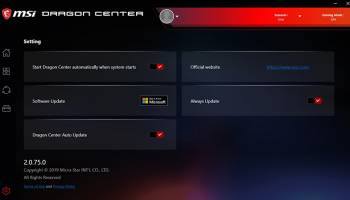
MSI Dragon Center, developed by MSI Co. LTD., is a powerful and versatile software suite designed to enhance the performance, monitoring, and customization of MSI hardware. This all-in-one application is tailored for gamers, content creators, and tech enthusiasts who demand precise control over their systems.
### Key Features
#### 1. System Monitoring and Optimization
MSI Dragon Center provides real-time monitoring of your system's vital statistics, including CPU, GPU, and RAM usage. The software offers detailed insights into temperature, voltage, and fan speeds, allowing users to keep their hardware in peak condition. The "System Tuner" feature enables users to optimize their system's performance by adjusting various parameters, ensuring that their PC runs smoothly and efficiently.
#### 2. Gaming Mode
Designed with gamers in mind, the Gaming Mode feature automatically optimizes system settings for a superior gaming experience. It adjusts display settings, prioritizes network bandwidth for gaming applications, and frees up system resources to ensure smooth gameplay. Users can also create custom profiles for their favorite games, ensuring optimal performance every time they play.
#### 3. Mystic Light
Mystic Light is MSI's RGB lighting control feature, allowing users to customize the lighting effects on their MSI hardware. With a wide range of colors and effects to choose from, users can create a personalized and immersive lighting experience. Mystic Light Sync extends this control to compatible peripherals, creating a cohesive and visually stunning setup.
#### 4. Hardware Management
MSI Dragon Center simplifies the management of MSI hardware components. Users can update drivers, firmware, and BIOS with just a few clicks, ensuring that their system is always up-to-date. The software also provides detailed information about installed hardware, making it easy to troubleshoot and manage components.
#### 5. User-Friendly Interface
The intuitive and user-friendly interface of MSI Dragon Center makes it accessible to both novice and experienced users. The dashboard provides quick access to all features, and the software's layout is clean and well-organized. This ensures that users can easily navigate and utilize the full range of tools and features available.
#### 6. Mobile App Integration
For added convenience, MSI Dragon Center offers a mobile app that allows users to monitor and control their system remotely. This feature is particularly useful for gamers who want to keep an eye on their system's performance without interrupting their gameplay.
### Conclusion
MSI Dragon Center is an essential tool for anyone looking to get the most out of their MSI hardware. Its comprehensive suite of features, including system monitoring, gaming optimization, RGB lighting control, and hardware management, makes it a versatile and powerful application. Whether you're a gamer seeking peak performance or a tech enthusiast looking to customize your setup, MSI Dragon Center provides the tools you need to achieve your goals.
With its user-friendly interface and robust functionality, MSI Dragon Center stands out as a top choice for managing and optimizing MSI hardware. It is a testament to MSI's commitment to providing high-quality software that complements their cutting-edge hardware solutions.
MSI Dragon Center, developed by MSI Co. LTD., is a powerful and versatile software suite designed to enhance the performance, monitoring, and customization of MSI hardware. This all-in-one application is tailored for gamers, content creators, and tech enthusiasts who demand precise control over their systems.
### Key Features
#### 1. System Monitoring and Optimization
MSI Dragon Center provides real-time monitoring of your system's vital statistics, including CPU, GPU, and RAM usage. The software offers detailed insights into temperature, voltage, and fan speeds, allowing users to keep their hardware in peak condition. The "System Tuner" feature enables users to optimize their system's performance by adjusting various parameters, ensuring that their PC runs smoothly and efficiently.
#### 2. Gaming Mode
Designed with gamers in mind, the Gaming Mode feature automatically optimizes system settings for a superior gaming experience. It adjusts display settings, prioritizes network bandwidth for gaming applications, and frees up system resources to ensure smooth gameplay. Users can also create custom profiles for their favorite games, ensuring optimal performance every time they play.
#### 3. Mystic Light
Mystic Light is MSI's RGB lighting control feature, allowing users to customize the lighting effects on their MSI hardware. With a wide range of colors and effects to choose from, users can create a personalized and immersive lighting experience. Mystic Light Sync extends this control to compatible peripherals, creating a cohesive and visually stunning setup.
#### 4. Hardware Management
MSI Dragon Center simplifies the management of MSI hardware components. Users can update drivers, firmware, and BIOS with just a few clicks, ensuring that their system is always up-to-date. The software also provides detailed information about installed hardware, making it easy to troubleshoot and manage components.
#### 5. User-Friendly Interface
The intuitive and user-friendly interface of MSI Dragon Center makes it accessible to both novice and experienced users. The dashboard provides quick access to all features, and the software's layout is clean and well-organized. This ensures that users can easily navigate and utilize the full range of tools and features available.
#### 6. Mobile App Integration
For added convenience, MSI Dragon Center offers a mobile app that allows users to monitor and control their system remotely. This feature is particularly useful for gamers who want to keep an eye on their system's performance without interrupting their gameplay.
### Conclusion
MSI Dragon Center is an essential tool for anyone looking to get the most out of their MSI hardware. Its comprehensive suite of features, including system monitoring, gaming optimization, RGB lighting control, and hardware management, makes it a versatile and powerful application. Whether you're a gamer seeking peak performance or a tech enthusiast looking to customize your setup, MSI Dragon Center provides the tools you need to achieve your goals.
With its user-friendly interface and robust functionality, MSI Dragon Center stands out as a top choice for managing and optimizing MSI hardware. It is a testament to MSI's commitment to providing high-quality software that complements their cutting-edge hardware solutions.
OS: Windows 11, Windows 10 32/64 bit
Add Your Review or 64-bit Compatibility Report
Top System Maintenance 64-bit downloads


WinToUSB 10.5 Build January 2
Easily create bootable USB drives from Windows installations with WinToUSB.
Shareware | $29.95


windows_exporter 0.30.8
Lightweight tool for exporting Windows metrics to Prometheus for monitoring.
Open Source

Windows 7 Service Pack 1 7601.17514.1011
SP1 - all previously publicly released updates for Windows 7 and Server 2008 R2
Freeware


Boost 1.0.2
Boost helps you gain back control of your PC by improving performance.
Shareware | $19.95


TopNotify 3.1.1
TopNotify: Real-time notifications and alerts for seamless communication.
Open Source

Fortect 7.3.4.6
Fortect repairs and optimizes your PC, enhancing performance effortlessly.
Trialware | $30.95
Members area
Top 64-bit Downloads
-
EasyTune6 B24.0119.1
x64 freeware download -
HWiNFO64 6.28 B4200
x64 freeware download -
BusDog x64 0.2
x64 freeware download -
HWMonitor (64-bit) 1.53
x64 freeware download -
Windows 7 x64
x64 trialware download -
SoftPerfect RAM Disk 26.2
x64 shareware download -
Disk Pulse Pro x64 16.1.28
x64 trialware download -
FixWin for Win 10 10.2.2.0
x64 freeware download -
7z SFX Builder x64 2.1
x64 freeware download -
PhotoRenamer 4.1
x64 freeware download
Top Downloads
-
Open Files from XLSX to
XLS 5.2
shareware download -
File Compression 1.0
commercial download -
Shell Tools 2.0.1
freeware download -
Hotkeycontrol 8.3
shareware download -
Caffeine 1.98
freeware download -
FMDiff 4.0.5
demo download -
Nomad.NET 3.2.0.2890
freeware download -
Music Collection 3.9.6.0
freeware download -
FastKeys 6.05
demo download -
WinToUSB 10.5 Build January 2
shareware download -
FURY CTRL 2.0.65.0
freeware download -
Vim 9.2.0167
open source download -
novelWriter 2.8.2
open source download -
Thaiphoon Burner 17.4.1.2
freeware download -
GoodSync 12.9.26
freeware download