
NXPowerLite - X 64-bit Download
Popular x64 Tags
- office x64 download
- microsoft x64 download
- importing x64 download
- exporting x64 download
- acrobat x64 download
- xls x64 download
- printer x64 download
- pdf x64 download
- pdf converter x64 download
- software x64 download
- word x64 download
- outlook x64 download
- excel x64 download
- powerpoint x64 download
- tool x64 download
- ppt x64 download
- adobe x64 download
- convert x64 download
- spreadsheet x64 download
- text x64 download
- create x64 download
- doc x64 download
- printing x64 download
- files x64 download
- add in x64 download
- open x64 download
- document x64 download
- data x64 download
- export x64 download
- saving x64 download
NXPowerLite 10.2.0
Sponsored links:

Neuxpower Solutions Ltd

Compress PowerPoint, Word, Excel, JPEG and PDF files with NXPowerLite Desktop Edition
Most Microsoft Office, JPEG and PDF files are unnecessarily bloated – and bloated files are hard to share. Large email attachments fill up your mailbox, take ages to send and often get ‘bounced back’ without ever reaching their intended recipient.
For IT departments, it means additional storage, slower mail servers, choked bandwidth and an increasing number of IT support calls.
Used by more than a million people worldwide, NXPowerLite Desktop Edition attacks file bloat at the core, compressing Powerpoint, Word, Excel, JPEG and PDF files by up to 95%.
Incredibly simple to use, it can compress files from within Microsoft Office, or integrate with your email client to automatically compress email attachments as they are sent.
Files remain in their original format, retaining all their attributes and visual content integrity – they look and function identically to the originals, but are much smaller!
Features:
Simple user interface
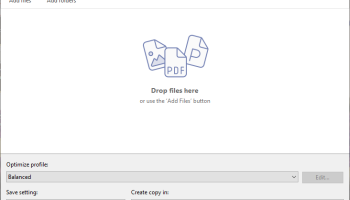
NXPowerLite Desktop Edition is fast, effective and incredibly easy to use. The simple user interface will feel instantly familiar so you can compress PowerPoint, Word, Excel, JPEG and PDF files within seconds.
Choice of optimization levels
You can optimize for screen, print or mobile devices – or select your own custom compression settings. Whichever you choose, you'll find that NXPowerLite is far more effective than ZIP file compression on image-heavy files.
Microsoft Office integration
You can use NXPowerLite file compression from within PowerPoint, Word or Excel. You can also optimize a file by right-clicking it in Windows Explorer.
Batch processing
You can optimize multiple files in one sitting – simply drag them onto the NXPowerLite window to build a list of files to optimize. If you add a folder or standard ZIP archive to the list, NXPowerLite will search through it and compress Word, Excel, PowerPoint, JPEG and PDF files contained within.
Automatically compress email attachments
NXPowerLite Desktop Edition integrates with your email client* to automatically compress big Powerpoint, Word, Excel, JPEG and PDF files attached to emails. If you ever decide that you don't want to compress an email attachment, it's easy to temporarily disable the optimization (it will be re-enabled next time you send an attachment).
Easily share your photos
Simplify the sharing of digital images with JPEG compression built right into your email*. Smaller images are more likely to be successfully delivered, and are quicker for people to download.
Most Microsoft Office, JPEG and PDF files are unnecessarily bloated – and bloated files are hard to share. Large email attachments fill up your mailbox, take ages to send and often get ‘bounced back’ without ever reaching their intended recipient.
For IT departments, it means additional storage, slower mail servers, choked bandwidth and an increasing number of IT support calls.
Used by more than a million people worldwide, NXPowerLite Desktop Edition attacks file bloat at the core, compressing Powerpoint, Word, Excel, JPEG and PDF files by up to 95%.
Incredibly simple to use, it can compress files from within Microsoft Office, or integrate with your email client to automatically compress email attachments as they are sent.
Files remain in their original format, retaining all their attributes and visual content integrity – they look and function identically to the originals, but are much smaller!
Features:
Simple user interface
NXPowerLite Desktop Edition is fast, effective and incredibly easy to use. The simple user interface will feel instantly familiar so you can compress PowerPoint, Word, Excel, JPEG and PDF files within seconds.
Choice of optimization levels
You can optimize for screen, print or mobile devices – or select your own custom compression settings. Whichever you choose, you'll find that NXPowerLite is far more effective than ZIP file compression on image-heavy files.
Microsoft Office integration
You can use NXPowerLite file compression from within PowerPoint, Word or Excel. You can also optimize a file by right-clicking it in Windows Explorer.
Batch processing
You can optimize multiple files in one sitting – simply drag them onto the NXPowerLite window to build a list of files to optimize. If you add a folder or standard ZIP archive to the list, NXPowerLite will search through it and compress Word, Excel, PowerPoint, JPEG and PDF files contained within.
Automatically compress email attachments
NXPowerLite Desktop Edition integrates with your email client* to automatically compress big Powerpoint, Word, Excel, JPEG and PDF files attached to emails. If you ever decide that you don't want to compress an email attachment, it's easy to temporarily disable the optimization (it will be re-enabled next time you send an attachment).
Easily share your photos
Simplify the sharing of digital images with JPEG compression built right into your email*. Smaller images are more likely to be successfully delivered, and are quicker for people to download.
OS: Windows 7, Windows 7 x64, Windows 8, Windows 8 x64, Windows 10, Windows 10 x64, Windows 11
Add Your Review or 64-bit Compatibility Report
Top Office Suites & Tools 64-bit downloads


Quite Imposing Plus 6.0d
Effortlessly create and manage complex impositions for PDF documents.
Demo | $949.00

Seavus Project Viewer 19.0
Free to experience the best viewer for Micrsoft Project. Try our Project Viewer
Trialware | $29.50


SilentNotes 8.7.1
SilentNotes: Secure, offline note-taking app with encryption and cross-device sync.
Open Source


CZ Excel Converter 1.9.4.6366
CZ V: A powerful synth emulation with rich sounds and intuitive controls.
Demo | $149.00

callas pdfaPilot 14.2.400
Powerful tool for creating, validating, and optimizing PDF/A documents.
Trialware

mini PDF to TXT OCR Converter 3.2
PDF to TXT OCR Converter is a best OCR Converter
Shareware | $59.95

Members area
Top 64-bit Downloads
-
mbFXWords 2.80
x64 freeware download -
FontAgent Pro 10.0.15.0
x64 trialware download -
Microsoft Office 2016
x64 2405 B17628.20164
x64 trialware download -
Print to PDF Toolkit Pro 3.0
x64 shareware download -
PDFill PDF and Image
Writer x64 15.0 Build 2
x64 freeware download -
XLIFFChecker 7.5.0
x64 freeware download -
CSV2IIF Portable 5.0.060
x64 demo download -
Foxit Reader 2023.3
x64 freeware download -
Hl7Spy 24.1.227
x64 trialware download -
Microsoft Office 2010
Service Pack x64 SP2
x64 freeware download
Top Downloads
-
Quite Imposing Plus 6.0d
demo download -
Total CSV Converter 4.0
shareware download -
Active Barcode and QR
code Generator 1.24.8.15
freeware download -
Seavus Project Viewer 19.0
trialware download -
Miro for Windows 0.11.110
shareware download -
Odoo 19.0.20260330
demo download -
Flipping Book Writer 2.6
shareware download -
mbFXWords 2.80
freeware download -
SmarThru 4.04
freeware download -
SilentNotes 8.7.1
open source download -
LawTrust 5.1.1
shareware download -
HelpDesk 11.19.9557.25020
trialware download -
DeskWork Standard 4.0.2827
trialware download -
LiquiBase 5.0.2
trialware download -
4EPOS POS 12.20.48
demo download