
Office.Files.Images - X 64-bit Download
Popular x64 Tags
- office x64 download
- microsoft x64 download
- importing x64 download
- exporting x64 download
- acrobat x64 download
- xls x64 download
- printer x64 download
- pdf x64 download
- pdf converter x64 download
- software x64 download
- word x64 download
- outlook x64 download
- excel x64 download
- powerpoint x64 download
- tool x64 download
- ppt x64 download
- adobe x64 download
- convert x64 download
- spreadsheet x64 download
- text x64 download
- create x64 download
- doc x64 download
- printing x64 download
- files x64 download
- add in x64 download
- open x64 download
- document x64 download
- data x64 download
- export x64 download
- saving x64 download
Office.Files.Images 2.81
Sponsored links:
license: Freeware
downloads: 48
size: 184 kB
updated: 2026-03-04
tags: Office.Files.Images, download Office.Files.Images, Office.Files.Images free download, Image Extractor, Extract Image, Image Extraction, Extractor, Extraction, Extract, Image
Add to Basket

Nenad Hrg

**Office.Files.Images by Nenad Hrg: A Versatile Tool for Efficient File Management**
Office.Files.Images, developed by Nenad Hrg, is a robust and versatile software solution designed to streamline file management tasks, particularly focusing on office documents and image files. This utility stands out for its simplicity, efficiency, and user-friendly interface, making it an essential tool for both casual users and professionals who deal with a large volume of files daily.
**Key Features:**
1. **Comprehensive File Handling:**
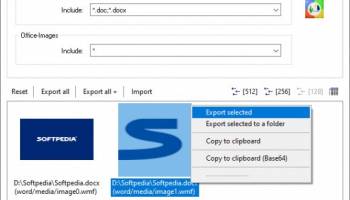
Office.Files.Images supports a wide range of file formats, including popular office documents (such as DOC, DOCX, XLS, XLSX, PPT, and PPTX) and various image formats (like JPG, PNG, BMP, and GIF). This extensive compatibility ensures that users can manage all their essential files within a single application.
2. **Batch Processing:**
One of the standout features of Office.Files.Images is its ability to handle batch processing. Users can perform operations on multiple files simultaneously, saving significant time and effort. Whether it's renaming, converting, or organizing files, the batch processing capability makes it incredibly efficient.
3. **Intuitive Interface:**
The software boasts a clean and intuitive interface, designed to be accessible to users of all skill levels. The straightforward layout and easy-to-navigate menus ensure that users can quickly find and utilize the features they need without a steep learning curve.
4. **File Conversion:**
Office.Files.Images includes powerful file conversion tools, allowing users to convert documents and images between different formats effortlessly. This feature is particularly useful for users who need to ensure compatibility across various platforms and devices.
5. **Preview and Editing:**
The built-in preview functionality enables users to view documents and images before making any changes. Additionally, basic editing tools are available for quick adjustments, such as cropping images or tweaking document formatting.
6. **Organizational Tools:**
Efficient file organization is at the heart of Office.Files.Images. The software provides robust tools for categorizing, tagging, and sorting files, making it easier to keep track of important documents and images. Users can create custom folders and subfolders, ensuring a well-structured file system.
7. **Performance and Reliability:**
Office.Files.Images is designed to perform efficiently even with large file sizes and extensive batches. The software is lightweight, ensuring it doesn't bog down system resources, and it operates reliably, minimizing the risk of crashes or data loss.
**Conclusion:**
Office.Files.Images by Nenad Hrg is a comprehensive file management tool that excels in handling both office documents and image files. Its combination of batch processing, file conversion, and organizational features, all wrapped in an intuitive interface, makes it an invaluable asset for anyone looking to streamline their file management tasks. Whether you're a professional managing extensive document libraries or a casual user organizing personal files, Office.Files.Images offers the tools you need to stay organized and efficient.
Office.Files.Images, developed by Nenad Hrg, is a robust and versatile software solution designed to streamline file management tasks, particularly focusing on office documents and image files. This utility stands out for its simplicity, efficiency, and user-friendly interface, making it an essential tool for both casual users and professionals who deal with a large volume of files daily.
**Key Features:**
1. **Comprehensive File Handling:**
Office.Files.Images supports a wide range of file formats, including popular office documents (such as DOC, DOCX, XLS, XLSX, PPT, and PPTX) and various image formats (like JPG, PNG, BMP, and GIF). This extensive compatibility ensures that users can manage all their essential files within a single application.
2. **Batch Processing:**
One of the standout features of Office.Files.Images is its ability to handle batch processing. Users can perform operations on multiple files simultaneously, saving significant time and effort. Whether it's renaming, converting, or organizing files, the batch processing capability makes it incredibly efficient.
3. **Intuitive Interface:**
The software boasts a clean and intuitive interface, designed to be accessible to users of all skill levels. The straightforward layout and easy-to-navigate menus ensure that users can quickly find and utilize the features they need without a steep learning curve.
4. **File Conversion:**
Office.Files.Images includes powerful file conversion tools, allowing users to convert documents and images between different formats effortlessly. This feature is particularly useful for users who need to ensure compatibility across various platforms and devices.
5. **Preview and Editing:**
The built-in preview functionality enables users to view documents and images before making any changes. Additionally, basic editing tools are available for quick adjustments, such as cropping images or tweaking document formatting.
6. **Organizational Tools:**
Efficient file organization is at the heart of Office.Files.Images. The software provides robust tools for categorizing, tagging, and sorting files, making it easier to keep track of important documents and images. Users can create custom folders and subfolders, ensuring a well-structured file system.
7. **Performance and Reliability:**
Office.Files.Images is designed to perform efficiently even with large file sizes and extensive batches. The software is lightweight, ensuring it doesn't bog down system resources, and it operates reliably, minimizing the risk of crashes or data loss.
**Conclusion:**
Office.Files.Images by Nenad Hrg is a comprehensive file management tool that excels in handling both office documents and image files. Its combination of batch processing, file conversion, and organizational features, all wrapped in an intuitive interface, makes it an invaluable asset for anyone looking to streamline their file management tasks. Whether you're a professional managing extensive document libraries or a casual user organizing personal files, Office.Files.Images offers the tools you need to stay organized and efficient.
OS: Windows Server 2025, Windows 11, Windows Server 2022, Windows Server 2019, Windows Server 2016, Windows 10 32/64 bit, Windows Server 2012 R2, Windows Server 2012, Windows 8 32/64 bit, Windows 7 32/64 bit
Add Your Review or 64-bit Compatibility Report
Top Office Suites & Tools 64-bit downloads


Quite Imposing Plus 6.0c
Effortlessly create and manage complex impositions for PDF documents.
Demo | $949.00


Imposition Wizard 3.6.8
Streamline your print layout with Imposition Wizard's intuitive tools.
Demo | $264.00

CZ Excel Converter 1.9.4.6366
CZ V: A powerful synth emulation with rich sounds and intuitive controls.
Demo | $149.00


callas pdfaPilot 14.2.400
Powerful tool for creating, validating, and optimizing PDF/A documents.
Trialware

mini PDF to TXT OCR Converter 3.2
PDF to TXT OCR Converter is a best OCR Converter
Shareware | $59.95

Florencesoft DiffEngineX 3.18.0.0
Reports on the differences between two Microsoft Excel workbooks
Trialware | $85.00

Venta4Net 2.7.136.392
Network solution for fax and voice mail exchange via a modem
Trialware | $249.00
Members area
Top 64-bit Downloads
-
mbFXWords 2.80
x64 freeware download -
FontAgent Pro 10.0.15.0
x64 trialware download -
Microsoft Office 2016
x64 2405 B17628.20164
x64 trialware download -
Print to PDF Toolkit Pro 3.0
x64 shareware download -
Microsoft Office 2010
Service Pack x64 SP2
x64 freeware download -
Logizian Analyst
Portable x64 11.0 B20141203
x64 trialware download -
Zed Axis 64bit 10.0
x64 trialware download -
Microsoft Deployment
Toolkit x64 6.3.8456.1000
x64 freeware download -
iNFekt 1.3.0
x64 open source download -
Microsoft OneNote 2013
x64 15.0.4641.1001
x64 freeware download
Top Downloads
-
Active Barcode and QR
code Generator 1.24.8.15
freeware download -
Quite Imposing Plus 6.0c
demo download -
Flipping Book Writer 2.6
shareware download -
DeskWork Standard 4.0.2827
trialware download -
Forex Strategy Trader 3.6.0.0
freeware download -
mbFXWords 2.80
freeware download -
SmarThru 4.04
freeware download -
Imposition Wizard 3.6.8
demo download -
Miro for Windows 0.11.110
shareware download -
CZ Excel Converter 1.9.4.6366
demo download -
FontAgent Pro 10.0.15.0
trialware download -
Total CSV Converter 1.8
shareware download -
Age Calculator .Net 1.0
freeware download -
Total CSV Converter 4.0
shareware download -
VersionSQL 0.20
demo download