
PatchOnClick - X 64-bit Download
Popular x64 Tags
- files x64 download
- file manager x64 download
- zip x64 download
- tool x64 download
- software x64 download
- ntfs x64 download
- remove x64 download
- disk x64 download
- free x64 download
- duplicate x64 download
- copy x64 download
- folder x64 download
- utility x64 download
- data recovery software x64 download
- undelete x64 download
- erase x64 download
- directory x64 download
- backup x64 download
- file x64 download
- hard x64 download
- data recovery x64 download
- delete x64 download
- recovery x64 download
- find x64 download
- file recovery x64 download
- unerase x64 download
- recover x64 download
- mp3 x64 download
- space x64 download
- search x64 download
PatchOnClick 3.8.8.0
Sponsored links:
license: Freeware
downloads: 48
size: 7.00 MB
updated: 2024-07-19
tags: PatchOnClick, file repair, patch, patch file, create, 2BrightSparks, PatchOnClick free download, patcher, updater, data integrity, create patch, software update, file patching, download PatchOnClick
Add to Basket

2BrightSparks

PatchOnClick, developed by 2BrightSparks, is an innovative and user-friendly software solution designed to streamline the process of updating files. This tool stands out in the realm of file management by offering a straightforward, efficient way to apply patches to existing files, ensuring that users can keep their data current without the hassle of downloading entire files anew.
At its core, PatchOnClick is engineered to create and apply patch files, which contain only the differences between the original and updated versions of a file. This means that instead of re-downloading or distributing the entire file, users can simply share the much smaller patch file, saving both time and bandwidth. This is particularly beneficial for users with limited internet connectivity or those managing large files, such as software developers, content creators, and IT professionals.
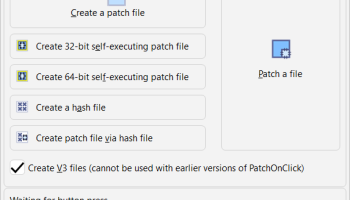
The software boasts a clean, intuitive interface that makes it accessible to both novice and experienced users. The process of creating a patch is straightforward: users select the original file and the updated file, and PatchOnClick generates a patch file that can be easily distributed. Applying a patch is equally simple, requiring just a few clicks to update the original file to its new version.
One of the standout features of PatchOnClick is its robust error-checking mechanism. This ensures that patches are applied correctly, maintaining the integrity of the updated files. Additionally, the software supports a wide range of file types, making it a versatile tool for various applications.
Security is also a key consideration in PatchOnClick’s design. The software includes features to verify the authenticity of patches, ensuring that users can trust the updates they are applying. This is particularly important in environments where data integrity and security are paramount.
PatchOnClick is lightweight and does not demand significant system resources, making it an ideal addition to any workflow without causing performance issues. It is compatible with various versions of Windows, ensuring broad accessibility for users across different operating systems.
In summary, PatchOnClick by 2BrightSparks is a powerful, efficient, and user-friendly tool for managing file updates. Its ability to create and apply patches with ease, combined with its robust error-checking and security features, make it an invaluable asset for anyone looking to streamline their file management processes. Whether you are a software developer needing to distribute updates or a business professional managing large documents, PatchOnClick offers a reliable and efficient solution to keep your files up-to-date.
At its core, PatchOnClick is engineered to create and apply patch files, which contain only the differences between the original and updated versions of a file. This means that instead of re-downloading or distributing the entire file, users can simply share the much smaller patch file, saving both time and bandwidth. This is particularly beneficial for users with limited internet connectivity or those managing large files, such as software developers, content creators, and IT professionals.
The software boasts a clean, intuitive interface that makes it accessible to both novice and experienced users. The process of creating a patch is straightforward: users select the original file and the updated file, and PatchOnClick generates a patch file that can be easily distributed. Applying a patch is equally simple, requiring just a few clicks to update the original file to its new version.
One of the standout features of PatchOnClick is its robust error-checking mechanism. This ensures that patches are applied correctly, maintaining the integrity of the updated files. Additionally, the software supports a wide range of file types, making it a versatile tool for various applications.
Security is also a key consideration in PatchOnClick’s design. The software includes features to verify the authenticity of patches, ensuring that users can trust the updates they are applying. This is particularly important in environments where data integrity and security are paramount.
PatchOnClick is lightweight and does not demand significant system resources, making it an ideal addition to any workflow without causing performance issues. It is compatible with various versions of Windows, ensuring broad accessibility for users across different operating systems.
In summary, PatchOnClick by 2BrightSparks is a powerful, efficient, and user-friendly tool for managing file updates. Its ability to create and apply patches with ease, combined with its robust error-checking and security features, make it an invaluable asset for anyone looking to streamline their file management processes. Whether you are a software developer needing to distribute updates or a business professional managing large documents, PatchOnClick offers a reliable and efficient solution to keep your files up-to-date.
OS: Windows 11, Windows 10 32/64 bit, Windows 8 32/64 bit, Windows 7 32/64 bit
Add Your Review or 64-bit Compatibility Report
Top File & Disk Management 64-bit downloads


Open Files from XLSX to XLS 5.2
Convert XLSX to XLS with Open files from XLSX to XLS program
Shareware | $29.00


FileAnt 2024.05.018
Tabbed File Manager, Ftp Client, Pie Chart, Advanced Tools, And File Viewer
Freeware

WinFindr 1.8
Effortlessly locate files and folders with WinFindr's intuitive search.
Shareware | $23.00


EDB Recovery Tools 6.2
Stella EDB Recovery tools best to transfer EDB mailbox into working MS outlook
Shareware | $199.00

Pitara 4.0.9571.29140

Pitara: Your all-in-one solution for seamless project management and collaboration.
Open Source

tail for Windows 2.1
tail for Windows is a UNIX/Linux like tail DOS Command for Windows.
Shareware | $29.99
Members area
Top 64-bit Downloads
-
EasyTune6 B24.0119.1
x64 freeware download -
HWiNFO64 6.28 B4200
x64 freeware download -
GRBackPro Server Backup
x64 11.2.0
x64 shareware download -
Windows 7 x64
x64 trialware download -
SoftPerfect RAM Disk 26.2
x64 shareware download -
BusDog x64 0.2
x64 freeware download -
XtraTools Professional
x64 26.2.1
x64 shareware download -
HWMonitor (64-bit) 1.53
x64 freeware download -
Microsoft Security
Essentials Definition
Updates x64 1.67.7.0
x64 freeware download -
Disk Pulse Pro x64 16.1.28
x64 trialware download
Top Downloads
-
Open Files from XLSX to
XLS 5.2
shareware download -
FMDiff 4.0.5
demo download -
Shell Tools 2.0.1
freeware download -
Music Collection 3.9.7.0
freeware download -
File Compression 1.0
commercial download -
WriterClassic 10.8.0
open source download -
Caffeine 1.98
freeware download -
AnyMP4 Data Recovery 1.5.12
shareware download -
EaseUS Key Finder 4.1.6 Build 20240910
demo download -
Nomad.NET 3.2.0.2890
freeware download -
FileAnt 2024.05.018
freeware download -
WinFindr 1.8
shareware download -
Hotkeycontrol 8.3
shareware download -
Vim 9.2.0184
open source download -
novelWriter 2.8.2
open source download