
PCBoost - X 64-bit Download
Popular x64 Tags
- freeware x64 download
- windows x64 download
- free x64 download
- web x64 download
- software x64 download
- folder x64 download
- utility x64 download
- monitor x64 download
- convert x64 download
- download x64 download
- tool x64 download
- video x64 download
- memory x64 download
- audio x64 download
- text x64 download
- password x64 download
- editor x64 download
- file x64 download
- security x64 download
- image x64 download
- database x64 download
- jpeg x64 download
- icon x64 download
- organizer x64 download
- viewer x64 download
- data x64 download
- print x64 download
- edit x64 download
- search x64 download
- pim x64 download
PCBoost 5.10.21.2024
Sponsored links:
license: Trialware
downloads: 84
size: 6.90 MB
updated: 2024-10-21
tags: boost, PCBoost, PCBoost free download, optimize computer, tuneup, optimizer, computer optimizer, gaming, download PCBoost, software, benchmark CPU, performance, PGWARE, CPU, optimization
Add to Basket

PGWARE

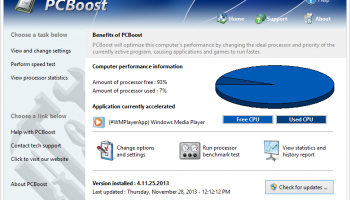
PCBoost, developed by PGWARE, is a dynamic software solution designed to enhance the performance of Windows-based PCs by intelligently managing and optimizing CPU resources. This tool is crafted for users who seek to maximize their computer's processing power, ensuring smoother and more efficient operation, particularly when running demanding applications or multitasking.
At its core, PCBoost functions by reallocating CPU resources to prioritize active applications, thereby improving their performance. This is particularly beneficial for users who frequently engage in resource-intensive tasks such as gaming, video editing, or running complex simulations. By dynamically adjusting the CPU's priority levels, PCBoost ensures that these applications receive the necessary processing power to function optimally, reducing lag and enhancing overall responsiveness.
One of the standout features of PCBoost is its user-friendly interface, which makes it accessible even to those with limited technical expertise. The software operates seamlessly in the background, requiring minimal user intervention once configured. Users can easily monitor performance improvements and adjust settings through a straightforward control panel, allowing for a tailored experience that meets individual needs.
PCBoost also includes a range of customization options, enabling users to set specific parameters for CPU allocation. This flexibility ensures that the software can adapt to a wide variety of use cases, from casual browsing and office work to high-stakes gaming and professional-grade software applications. Additionally, the software is designed to be lightweight, ensuring that it does not become a burden on system resources itself.
Security and stability are also key considerations in the design of PCBoost. The software is engineered to operate without causing system instability or crashes, a common concern with performance-enhancing tools. Regular updates from PGWARE ensure that PCBoost remains compatible with the latest Windows updates and continues to deliver reliable performance improvements.
In summary, PCBoost by PGWARE is a powerful tool for users looking to extract more performance from their Windows PCs. Its ability to intelligently manage CPU resources makes it an ideal solution for both casual users and professionals who demand more from their computing experience. With its intuitive interface, customizable settings, and commitment to stability, PCBoost stands out as a valuable addition to any PC optimization toolkit. Whether you're looking to enhance gaming performance or streamline professional workflows, PCBoost offers a practical and effective solution.
At its core, PCBoost functions by reallocating CPU resources to prioritize active applications, thereby improving their performance. This is particularly beneficial for users who frequently engage in resource-intensive tasks such as gaming, video editing, or running complex simulations. By dynamically adjusting the CPU's priority levels, PCBoost ensures that these applications receive the necessary processing power to function optimally, reducing lag and enhancing overall responsiveness.
One of the standout features of PCBoost is its user-friendly interface, which makes it accessible even to those with limited technical expertise. The software operates seamlessly in the background, requiring minimal user intervention once configured. Users can easily monitor performance improvements and adjust settings through a straightforward control panel, allowing for a tailored experience that meets individual needs.
PCBoost also includes a range of customization options, enabling users to set specific parameters for CPU allocation. This flexibility ensures that the software can adapt to a wide variety of use cases, from casual browsing and office work to high-stakes gaming and professional-grade software applications. Additionally, the software is designed to be lightweight, ensuring that it does not become a burden on system resources itself.
Security and stability are also key considerations in the design of PCBoost. The software is engineered to operate without causing system instability or crashes, a common concern with performance-enhancing tools. Regular updates from PGWARE ensure that PCBoost remains compatible with the latest Windows updates and continues to deliver reliable performance improvements.
In summary, PCBoost by PGWARE is a powerful tool for users looking to extract more performance from their Windows PCs. Its ability to intelligently manage CPU resources makes it an ideal solution for both casual users and professionals who demand more from their computing experience. With its intuitive interface, customizable settings, and commitment to stability, PCBoost stands out as a valuable addition to any PC optimization toolkit. Whether you're looking to enhance gaming performance or streamline professional workflows, PCBoost offers a practical and effective solution.
OS: Windows 11, Windows 10 32/64 bit, Windows Server 2012, Windows 2008 32/64 bit, Windows 2003, Windows 8 32/64 bit, Windows 7 32/64 bit, Windows Vista, Windows XP 32/64 bit
Add Your Review or 64-bit Compatibility Report
Top Other 64-bit downloads


Caffeine 1.98
Keep your computer awake effortlessly with Caffeine, the ultimate productivity tool.
Freeware


Chopping List 1.0.5.1
Split the content of text files into multiple new files using a custom delimiter
Freeware

Windows 7 x64
Windows 7 x64 is the next release of the Windows client operating system
Trialware | $199.99


Convert Document to Image 16.20
Convert DOC to Tiff, JPG, GIF, BMP etc. Fast & accurate. Batchable. Command line
Shareware | $549.95

iSunshare iBypass Genius 3.1.2.1
bypass icloud activation lock and turn off FMI without password
Shareware | $19.95
Members area
Top 64-bit Downloads
-
HWiNFO64 6.28 B4200
x64 freeware download -
GRBackPro Server Backup
x64 11.2.0
x64 shareware download -
Windows 7 x64
x64 trialware download -
EasyTune6 B24.0119.1
x64 freeware download -
XtraTools Professional
x64 26.2.1
x64 shareware download -
DAR 2.7.14
x64 open source download -
BusDog x64 0.2
x64 freeware download -
PhotoRenamer 4.1
x64 freeware download -
Laplink DiskImage
Professional x64 10.0.71
x64 trialware download -
CIB pdf brewer 4.20.0
x64 freeware download
Top Downloads
-
FreeCommander XE
Portable 2026 Build 941
freeware download -
FURY CTRL 2.0.65.0
freeware download -
FMDiff 4.0.5
demo download -
Open Files from XLSX to
XLS 5.2
shareware download -
Shell Tools 2.0.1
freeware download -
Vim 9.2.0260
open source download -
AnyMP4 Data Recovery 1.5.12
shareware download -
PCtransfer 1.0.0.1033
freeware download -
Software to Data
Recovery 5.8.4.1
shareware download -
EaseUS Key Finder 4.1.6 Build 20240910
demo download -
HWiNFO64 6.28 B4200
freeware download -
Music Collection 3.9.7.2
freeware download -
WinFindr 1.9
shareware download -
File Compression 1.0
commercial download -
NirLauncher 1.30.22
freeware download