
PFrank - X 64-bit Download
Popular x64 Tags
- files x64 download
- file manager x64 download
- zip x64 download
- tool x64 download
- software x64 download
- ntfs x64 download
- remove x64 download
- disk x64 download
- free x64 download
- duplicate x64 download
- copy x64 download
- folder x64 download
- utility x64 download
- data recovery software x64 download
- undelete x64 download
- erase x64 download
- directory x64 download
- backup x64 download
- file x64 download
- hard x64 download
- data recovery x64 download
- delete x64 download
- recovery x64 download
- find x64 download
- file recovery x64 download
- unerase x64 download
- recover x64 download
- mp3 x64 download
- space x64 download
- search x64 download
PFrank 2.33
Sponsored links:

Peter Frankenberger

PFrank is an acronym for Peter's Flexible RenAmiNg Kit. This is a Freeware Professional Grade bulk file/folder Renaming Program that runs under Windows. With this tool you can easily organize your music, picture, video, or any other types of files. Although PFrank is primarily designed for Renaming, it also has the following capabilities:
JPEG Comment Editor. Features bulk comment editing capabilities. Can be used for adding/modifying comment tags of JPEG or of MP3 files. A highly optimized data entry scheme enables fast efficient changes during manual editing. It's now easier than ever to write comment tags into your JPEG files or MP3 files.
File Properties Changer. Features bulk file property changing capabilities. Can be used for quickly changing last modified/created dates or read-only or other file attributes. More details can be found here
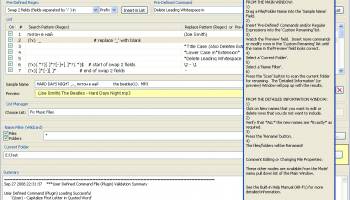
PFrank is second to none when it comes to renaming. It is equipped with many features, some of which you won't find on any other renaming program. The beauty of this tool is it's flexibility. You can easily build any renaming command sequence you like, preview all of the results, press the rename button, and you're done!
Renaming Features:
Pre-Defined renaming commands for:
changing case,
inserting counters,
inserting parent folder names,
eliminating whitespace sequences.
inserting file properties,
inserting tag information and meta-data from Music files (e.g. MP3, Ogg Vorbis, FLAC),
inserting EXIF tag, IPTC tag, and meta-data from Image files (e.g. JPEG, TIFF, GIF, etc.),
inserting meta-data from Raw Image files (e.g. CRW, NEF, DNG, etc.) is supported via a plugin,
inserting meta-data from PDF files is supported via a plugin,
inserting tag information and meta-data from Video files (e.g. MPEG, AVI, etc.),
inserting tags from Markup Language files (e.g. HTML, SGML, etc.),
inserting meta-data from Email files (e.g. Mozilla EML),
inserting meta-data from Office type files (e.g. Word, Excel, Powerpoint, etc.),
inserting information from text files,
inserting hash codes,
Powerful Regular Expression (regex) based search/replace engine for defining custom replace commands. Regular expressions are a standard language. With PFrank there is no need to learn any custom or non-standard languages or syntax. With regular expressions it is trivial to add/delete/replace text or move/swap any parts of the filename.
You create the expressions or choose from dozens of pre-defined regular expression sequences that you can modify as required.
Define any number of search/replace regular expressions and then run them in a custom sequence with one command!.
Include any of and as many of the pre-defined renaming commands in the custom sequence!
If the pre-defined commands and regular expression capability can't do what you want, then develop your own commands using the full power of the python programming language! See here for details. These commands, once plugged in, are treated like any of the built-in pre-defined commands.
Save custom sequences into a list. Any number of lists can be saved. A list manager is used to manage the lists.
Regular expression flags are available to ignore letter case, ignore file/folder name extensions, control the number of replacements made, and more!
JPEG Comment Editor. Features bulk comment editing capabilities. Can be used for adding/modifying comment tags of JPEG or of MP3 files. A highly optimized data entry scheme enables fast efficient changes during manual editing. It's now easier than ever to write comment tags into your JPEG files or MP3 files.
File Properties Changer. Features bulk file property changing capabilities. Can be used for quickly changing last modified/created dates or read-only or other file attributes. More details can be found here
PFrank is second to none when it comes to renaming. It is equipped with many features, some of which you won't find on any other renaming program. The beauty of this tool is it's flexibility. You can easily build any renaming command sequence you like, preview all of the results, press the rename button, and you're done!
Renaming Features:
Pre-Defined renaming commands for:
changing case,
inserting counters,
inserting parent folder names,
eliminating whitespace sequences.
inserting file properties,
inserting tag information and meta-data from Music files (e.g. MP3, Ogg Vorbis, FLAC),
inserting EXIF tag, IPTC tag, and meta-data from Image files (e.g. JPEG, TIFF, GIF, etc.),
inserting meta-data from Raw Image files (e.g. CRW, NEF, DNG, etc.) is supported via a plugin,
inserting meta-data from PDF files is supported via a plugin,
inserting tag information and meta-data from Video files (e.g. MPEG, AVI, etc.),
inserting tags from Markup Language files (e.g. HTML, SGML, etc.),
inserting meta-data from Email files (e.g. Mozilla EML),
inserting meta-data from Office type files (e.g. Word, Excel, Powerpoint, etc.),
inserting information from text files,
inserting hash codes,
Powerful Regular Expression (regex) based search/replace engine for defining custom replace commands. Regular expressions are a standard language. With PFrank there is no need to learn any custom or non-standard languages or syntax. With regular expressions it is trivial to add/delete/replace text or move/swap any parts of the filename.
You create the expressions or choose from dozens of pre-defined regular expression sequences that you can modify as required.
Define any number of search/replace regular expressions and then run them in a custom sequence with one command!.
Include any of and as many of the pre-defined renaming commands in the custom sequence!
If the pre-defined commands and regular expression capability can't do what you want, then develop your own commands using the full power of the python programming language! See here for details. These commands, once plugged in, are treated like any of the built-in pre-defined commands.
Save custom sequences into a list. Any number of lists can be saved. A list manager is used to manage the lists.
Regular expression flags are available to ignore letter case, ignore file/folder name extensions, control the number of replacements made, and more!
OS: Windows Vista, Windows Vista x64, Windows 7, Windows 7 x64, Windows 8, Windows 8 x64, Windows 10, Windows 10 x64
Add Your Review or 64-bit Compatibility Report
Top File & Disk Management 64-bit downloads


Copy Outlook Express to Windows Live Mail 3.54
PCVARE's HOT Product offers to Copy Outlook Express to Windows Live Mail
Shareware | $69.00


Outlook Emails to PDF 1.2
Batch conversion of Outlook Emails to PDF via PST to PDF Converter
Shareware | $49.00

Convert Yahoo Email to PDF 2.1
Yahoo Backup to PDF Format with Attachments Easy Migration
Shareware | $29.00

OST Export to PST 2.2
OST Export to PST Software helps users to export OST file and convert OST to PST
Shareware | $49.00

EML File Converter 21.4
EML File Converter exports mailbox contents of EML files to other email clients.
Shareware | $39.00

SoftTweak OST to PST 3.1
Convert OST to PST Outlook by advanced SoftTweak OST to PST tool
Shareware | $29.00


Open Files from XLSX to XLS 5.2
Convert XLSX to XLS with Open files from XLSX to XLS program
Shareware | $29.00

PST Split Software 2.2
Advance PST Split Software For Split PST File into Few Easy Clicks
Shareware | $49.00
Members area
Top 64-bit Downloads
-
O&O DiskRecovery x64 14.0.17
x64 demo download -
O&O DiskRecovery
Admin Edition x64 10.0 B117
x64 demo download -
XtraTools Home x64 26.3.1
x64 shareware download -
Processor X32 or X64 1.5
x64 freeware download -
EasyTune6 B24.0119.1
x64 freeware download -
O&O DiskImage
Professional x64 19.0.109
x64 trialware download -
O&O DiskImage
Professional x64 19.0.109
x64 trialware download -
O&O CleverCache
Professional Edition x64 7.1.2737
x64 trialware download -
O&O Defrag
Professional Edition x64 28.0.10005
x64 trialware download -
ASUS Fan Xpert 4.0
x64 freeware download
Top Downloads
-
Copy Outlook Express to
Windows Live Mail 3.54
shareware download -
File Checksum Tool 1.41
freeware download -
Outlook Emails to PDF 1.2
shareware download -
Convert Yahoo Email to
PDF 2.1
shareware download -
OST Export to PST 2.2
shareware download -
EML File Converter 21.4
shareware download -
SoftTweak OST to PST 3.1
shareware download -
iTop PDF 3.6.0.4
freeware download -
SharpBoot 5.0
freeware download -
O&O DiskRecovery x64 14.0.17
demo download -
O&O DiskRecovery
Admin Edition x64 10.0 B117
demo download -
Image 4.01
trialware download -
O&O DiskImage
Professional x64 19.0.109
trialware download -
O&O DiskImage
Professional x64 19.0.109
trialware download -
AnyMP4 Data Recovery 1.5.12
shareware download