
PhotoBlend 3D - X 64-bit Download
Popular x64 Tags
- image x64 download
- design x64 download
- size x64 download
- color x64 download
- graphics x64 download
- gif x64 download
- panorama x64 download
- photoshop x64 download
- software x64 download
- jpeg x64 download
- photo x64 download
- utility x64 download
- plugin x64 download
- cover x64 download
- tool x64 download
- rgb x64 download
- png x64 download
- jpg x64 download
- pictures x64 download
- images x64 download
- vanderlee x64 download
- bmp x64 download
- photos x64 download
- vdl x64 download
- picture x64 download
- scanner x64 download
- screen x64 download
- video x64 download
- scan x64 download
- dust x64 download
PhotoBlend 3D 2.3
Sponsored links:

MediaChance

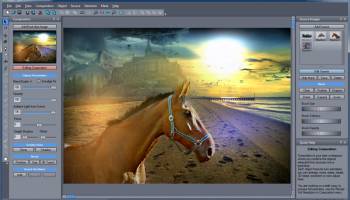
Photo Blend 3D is uniquely designed software to quickly combine parts of different photos into a new 2D photo montage or composition as well as to easily create 3D stereogram and anaglyph 3D images.
With its original features such as automatic color adjustment it will give you more time to focus on the creative and artistic aspect of the whole process.
And the best part of it is that you will have tremendous fun doing it.
FEATURES:
If I want to create a quick photo composition or mash-up in a professional standard photo editor (lets not name any names here so I will just abbreviate that as PS) then in a nutshell I need to isolate an object from one photo with selection tools or layer masks and then paste it over another photo.
Everybody who did that at least once knows why it takes a lot of time: The selection or mask has to be precise or else it looks like scrapbook page cut by scissors. And correctly masking semi-transparencies and hair is a discussion for a whole book.
Once that is done there is the other thing called "colors". If those two photos are unrelated, created in different times of a day, at different places and with different lights, perhaps even by different cameras, we have a problem. It takes a lot of patience to adjust the colors so they fit to the image and the foreign objects don't look like a bad copy-paste job in some newspapers (for younger users, newspaper is like an iPad but printed on a paper).
Needles to say that adjusting colors in a layer is usually a flat process that doesn't care much about the background. If the new background has a red light in one side we would need to adjust the left colors of the object differently than the right so the object gets some ambient light from the scene. At the end, doing all this will make sure that the image only looks good if nothing ever moves.
Moving an object from one side to another will surely require tracing back all the steps and redoing them. And at the end of the day if your boss pops in and say, "Well, it looks good, but I would just put different background" you know the night just got very long.
With its original features such as automatic color adjustment it will give you more time to focus on the creative and artistic aspect of the whole process.
And the best part of it is that you will have tremendous fun doing it.
FEATURES:
If I want to create a quick photo composition or mash-up in a professional standard photo editor (lets not name any names here so I will just abbreviate that as PS) then in a nutshell I need to isolate an object from one photo with selection tools or layer masks and then paste it over another photo.
Everybody who did that at least once knows why it takes a lot of time: The selection or mask has to be precise or else it looks like scrapbook page cut by scissors. And correctly masking semi-transparencies and hair is a discussion for a whole book.
Once that is done there is the other thing called "colors". If those two photos are unrelated, created in different times of a day, at different places and with different lights, perhaps even by different cameras, we have a problem. It takes a lot of patience to adjust the colors so they fit to the image and the foreign objects don't look like a bad copy-paste job in some newspapers (for younger users, newspaper is like an iPad but printed on a paper).
Needles to say that adjusting colors in a layer is usually a flat process that doesn't care much about the background. If the new background has a red light in one side we would need to adjust the left colors of the object differently than the right so the object gets some ambient light from the scene. At the end, doing all this will make sure that the image only looks good if nothing ever moves.
Moving an object from one side to another will surely require tracing back all the steps and redoing them. And at the end of the day if your boss pops in and say, "Well, it looks good, but I would just put different background" you know the night just got very long.
OS: Windows XP, Windows Vista, Windows Vista x64, Windows 7, Windows 7 x64, Windows 8, Windows 8 x64, Windows 10, Windows 10 x64
Add Your Review or 64-bit Compatibility Report
Top Other 64-bit downloads


Topaz DeNoise 6.0.1
A Photoshop plugin that can help you remove digital image noise
Trialware | $79.99


Just Color Picker 6.2
Free portable colour picker and editor for web-designers and digital artists.
Freeware

PDF Writer for Windows 2022 1.02
Server-based solution for deploying PDF creation ability across your company
Shareware | $700.00
tags: pdf, server, writer, print, printer, windows2022, win2022, printing, driver, feature, secure, password, vector, concurrent, client, virtual, server2022, windows, 2022, windows server 2022

iWisdom 0.0.0+2107~ga0785ce1
An application which helps you store small bits of wisdom, such as quotations
Open Source


Blue Cat's Protector x64 2.31
0dB stereo brickwall limiter with adjustable dynamics response
Demo | $99.00

Topaz DeJPEG 4.1.0
Gives you the ability to improve the quality of your JPEG images
Trialware | $29.99
Members area
Top 64-bit Downloads
-
cPicture (x64 bit) 4.1
x64 freeware download -
HyperCam (x64 bit) 2.29.00
x64 freeware download -
PhotoFiltre 11.6.1
x64 freeware download -
VanceAI 1.0.0.7
x64 shareware download -
Adobe Photoshop Elements 2024.3
x64 trialware download -
PDF Writer for Windows
2022 1.02
x64 shareware download -
Gimp for x64 Windows 2.10.38
x64 open source download -
ICO file format x64 2.1f1
x64 open source download -
Portable PhotoFiltre 11.6.1
x64 freeware download -
Blue Cat's Protector x64 2.31
x64 demo download
Top Downloads
-
CorelDRAW X5 2025 26.2.0.29
trialware download -
Fotosizer 3.21.0.594
freeware download -
CorelDRAW X6 16.4.0.1280
trialware download -
Scanahand 8.0.0.320
demo download -
MSU Subtitle Remover
VirtualDub plugin 3.0beta2
freeware download -
TinyPDF 3.00
freeware download -
cPicture (x64 bit) 4.1
freeware download -
VueScan 9.8.52
demo download -
Scripthea 3.0.0
open source download -
PhotoFiltre 11.6.1
freeware download -
WinScan2PDF 9.55
freeware download -
PDF24 Creator 11.17.0
freeware download -
VanceAI 1.0.0.7
shareware download -
ReaConverter Standard 8.200
demo download -
FreeFotoWorks 2026 26.0.9
freeware download