
Pixillion Photo and Image Converter - X 64-bit Download
Popular x64 Tags
- pdf x64 download
- images x64 download
- freeware x64 download
- autocad x64 download
- html x64 download
- converter x64 download
- copyright x64 download
- convert x64 download
- jpg x64 download
- pictures x64 download
- photo x64 download
- picture x64 download
- bmp x64 download
- tif x64 download
- image resizer x64 download
- image x64 download
- software x64 download
- resize x64 download
- png x64 download
- free x64 download
- watermark x64 download
- conversion x64 download
- converting x64 download
- jpeg x64 download
- tiff x64 download
- gif x64 download
- batch x64 download
- resizer x64 download
- dxf x64 download
- photos x64 download
You are here: X-64-bit Download
\ Graphic Apps
\ Converters & Optimizers \ Pixillion Photo and Image Converter
Pixillion Photo and Image Converter 13.02 Beta
Sponsored links:
license: Adware
downloads: 46
size: 2.00 MB
updated: 2025-03-11
tags: Pixillion Photo and Image Converter, download Pixillion Photo and Image Converter, Pixillion Photo and Image Converter free download, image converter, convert photo, apply watermark, convert, resize, rotate, watermark
Add to Basket

NCH Software

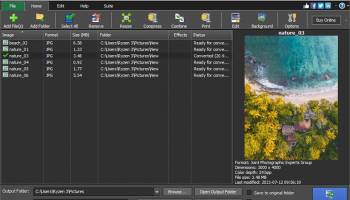
Pixillion Photo and Image Converter, developed by NCH Software, is a versatile and user-friendly tool designed to meet the diverse needs of both amateur and professional photographers. This robust software excels in converting image files into a wide array of formats, ensuring compatibility and ease of use across different platforms and applications.
One of Pixillion's standout features is its extensive format support. It effortlessly handles popular formats like JPEG, PNG, GIF, and BMP, as well as more specialized ones such as TIFF, ICO, and PDF. This makes it an invaluable asset for users who frequently work with varied file types and need a reliable solution for seamless conversion.
The software's intuitive interface is another highlight. Even those with minimal technical expertise will find it easy to navigate through Pixillion's straightforward layout. The drag-and-drop functionality simplifies the process of adding files, while batch conversion capabilities save time by allowing users to convert multiple images simultaneously. This efficiency is further enhanced by the ability to preview images before conversion, ensuring that the output meets the desired specifications.
In addition to its core conversion capabilities, Pixillion offers a suite of basic editing tools. Users can resize, rotate, and compress images, as well as add watermarks to protect their work. These features, while not as comprehensive as those found in dedicated photo editing software, provide sufficient functionality for quick adjustments and enhancements.
Pixillion also shines in its performance. The software is lightweight and operates smoothly, even when handling large batches of high-resolution images. This ensures that users can complete their tasks without experiencing significant slowdowns or crashes, a common issue with many image processing tools.
Moreover, Pixillion supports command-line operations, catering to advanced users who prefer automation and scripting for their workflows. This flexibility makes it suitable for a wide range of applications, from simple personal projects to more complex professional tasks.
One potential area for improvement is the software's lack of advanced editing features. While the basic tools are adequate for minor adjustments, users seeking more comprehensive editing capabilities may need to supplement Pixillion with additional software. However, this is a minor drawback considering Pixillion's primary function as a converter.
In conclusion, Pixillion Photo and Image Converter by NCH Software is a reliable, efficient, and user-friendly solution for anyone needing to convert and perform basic edits on their images. Its extensive format support, intuitive interface, and solid performance make it a valuable tool for both casual users and professionals alike. Whether you're looking to streamline your workflow or simply need a dependable converter, Pixillion is well worth considering.
One of Pixillion's standout features is its extensive format support. It effortlessly handles popular formats like JPEG, PNG, GIF, and BMP, as well as more specialized ones such as TIFF, ICO, and PDF. This makes it an invaluable asset for users who frequently work with varied file types and need a reliable solution for seamless conversion.
The software's intuitive interface is another highlight. Even those with minimal technical expertise will find it easy to navigate through Pixillion's straightforward layout. The drag-and-drop functionality simplifies the process of adding files, while batch conversion capabilities save time by allowing users to convert multiple images simultaneously. This efficiency is further enhanced by the ability to preview images before conversion, ensuring that the output meets the desired specifications.
In addition to its core conversion capabilities, Pixillion offers a suite of basic editing tools. Users can resize, rotate, and compress images, as well as add watermarks to protect their work. These features, while not as comprehensive as those found in dedicated photo editing software, provide sufficient functionality for quick adjustments and enhancements.
Pixillion also shines in its performance. The software is lightweight and operates smoothly, even when handling large batches of high-resolution images. This ensures that users can complete their tasks without experiencing significant slowdowns or crashes, a common issue with many image processing tools.
Moreover, Pixillion supports command-line operations, catering to advanced users who prefer automation and scripting for their workflows. This flexibility makes it suitable for a wide range of applications, from simple personal projects to more complex professional tasks.
One potential area for improvement is the software's lack of advanced editing features. While the basic tools are adequate for minor adjustments, users seeking more comprehensive editing capabilities may need to supplement Pixillion with additional software. However, this is a minor drawback considering Pixillion's primary function as a converter.
In conclusion, Pixillion Photo and Image Converter by NCH Software is a reliable, efficient, and user-friendly solution for anyone needing to convert and perform basic edits on their images. Its extensive format support, intuitive interface, and solid performance make it a valuable tool for both casual users and professionals alike. Whether you're looking to streamline your workflow or simply need a dependable converter, Pixillion is well worth considering.
OS: Windows 11, Windows 10 32/64 bit, Windows 8 32/64 bit, Windows 7 32/64 bit
Add Your Review or 64-bit Compatibility Report
Top Converters & Optimizers 64-bit downloads


MSU Subtitle Remover VirtualDub plugin 3.0beta2
Free high-quality subtitle remover plugin. Removes subtitle from video sequences
Freeware


VanceAI 1.0.0.7
VanceAI Image Enhancer is to enhance image quality with machine learning.
Shareware | $9.90

ReaConverter Standard 8.200

Powerful image converter with batch processing and extensive format support.
Demo | $45.00

Free PDF To Word Converter 4.1
Free PDF To Word Converter. PDF To Word Converter. Convert PDF file to Word.
Freeware

ReaConverter Lite 8.200
Effortlessly convert and edit images with ReaConverter Lite's intuitive tools.
Shareware | $45.00

Batch TIFF PDF Resizer 4.00
Batch TIFF PDF Resizer which converts and resize multipage TIFF, PDF and JPG to
Shareware | $34.95
Members area
Top 64-bit Downloads
-
cPicture (x64 bit) 4.1
x64 freeware download -
PhotoFiltre 11.6.1
x64 freeware download -
VanceAI 1.0.0.7
x64 shareware download -
Adobe Photoshop Elements 2024.3
x64 trialware download -
PDF Writer for Windows
2022 1.02
x64 shareware download -
HyperCam (x64 bit) 2.29.00
x64 freeware download -
Gimp for x64 Windows 2.10.38
x64 open source download -
ICO file format x64 2.1f1
x64 open source download -
Portable PhotoFiltre 11.6.1
x64 freeware download -
Blue Cat's Protector x64 2.31
x64 demo download
Top Downloads
-
CorelDRAW X5 2025 26.2.0.29
trialware download -
Fotosizer 3.21.0.594
freeware download -
CorelDRAW X6 16.4.0.1280
trialware download -
Scanahand 8.0.0.320
demo download -
MSU Subtitle Remover
VirtualDub plugin 3.0beta2
freeware download -
TinyPDF 3.00
freeware download -
cPicture (x64 bit) 4.1
freeware download -
PhotoFiltre 11.6.1
freeware download -
WinScan2PDF 9.55
freeware download -
PDF24 Creator 11.17.0
freeware download -
VanceAI 1.0.0.7
shareware download -
ReaConverter Standard 8.200
demo download -
FreeFotoWorks 2026 26.0.9
freeware download -
Anim8or 1.00
freeware download -
Screenpresso 2.2.4
shareware download