
Portable PDF Split and Merge Basic Edition - X 64-bit Download
Popular x64 Tags
- office x64 download
- microsoft x64 download
- importing x64 download
- exporting x64 download
- acrobat x64 download
- xls x64 download
- printer x64 download
- pdf x64 download
- pdf converter x64 download
- software x64 download
- word x64 download
- outlook x64 download
- excel x64 download
- powerpoint x64 download
- tool x64 download
- ppt x64 download
- adobe x64 download
- convert x64 download
- spreadsheet x64 download
- text x64 download
- create x64 download
- doc x64 download
- printing x64 download
- files x64 download
- add in x64 download
- open x64 download
- document x64 download
- data x64 download
- export x64 download
- saving x64 download
You are here: X-64-bit Download
\ Business
\ Office Suites & Tools \ Portable PDF Split and Merge Basic Edition
Portable PDF Split and Merge Basic Edition 5.4.5
Sponsored links:
license: Trialware ($69.00)
downloads: 48
size: 92.00 MB
updated: 2026-03-03
tags: Portable PDF Split and Merge Basic Edition, download Portable PDF Split and Merge Basic Edition, Portable PDF Split and Merge Basic Edition free download, merge PDF, PDF splitter, mix PDF, merge, split, bookmark, roate
Add to Basket

Andrea Vacondio

**PDF Split and Merge Basic Edition: A Comprehensive Review**
**Overview:**
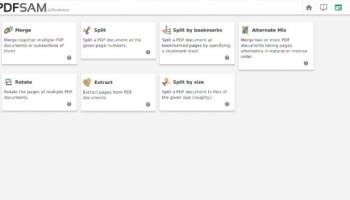
PDF Split and Merge Basic Edition, developed by Andrea Vacondio, is a robust and user-friendly software designed to handle essential PDF manipulation tasks. This open-source tool focuses on providing a straightforward solution for splitting and merging PDF documents, catering to both novice users and seasoned professionals who require efficient PDF management.
**Key Features:**
1. **Splitting PDFs:**
- **Page Range Selection:** Users can split PDFs by specifying page ranges, allowing for precise extraction of content.
- **Even/Odd Pages:** The software offers options to split documents into even or odd pages, which is particularly useful for duplex scanning and printing tasks.
- **Size Limit:** Split PDFs based on file size, ensuring that documents remain within manageable limits for sharing or storage.
2. **Merging PDFs:**
- **Simple Merging:** Combine multiple PDF files into a single document with ease, maintaining the original formatting and layout.
- **Page Order Customization:** Rearrange pages before merging to ensure the final document meets specific requirements.
- **Bookmarks and Outlines:** Preserve bookmarks and outlines during the merging process, ensuring that navigation within the document remains intuitive.
3. **User Interface:**
- **Intuitive Design:** The software boasts a clean and intuitive interface, making it accessible for users of all skill levels.
- **Drag and Drop:** Easily add files to the workspace using the drag-and-drop functionality, streamlining the workflow.
- **Batch Processing:** Handle multiple files simultaneously, saving time and effort for users dealing with large volumes of documents.
4. **Performance:**
- **Speed and Efficiency:** PDF Split and Merge Basic Edition is optimized for performance, delivering fast and reliable results without compromising on quality.
- **Resource Management:** The software is lightweight and does not consume excessive system resources, ensuring smooth operation even on older hardware.
5. **Compatibility:**
- **Cross-Platform Support:** Available for Windows, macOS, and Linux, making it a versatile choice for users across different operating systems.
- **File Format Support:** While primarily focused on PDFs, the software can handle a variety of PDF versions and standards, ensuring broad compatibility.
**Pros:**
- Open-source and free to use, making it accessible to a wide audience.
- Comprehensive feature set for basic PDF manipulation tasks.
- User-friendly interface with intuitive controls.
- Cross-platform availability ensures versatility.
- Regular updates and active community support.
**Cons:**
- Lacks advanced features found in premium PDF editing software.
- Limited to splitting and merging functions, which may not suffice for users needing more complex PDF editing capabilities.
- Occasional minor bugs, though these are typically addressed promptly through updates.
**Conclusion:**
PDF Split and Merge Basic Edition by Andrea Vacondio is an excellent tool for users seeking a reliable and straightforward solution for splitting and merging PDF documents. Its open-source nature, combined with a user-friendly interface and efficient performance, makes it a valuable addition to any productivity toolkit. While it may not offer the advanced features of premium software, its core functionality is robust and dependable, making it a top choice for basic PDF management tasks.
**Overview:**
PDF Split and Merge Basic Edition, developed by Andrea Vacondio, is a robust and user-friendly software designed to handle essential PDF manipulation tasks. This open-source tool focuses on providing a straightforward solution for splitting and merging PDF documents, catering to both novice users and seasoned professionals who require efficient PDF management.
**Key Features:**
1. **Splitting PDFs:**
- **Page Range Selection:** Users can split PDFs by specifying page ranges, allowing for precise extraction of content.
- **Even/Odd Pages:** The software offers options to split documents into even or odd pages, which is particularly useful for duplex scanning and printing tasks.
- **Size Limit:** Split PDFs based on file size, ensuring that documents remain within manageable limits for sharing or storage.
2. **Merging PDFs:**
- **Simple Merging:** Combine multiple PDF files into a single document with ease, maintaining the original formatting and layout.
- **Page Order Customization:** Rearrange pages before merging to ensure the final document meets specific requirements.
- **Bookmarks and Outlines:** Preserve bookmarks and outlines during the merging process, ensuring that navigation within the document remains intuitive.
3. **User Interface:**
- **Intuitive Design:** The software boasts a clean and intuitive interface, making it accessible for users of all skill levels.
- **Drag and Drop:** Easily add files to the workspace using the drag-and-drop functionality, streamlining the workflow.
- **Batch Processing:** Handle multiple files simultaneously, saving time and effort for users dealing with large volumes of documents.
4. **Performance:**
- **Speed and Efficiency:** PDF Split and Merge Basic Edition is optimized for performance, delivering fast and reliable results without compromising on quality.
- **Resource Management:** The software is lightweight and does not consume excessive system resources, ensuring smooth operation even on older hardware.
5. **Compatibility:**
- **Cross-Platform Support:** Available for Windows, macOS, and Linux, making it a versatile choice for users across different operating systems.
- **File Format Support:** While primarily focused on PDFs, the software can handle a variety of PDF versions and standards, ensuring broad compatibility.
**Pros:**
- Open-source and free to use, making it accessible to a wide audience.
- Comprehensive feature set for basic PDF manipulation tasks.
- User-friendly interface with intuitive controls.
- Cross-platform availability ensures versatility.
- Regular updates and active community support.
**Cons:**
- Lacks advanced features found in premium PDF editing software.
- Limited to splitting and merging functions, which may not suffice for users needing more complex PDF editing capabilities.
- Occasional minor bugs, though these are typically addressed promptly through updates.
**Conclusion:**
PDF Split and Merge Basic Edition by Andrea Vacondio is an excellent tool for users seeking a reliable and straightforward solution for splitting and merging PDF documents. Its open-source nature, combined with a user-friendly interface and efficient performance, makes it a valuable addition to any productivity toolkit. While it may not offer the advanced features of premium software, its core functionality is robust and dependable, making it a top choice for basic PDF management tasks.
OS: Windows 11, Windows 10 64 bit
Add Your Review or 64-bit Compatibility Report
Top Office Suites & Tools 64-bit downloads


Quite Imposing Plus 6.0c
Effortlessly create and manage complex impositions for PDF documents.
Demo | $949.00


Imposition Wizard 3.6.8
Streamline your print layout with Imposition Wizard's intuitive tools.
Demo | $264.00

CZ Excel Converter 1.9.4.6366
CZ V: A powerful synth emulation with rich sounds and intuitive controls.
Demo | $149.00


WinCalendar 4.43
Integrated Desktop Calendar, Calendar Creator & Pop-up Calendar for Windows
Demo | $32.00

callas pdfaPilot 14.2.400
Powerful tool for creating, validating, and optimizing PDF/A documents.
Trialware

mini PDF to TXT OCR Converter 3.2
PDF to TXT OCR Converter is a best OCR Converter
Shareware | $59.95

Florencesoft DiffEngineX 3.18.0.0
Reports on the differences between two Microsoft Excel workbooks
Trialware | $85.00
Members area
Top 64-bit Downloads
-
mbFXWords 2.80
x64 freeware download -
FontAgent Pro 10.0.15.0
x64 trialware download -
Microsoft Office 2016
x64 2405 B17628.20164
x64 trialware download -
Print to PDF Toolkit Pro 3.0
x64 shareware download -
Microsoft Office 2010
Service Pack x64 SP2
x64 freeware download -
Logizian Analyst
Portable x64 11.0 B20141203
x64 trialware download -
Zed Axis 64bit 10.0
x64 trialware download -
Microsoft Deployment
Toolkit x64 6.3.8456.1000
x64 freeware download -
iNFekt 1.3.0
x64 open source download -
Microsoft OneNote 2013
x64 15.0.4641.1001
x64 freeware download
Top Downloads
-
Active Barcode and QR
code Generator 1.24.8.15
freeware download -
Quite Imposing Plus 6.0c
demo download -
Flipping Book Writer 2.6
shareware download -
DeskWork Standard 4.0.2827
trialware download -
Forex Strategy Trader 3.6.0.0
freeware download -
mbFXWords 2.80
freeware download -
SmarThru 4.04
freeware download -
Imposition Wizard 3.6.8
demo download -
Miro for Windows 0.11.110
shareware download -
FileMaker Pro 22.0.5.500
trialware download -
CZ Excel Converter 1.9.4.6366
demo download -
FontAgent Pro 10.0.15.0
trialware download -
WinCalendar 4.43
demo download -
Total CSV Converter 1.8
shareware download -
Age Calculator .Net 1.0
freeware download