
Power Plan Assistant - X 64-bit Download
Popular x64 Tags
- windows x64 download
- customize x64 download
- batch x64 download
- explorer x64 download
- folder x64 download
- cmd x64 download
- desktop x64 download
- cmd exe x64 download
- command line x64 download
- change x64 download
- shell x64 download
- icon x64 download
- free x64 download
- system x64 download
- download x64 download
- system tray x64 download
- changer x64 download
- command interpreter x64 download
- batch programming x64 download
- keyboard x64 download
- minimize to tray x64 download
- settings x64 download
- internet x64 download
- create x64 download
- monitor x64 download
- display x64 download
- take command x64 download
- folders x64 download
- vista x64 download
- 4nt x64 download
Power Plan Assistant 3.3a
Sponsored links:

Vladimir Plenskiy

Power Plan Assistant is the world's smartest power management tool for Windows 7, 8 and 10. It's an ultimate automatic & manual power plan switcher with a compact yet very informative Power Icon and other goods for a PC or Mac running Windows via Boot Camp.
Power Plan Assistant application can be considered as "donationware": it's totally free to use, although the users are welcome to support the development by making a voluntary donation. Every donator receives the permanent Personal Serial Number for Power Plan Assistant tool!
With Power Plan Assistant you can:
1. Easily switch between the Windows built-in/custom power plans (all plans, not 2, as when operating via system Power icon) and instantly power off the display on user's demand (why wait at least one minute for it to be powered off, wasting energy?). It can be waked up then by pressing any key or moving the cursor;
2. Always observe which power plan is currently active (the dynamic Power Plan Assistant's icon in the notification area of Windows taskbar changes in accordance
with an active power plan, does not matter where the plan was changed - in Control Panel, using system Power icon or Power Plan Assistant itself);
>>NEW<< Now the notification are icon of the Power Plan Assistant can replace the system Power icon completely: it displays more information (battery level, active power plan [via battery icon color], power source status [via battery icon cap]) and offers much higher precision than the system Power icon.
3. Switch the power plans automatically: to 'Power Saver' in order to start saving the energy before the battery power is gone (the threshold is user-configurable), to 'High Performance' or 'Balanced' (on plugging in), to 'Balanced' or 'Power Saver' (on unplugging).
4. Instantly power off the display, lock the workstation, etc., without a need to perform even a single click: the user-configurable action can fire on placing a cursor precisely at the top left corner of the screen (note: this is not available in Windows 8.x because it would conflict with Windows own usage of this 'hot corner').
5. >>NEW<< Run the user-defined application or a batch file if power plan changes (individual setting per each power plan is available). This enriches Power Plan Assistant with virtually infinite capabilities: for example, you can tie your favorite overclocking software preset to an active power plan, turn off specific devices, etc.
Every feature of Power Plan Assistant is user-configurable, i.e. user can enable or disable it, either permanently or for the current session only.
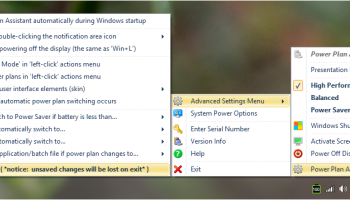
Even the balloon messages and the notification icon appearance / behavior can be customized. When application is started, please refer to 'left-click' actions menu, from where you can view and modify all of the available settings.
Power Plan Assistant application can be considered as "donationware": it's totally free to use, although the users are welcome to support the development by making a voluntary donation. Every donator receives the permanent Personal Serial Number for Power Plan Assistant tool!
With Power Plan Assistant you can:
1. Easily switch between the Windows built-in/custom power plans (all plans, not 2, as when operating via system Power icon) and instantly power off the display on user's demand (why wait at least one minute for it to be powered off, wasting energy?). It can be waked up then by pressing any key or moving the cursor;
2. Always observe which power plan is currently active (the dynamic Power Plan Assistant's icon in the notification area of Windows taskbar changes in accordance
with an active power plan, does not matter where the plan was changed - in Control Panel, using system Power icon or Power Plan Assistant itself);
>>NEW<< Now the notification are icon of the Power Plan Assistant can replace the system Power icon completely: it displays more information (battery level, active power plan [via battery icon color], power source status [via battery icon cap]) and offers much higher precision than the system Power icon.
3. Switch the power plans automatically: to 'Power Saver' in order to start saving the energy before the battery power is gone (the threshold is user-configurable), to 'High Performance' or 'Balanced' (on plugging in), to 'Balanced' or 'Power Saver' (on unplugging).
4. Instantly power off the display, lock the workstation, etc., without a need to perform even a single click: the user-configurable action can fire on placing a cursor precisely at the top left corner of the screen (note: this is not available in Windows 8.x because it would conflict with Windows own usage of this 'hot corner').
5. >>NEW<< Run the user-defined application or a batch file if power plan changes (individual setting per each power plan is available). This enriches Power Plan Assistant with virtually infinite capabilities: for example, you can tie your favorite overclocking software preset to an active power plan, turn off specific devices, etc.
Every feature of Power Plan Assistant is user-configurable, i.e. user can enable or disable it, either permanently or for the current session only.
Even the balloon messages and the notification icon appearance / behavior can be customized. When application is started, please refer to 'left-click' actions menu, from where you can view and modify all of the available settings.
OS: Windows 7, Windows 7 x64, Windows 8, Windows 8 x64, Windows 10, Windows 10 x64
Add Your Review or 64-bit Compatibility Report
Top Shell Tools 64-bit downloads


XePlayer 6.0
XePlayer is a best & free Android Emulator for pc that enables all Android games
Freeware

TCC 32.0
A powerful replacement for the default Windows command interpreter CMD.EXE
Shareware | $69.95

DeskScapes 11.02
Transform your desktop with animated wallpapers and stunning effects.
Trialware | $4.99


Folder Marker Home - Change Folder Color 4.9
Lets you change folder color or icon (mark folder) in 2 click.
Shareware | $24.95

Power Plan Assistant 3.3a
Is a multiple software that, created to redefine the Windows 7 / 8 / 10
Freeware


Folder Marker Free - Customize Folders 4.9
Customize folder icon with color-coded and image-coded icon.
Freeware
Members area
Top 64-bit Downloads
-
HWiNFO64 6.28 B4200
x64 freeware download -
GRBackPro Server Backup
x64 11.2.0
x64 shareware download -
Windows 7 x64
x64 trialware download -
EasyTune6 B24.0119.1
x64 freeware download -
XtraTools Professional
x64 26.2.1
x64 shareware download -
DAR 2.7.14
x64 open source download -
BusDog x64 0.2
x64 freeware download -
PhotoRenamer 4.1
x64 freeware download -
Laplink DiskImage
Professional x64 10.0.71
x64 trialware download -
CIB pdf brewer 4.20.0
x64 freeware download
Top Downloads
-
FreeCommander XE
Portable 2026 Build 941
freeware download -
FURY CTRL 2.0.65.0
freeware download -
FMDiff 4.0.5
demo download -
Open Files from XLSX to
XLS 5.2
shareware download -
Shell Tools 2.0.1
freeware download -
Vim 9.2.0260
open source download -
AnyMP4 Data Recovery 1.5.12
shareware download -
PCtransfer 1.0.0.1033
freeware download -
Software to Data
Recovery 5.8.4.1
shareware download -
EaseUS Key Finder 4.1.6 Build 20240910
demo download -
HWiNFO64 6.28 B4200
freeware download -
Music Collection 3.9.7.2
freeware download -
WinFindr 1.9
shareware download -
File Compression 1.0
commercial download -
NirLauncher 1.30.22
freeware download