
Powerwall Companion - X 64-bit Download
Popular x64 Tags
- calculator x64 download
- tool x64 download
- freeware x64 download
- free x64 download
- software x64 download
- download x64 download
- radio x64 download
- data x64 download
- ebook x64 download
- home inventory x64 download
- planner x64 download
- windows x64 download
- free numerology software x64 download
- free numerology x64 download
- reg software x64 download
- numerology software x64 download
- numerology x64 download
- auto repair help x64 download
- passwords x64 download
- chicken coop plans x64 download
- numerology reading x64 download
- blood pressure x64 download
- automobile x64 download
- github x64 download
- 3d modeling x64 download
- viewer x64 download
- automation x64 download
- auto x64 download
- open source x64 download
- open-source x64 download
Powerwall Companion 12.4.4.0
Sponsored links:
license: Freeware
downloads: 53
size: 151.10 MB
updated: 2026-01-18
tags: Powerwall Companion, download Powerwall Companion, Powerwall Companion free download, Tesla battery, battery tracker, track Tesla, Tesla, battery, charging, energy
Add to Basket

Tom Hollander

**Powerwall Companion: Elevate Your Tesla Powerwall Experience**
Developed by Tom Hollander, Powerwall Companion is a sophisticated yet user-friendly application designed to enhance the management and monitoring of Tesla Powerwall systems. This software stands out by offering a comprehensive suite of features that cater to both novice users and seasoned energy enthusiasts.
**User Interface and Experience**
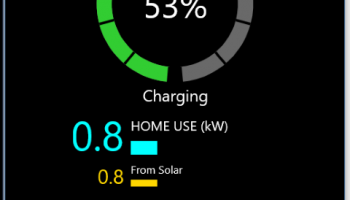
Powerwall Companion boasts an intuitive and visually appealing interface. The dashboard is clean, well-organized, and provides a wealth of information at a glance. Users can easily navigate through various sections, thanks to the logical layout and responsive design. The color-coded graphs and charts make it simple to understand energy consumption patterns, battery status, and overall system performance.
**Key Features**
1. **Real-Time Monitoring**: One of the standout features of Powerwall Companion is its ability to provide real-time data on energy production, consumption, and storage. Users can monitor their Powerwall's performance live, ensuring they are always informed about their energy status.
2. **Historical Data Analysis**: The software allows users to delve into historical data, offering insights into energy usage trends over days, weeks, months, or even years. This feature is invaluable for those looking to optimize their energy consumption and make informed decisions about their energy usage.
3. **Custom Alerts and Notifications**: Powerwall Companion enables users to set custom alerts for various parameters such as low battery levels, high energy consumption, or system faults. These notifications can be sent via email or push notifications, ensuring users are always in the loop.
4. **Integration with Smart Home Systems**: For those with smart home setups, Powerwall Companion offers seamless integration with various smart home devices. This allows for automated energy management, such as adjusting thermostat settings based on energy availability or scheduling appliance usage during off-peak hours.
5. **User Profiles and Permissions**: The software supports multiple user profiles, each with customizable permissions. This is particularly useful for households with multiple members, allowing each person to access the information and controls relevant to them.
6. **Data Export and Reporting**: Users can export their data in various formats for further analysis or reporting. This feature is particularly useful for energy consultants or those who need to present their energy data for regulatory or incentive purposes.
**Performance and Reliability**
Powerwall Companion is designed to be robust and reliable. The software runs smoothly on a variety of devices, including desktops, tablets, and smartphones. Regular updates from Tom Hollander ensure that the application remains compatible with the latest Tesla Powerwall firmware and continues to offer new features and improvements.
**Conclusion**
Powerwall Companion is an indispensable tool for Tesla Powerwall owners who wish to maximize their energy efficiency and gain deeper insights into their energy usage. With its blend of real-time monitoring, historical data analysis, and smart home integration, it offers a comprehensive solution that is both powerful and easy to use. Tom Hollander has crafted a software that not only meets but exceeds the expectations of modern energy management. Whether you're a tech-savvy user or someone new to energy storage systems, Powerwall Companion is sure to enhance your Tesla Powerwall experience.
Developed by Tom Hollander, Powerwall Companion is a sophisticated yet user-friendly application designed to enhance the management and monitoring of Tesla Powerwall systems. This software stands out by offering a comprehensive suite of features that cater to both novice users and seasoned energy enthusiasts.
**User Interface and Experience**
Powerwall Companion boasts an intuitive and visually appealing interface. The dashboard is clean, well-organized, and provides a wealth of information at a glance. Users can easily navigate through various sections, thanks to the logical layout and responsive design. The color-coded graphs and charts make it simple to understand energy consumption patterns, battery status, and overall system performance.
**Key Features**
1. **Real-Time Monitoring**: One of the standout features of Powerwall Companion is its ability to provide real-time data on energy production, consumption, and storage. Users can monitor their Powerwall's performance live, ensuring they are always informed about their energy status.
2. **Historical Data Analysis**: The software allows users to delve into historical data, offering insights into energy usage trends over days, weeks, months, or even years. This feature is invaluable for those looking to optimize their energy consumption and make informed decisions about their energy usage.
3. **Custom Alerts and Notifications**: Powerwall Companion enables users to set custom alerts for various parameters such as low battery levels, high energy consumption, or system faults. These notifications can be sent via email or push notifications, ensuring users are always in the loop.
4. **Integration with Smart Home Systems**: For those with smart home setups, Powerwall Companion offers seamless integration with various smart home devices. This allows for automated energy management, such as adjusting thermostat settings based on energy availability or scheduling appliance usage during off-peak hours.
5. **User Profiles and Permissions**: The software supports multiple user profiles, each with customizable permissions. This is particularly useful for households with multiple members, allowing each person to access the information and controls relevant to them.
6. **Data Export and Reporting**: Users can export their data in various formats for further analysis or reporting. This feature is particularly useful for energy consultants or those who need to present their energy data for regulatory or incentive purposes.
**Performance and Reliability**
Powerwall Companion is designed to be robust and reliable. The software runs smoothly on a variety of devices, including desktops, tablets, and smartphones. Regular updates from Tom Hollander ensure that the application remains compatible with the latest Tesla Powerwall firmware and continues to offer new features and improvements.
**Conclusion**
Powerwall Companion is an indispensable tool for Tesla Powerwall owners who wish to maximize their energy efficiency and gain deeper insights into their energy usage. With its blend of real-time monitoring, historical data analysis, and smart home integration, it offers a comprehensive solution that is both powerful and easy to use. Tom Hollander has crafted a software that not only meets but exceeds the expectations of modern energy management. Whether you're a tech-savvy user or someone new to energy storage systems, Powerwall Companion is sure to enhance your Tesla Powerwall experience.
OS: Windows 11, Windows 10 64 bit
Add Your Review or 64-bit Compatibility Report
Top Other 64-bit downloads


Handicap Manager for Excel 8.14
Effortlessly track and manage golf handicaps with this intuitive Excel tool.
Trialware | $19.95


Rocrail 2026-02-25 Revision

Rocrail: Open-source model railroad control software for automation and control.
Open Source

WriteMapper 4.5.0
WriteMapper: Transform mind maps into structured writing effortlessly.
Demo | $89.00

WinStars 3.0.304 (2025
Explore the cosmos with WinStars, your interactive astronomy software.
Freeware

Offline Map Maker 8.370
Create detailed offline maps from online sources with ease and precision.
Demo | $79.00


Flexify 2.1.48
Flexify: A versatile tool for seamless data manipulation and integration.
Open Source
Members area
Top 64-bit Downloads
-
Money Manager Ex
Portable x64 1.8.0
x64 freeware download -
Deeproot Plant Base X64 2.2.0
x64 shareware download -
MyTourbook 64-bit 19.6.1
x64 open source download -
JAWS 64-bit 14.0.5005
x64 trialware download -
Fitbit Connect 2.0.2.7066
x64 freeware download -
Parabator 2 1.0
x64 freeware download -
Parabator 2
"perkk"
booster mod 1.0
x64 freeware download -
Money Manager Ex x64 1.8.0
x64 freeware download -
Moneydance x64 2017.8 (1691)
x64 trialware download -
Parabator 2 -
"perk" booster
mod 1.0
x64 freeware download
Top Downloads
-
Netron 8.8.9
open source download -
Handicap Manager for
Excel 8.14
trialware download -
TARGET 3001 33.9.0.53
demo download -
WriteMapper 4.5.0
demo download -
FET 7.7.7
open source download -
Rocrail 2026-02-25 Revision
open source download -
Estlcam 13.003
trialware download -
flin4cell 2006-2022 11.8
shareware download -
WinStars 3.0.304 (2025
freeware download -
Offline Map Maker 8.370
demo download -
Panoply 5.9.0
freeware download -
Portable QCAD
Professional 3.32.6
demo download -
Flexify 2.1.48
open source download -
VariCAD Viewer 2026 1.01
freeware download -
Movie Inventory 13.3
shareware download