
PrintMyFonts - X 64-bit Download
Popular x64 Tags
- fonts x64 download
- font manager x64 download
- font x64 download
- manager x64 download
- opentype x64 download
- pfm x64 download
- preview x64 download
- ttf x64 download
- software x64 download
- truetype x64 download
- otf x64 download
- install x64 download
- postscript x64 download
- character map x64 download
- pfb x64 download
- handwriting x64 download
- font pack x64 download
- watermark x64 download
- tc components india x64 download
- graphic x64 download
- home x64 download
- picture x64 download
- image editor x64 download
- plugin x64 download
PrintMyFonts 19.3.13
Sponsored links:

Stefan Trost Media

PrintMyFonts is a straightforward and portable software application made to help you view and print all installed fonts. It doesn't include complex options or configuration parameters, making it suitable for all user levels.
Features
Simple operation: With only one mouse click, you are able to print your fonts. Nevertheless there are many other self explaining justifications available.
Installed and saved Fonts: The fonts must not be installed to be displayed with this tool. Alternatively to a display of installed fonts, you can also choose folders with font files. So you can have a look at fonts before installing them or you can compare new fonts with your old ones.
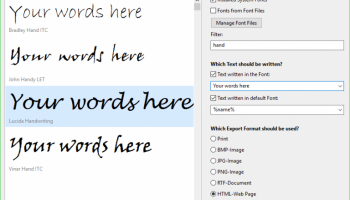
Preview: Without printing the font list and without saving the font list as file, it is possible to see all fonts directly within the application. The list in the program is showing the same text in the same formattings like the later export.
Print: You can print the font list with your default printer or you can use the printer dialog to select an arbitrary printer installed on your system. So, it is possible, for example, to choose a PDF printer in order to export the font list as PDF document.
Export as Image: Your list of fonts can also be saved as an image file in the formats BMP, JPG or PNG. If the resulting file is too large, the font list can automatically be divided to several separate files, so that also large font libraries can be stored.
Export as Document: The font list can also be saved as RTF document. You can open the RTF file in programs such as Microsoft Word or OpenOffice.
Export as Website: It is also possible to export to the list as web page in the HTML format.
Print only what you want: Besides printing all fonts you can also select only single ones and decide freely what is printed in this font: the name of the font, a numbering, a sentence and letters of your choice or everything, together.
Filter for Font Styles: PrintMyFonts automatically categorizes your font collection into fonts with variable or fixed monospace character width, into fonts with serifs (Serif) or without (Sans Serif) or other variants as well as according to their line widths. With using the corresponding filter, you can automatically only show the font styles you are interested in. So, you can dynamically shrink the displayed selection according to your needs. For example, you can automatically create a list of all available thin fonts without serifs with fixed widths.
Filter for Font Names: You can filter your fonts by using the field "Font Name Filter". Multiple search terms can be separated by a comma or a semicolon. If you want to exclude terms from the search, you can write a minus character in front of the term.
Font Variants: You can print and compare all fonts in the variants regular, bold, italic and bold-italic. You can also include the same font in several variants within one list.
Texts and Placeholders: For each font, you can define an arbitrary text that is written in the font and another text that is written in the default font. Within both texts, you can use placeholders, for example for the name of the font, the font style, a numbering or the file name. Placeholders and arbitrary other texts or characters can be mixed like you want. With this, for example, it is possible, to print out symbol fonts with their font name readable. You can find a list of all placeholders that are available here.
Advanced Settings: There are many parameters that can be adjusted in the settings: The font size used in the application and in the export, the color of the font and background, the page margins of exported images or documents, the height of the page, the line distance and so on. Thus, it is possible to adjust the exports and the font list within the tool according to your needs.
Features
Simple operation: With only one mouse click, you are able to print your fonts. Nevertheless there are many other self explaining justifications available.
Installed and saved Fonts: The fonts must not be installed to be displayed with this tool. Alternatively to a display of installed fonts, you can also choose folders with font files. So you can have a look at fonts before installing them or you can compare new fonts with your old ones.
Preview: Without printing the font list and without saving the font list as file, it is possible to see all fonts directly within the application. The list in the program is showing the same text in the same formattings like the later export.
Print: You can print the font list with your default printer or you can use the printer dialog to select an arbitrary printer installed on your system. So, it is possible, for example, to choose a PDF printer in order to export the font list as PDF document.
Export as Image: Your list of fonts can also be saved as an image file in the formats BMP, JPG or PNG. If the resulting file is too large, the font list can automatically be divided to several separate files, so that also large font libraries can be stored.
Export as Document: The font list can also be saved as RTF document. You can open the RTF file in programs such as Microsoft Word or OpenOffice.
Export as Website: It is also possible to export to the list as web page in the HTML format.
Print only what you want: Besides printing all fonts you can also select only single ones and decide freely what is printed in this font: the name of the font, a numbering, a sentence and letters of your choice or everything, together.
Filter for Font Styles: PrintMyFonts automatically categorizes your font collection into fonts with variable or fixed monospace character width, into fonts with serifs (Serif) or without (Sans Serif) or other variants as well as according to their line widths. With using the corresponding filter, you can automatically only show the font styles you are interested in. So, you can dynamically shrink the displayed selection according to your needs. For example, you can automatically create a list of all available thin fonts without serifs with fixed widths.
Filter for Font Names: You can filter your fonts by using the field "Font Name Filter". Multiple search terms can be separated by a comma or a semicolon. If you want to exclude terms from the search, you can write a minus character in front of the term.
Font Variants: You can print and compare all fonts in the variants regular, bold, italic and bold-italic. You can also include the same font in several variants within one list.
Texts and Placeholders: For each font, you can define an arbitrary text that is written in the font and another text that is written in the default font. Within both texts, you can use placeholders, for example for the name of the font, the font style, a numbering or the file name. Placeholders and arbitrary other texts or characters can be mixed like you want. With this, for example, it is possible, to print out symbol fonts with their font name readable. You can find a list of all placeholders that are available here.
Advanced Settings: There are many parameters that can be adjusted in the settings: The font size used in the application and in the export, the color of the font and background, the page margins of exported images or documents, the height of the page, the line distance and so on. Thus, it is possible to adjust the exports and the font list within the tool according to your needs.
OS: Windows XP, Windows Vista, Windows Vista x64, Windows 7, Windows 7 x64, Windows 8, Windows 8 x64, Windows 10, Windows 10 x64
Add Your Review or 64-bit Compatibility Report
Top Font Tools 64-bit downloads


Scanahand 8.0.0.320
Create custom fonts effortlessly by scanning your handwriting with Scanahand.
Demo


FontLab 8.4.3 Build 8984
FontLab: Advanced font editor for professional typeface design and customization.
Trialware

FontFinder 3.10.2
Discover and identify fonts effortlessly with FontFinder's intuitive interface.
Open Source

MainType 13.0.0.1364
Effortlessly manage, organize, and preview your font collection.
Shareware | $49.00


X-Fonter 8.3.0
Advanced Font Manager and Font Viewer for Windows
Shareware | $35.00
tags: Truetype, Opentype, Font, Fonts, Font manager, Font Viewer, Graphics, Preview, TTF, PostScript, Picture


PopChar Win 10.1
Type special characters without knowing the keyboard combos, explore fonts
Shareware | $34.99
Members area
Top 64-bit Downloads
-
cPicture (x64 bit) 4.1
x64 freeware download -
HyperCam (x64 bit) 2.29.00
x64 freeware download -
PhotoFiltre 11.6.1
x64 freeware download -
VanceAI 1.0.0.7
x64 shareware download -
Adobe Photoshop Elements 2024.3
x64 trialware download -
PDF Writer for Windows
2022 1.02
x64 shareware download -
Gimp for x64 Windows 2.10.38
x64 open source download -
ICO file format x64 2.1f1
x64 open source download -
Archicad 64bit 27 B3001
x64 demo download -
Portable PhotoFiltre 11.6.1
x64 freeware download
Top Downloads
-
CorelDRAW X5 2025 26.2.0.29
trialware download -
Fotosizer 3.21.0.594
freeware download -
CorelDRAW X6 16.4.0.1280
trialware download -
Scanahand 8.0.0.320
demo download -
Scripthea 3.0.0
open source download -
MSU Subtitle Remover
VirtualDub plugin 3.0beta2
freeware download -
TinyPDF 3.00
freeware download -
PDF24 Creator 11.17.0
freeware download -
cPicture (x64 bit) 4.1
freeware download -
VueScan 9.8.52
demo download -
PhotoFiltre 11.6.1
freeware download -
WinScan2PDF 9.55
freeware download -
VanceAI 1.0.0.7
shareware download -
ReaConverter Standard 8.200
demo download -
FreeFotoWorks 2026 26.0.9
freeware download