
Process Explorer - X 64-bit Download
Popular x64 Tags
- cpu x64 download
- performance x64 download
- windows x64 download
- driver updates x64 download
- driver update x64 download
- cleaner x64 download
- defrag x64 download
- system x64 download
- drivers update x64 download
- tune x64 download
- tweak x64 download
- registry cleaner x64 download
- security x64 download
- video driver update x64 download
- optimizer x64 download
- registry x64 download
- uninstall x64 download
- speed x64 download
- boost x64 download
- faster x64 download
- system utilities x64 download
- utility x64 download
- optimize x64 download
- driver update software x64 download
- startup x64 download
- disk cleaner x64 download
- clean disk x64 download
- clean x64 download
- vista x64 download
- disk x64 download
Process Explorer 17.07
Sponsored links:
license: Freeware
downloads: 2683
size: 3.30 MB
updated: 2025-11-12
tags: Windows tools, Sysinternals, process viewer, Process Explorer free download, download Process Explorer, resource analysis, Process Explorer, process manager, lister, performance optimization, process lister, manager, explorer, manage, process management
Add to Basket

Sysinternals

Process Explorer, developed by Sysinternals, is a sophisticated system monitoring tool designed to provide in-depth insights into Windows operating systems. This utility is a powerful alternative to the traditional Windows Task Manager, offering a comprehensive view of system processes and their associated resources.
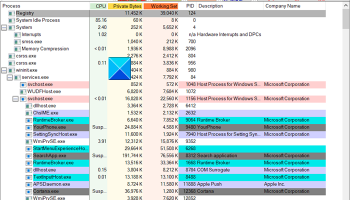
At its core, Process Explorer displays a detailed hierarchical view of all running processes, complete with information about their parent-child relationships. This feature is particularly useful for identifying which processes have spawned others, allowing users to trace the origins of any suspicious activity or resource hogs. Each process is accompanied by a wealth of information, including CPU usage, memory consumption, and a list of loaded DLLs, which can be crucial for diagnosing performance issues or potential security threats.
One of the standout features of Process Explorer is its ability to delve into process-specific details. Users can explore the properties of each process, revealing threads, handles, and security attributes. This level of detail is invaluable for advanced users and IT professionals who need to troubleshoot complex system issues or conduct forensic analysis.
Process Explorer also includes a powerful search capability that allows users to locate specific handles or DLLs loaded by processes. This feature is particularly useful for identifying which processes are using a particular file or library, aiding in the resolution of file locking issues or DLL conflicts.
The software's intuitive interface is divided into two main sections: the upper pane, which displays the list of currently active processes, and the lower pane, which provides additional details about the selected process. Users can toggle between different views in the lower pane to display DLLs, handles, or threads, depending on their investigative needs.
In addition to its monitoring capabilities, Process Explorer offers a range of options for managing processes. Users can terminate processes, suspend them, or change their priority levels, providing control over system performance and stability. This level of control is particularly beneficial in environments where resource management is critical.
Process Explorer is a lightweight, standalone application that does not require installation, making it a convenient tool for both regular users and IT professionals. It is compatible with all modern versions of Windows, ensuring broad accessibility and ease of use across different systems.
Overall, Process Explorer stands out as an essential tool for anyone needing a deeper understanding of their Windows environment. Its comprehensive feature set, combined with its user-friendly interface, makes it a go-to choice for system administrators, developers, and security experts alike. Whether you're troubleshooting a sluggish system, investigating a potential security threat, or simply curious about your system's inner workings, Process Explorer provides the insights you need with precision and clarity.
At its core, Process Explorer displays a detailed hierarchical view of all running processes, complete with information about their parent-child relationships. This feature is particularly useful for identifying which processes have spawned others, allowing users to trace the origins of any suspicious activity or resource hogs. Each process is accompanied by a wealth of information, including CPU usage, memory consumption, and a list of loaded DLLs, which can be crucial for diagnosing performance issues or potential security threats.
One of the standout features of Process Explorer is its ability to delve into process-specific details. Users can explore the properties of each process, revealing threads, handles, and security attributes. This level of detail is invaluable for advanced users and IT professionals who need to troubleshoot complex system issues or conduct forensic analysis.
Process Explorer also includes a powerful search capability that allows users to locate specific handles or DLLs loaded by processes. This feature is particularly useful for identifying which processes are using a particular file or library, aiding in the resolution of file locking issues or DLL conflicts.
The software's intuitive interface is divided into two main sections: the upper pane, which displays the list of currently active processes, and the lower pane, which provides additional details about the selected process. Users can toggle between different views in the lower pane to display DLLs, handles, or threads, depending on their investigative needs.
In addition to its monitoring capabilities, Process Explorer offers a range of options for managing processes. Users can terminate processes, suspend them, or change their priority levels, providing control over system performance and stability. This level of control is particularly beneficial in environments where resource management is critical.
Process Explorer is a lightweight, standalone application that does not require installation, making it a convenient tool for both regular users and IT professionals. It is compatible with all modern versions of Windows, ensuring broad accessibility and ease of use across different systems.
Overall, Process Explorer stands out as an essential tool for anyone needing a deeper understanding of their Windows environment. Its comprehensive feature set, combined with its user-friendly interface, makes it a go-to choice for system administrators, developers, and security experts alike. Whether you're troubleshooting a sluggish system, investigating a potential security threat, or simply curious about your system's inner workings, Process Explorer provides the insights you need with precision and clarity.
OS: Windows 11, Windows Server 2022, Windows Server 2019, Windows Server 2016, Windows 10 32/64 bit, Windows Server 2012 R2, Windows Server 2012, Windows 8 32/64 bit
Add Your Review or 64-bit Compatibility Report
Top System Maintenance 64-bit downloads


windows_exporter 0.31.5
Lightweight tool for exporting Windows metrics to Prometheus for monitoring.
Open Source

Windows 7 Service Pack 1 7601.17514.1011
SP1 - all previously publicly released updates for Windows 7 and Server 2008 R2
Freeware

WinToUSB 10.5 Build January 2
Easily create bootable USB drives from Windows installations with WinToUSB.
Shareware | $29.95

Microsoft Edge WebView2 Runtime 146.0.3856.78

WebView2 Runtime: Embed web content in apps with Edge's rendering engine.
Freeware

XtraTools Professional x64 26.2.1
XtraTools increases productivity and makes working with MS Windows easier.
Shareware | $29.99

TopNotify 3.1.1
TopNotify: Real-time notifications and alerts for seamless communication.
Open Source

Fortect 7.3.5.0
Fortect repairs and optimizes your PC, enhancing performance effortlessly.
Trialware | $30.95


Members area
Top 64-bit Downloads
-
HWiNFO64 6.28 B4200
x64 freeware download -
GRBackPro Server Backup
x64 11.2.0
x64 shareware download -
Windows 7 x64
x64 trialware download -
Windows 10 x64 22H2
x64 trialware download -
EasyTune6 B24.0119.1
x64 freeware download -
XtraTools Professional
x64 26.2.1
x64 shareware download -
O&O MediaRecovery
64-bit 14.0.17
x64 demo download -
DAR 2.7.14
x64 open source download -
BusDog x64 0.2
x64 freeware download -
PhotoRenamer 4.1
x64 freeware download
Top Downloads
-
FreeCommander XE
Portable 2026 Build 941
freeware download -
FURY CTRL 2.0.65.0
freeware download -
FMDiff 4.0.5
demo download -
Open Files from XLSX to
XLS 5.2
shareware download -
Vim 9.2.0261
open source download -
Shell Tools 2.0.1
freeware download -
HWiNFO64 6.28 B4200
freeware download -
AnyMP4 Data Recovery 1.5.12
shareware download -
PCtransfer 1.0.0.1033
freeware download -
Software to Data
Recovery 5.8.4.1
shareware download -
EaseUS Key Finder 4.1.6 Build 20240910
demo download -
Pitara 5.0.9582.21949
open source download -
Music Collection 3.9.7.2
freeware download -
WinFindr 1.9
shareware download -
File Compression 1.0
commercial download