
Process Lasso Server - X 64-bit Download
Popular x64 Tags
- cpu x64 download
- performance x64 download
- windows x64 download
- driver updates x64 download
- driver update x64 download
- cleaner x64 download
- defrag x64 download
- system x64 download
- drivers update x64 download
- tune x64 download
- tweak x64 download
- registry cleaner x64 download
- security x64 download
- video driver update x64 download
- optimizer x64 download
- registry x64 download
- uninstall x64 download
- speed x64 download
- boost x64 download
- faster x64 download
- system utilities x64 download
- utility x64 download
- optimize x64 download
- driver update software x64 download
- startup x64 download
- disk cleaner x64 download
- clean disk x64 download
- clean x64 download
- vista x64 download
- disk x64 download
Process Lasso Server 15.0.1.16
Add to Basket

Every running process uses some amount of system resources, depending on what type of data they need to handle and how. Your CPU dictates how fast computation is done, and Windows decides what the best distribution is in order to keep performance balanced. However, specialized applications like Process Lasso Server put you in control of distribution, also displaying usage and other details.
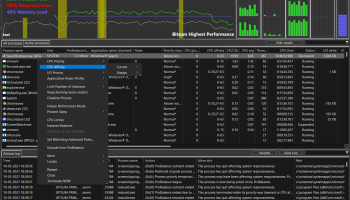
When the application starts, you're overwhelmed with a rich window that displays real time updating info on CPU use, as well as processes with all there is to know about them, such as user, restraint history, application name, rules, priority, affinity, and other memory and CPU related fields.
Bringing up the context menu puts you in charge of considerable more options that the task manager lets you handle. Amongst others, you can set class, affinity and memory priority, limit the number of instances, make it restart upon termination, prevent it from running, classify as game or enable hard throttling. If you don't want to risk accidentally messing up system processes, you can always switch to the active processes tab to view only applications you're currently using.
In case you're computer's processor is under a lot of pressure, chances are that changes are instantly visible. A detailed graph displays real time updating CPU usage, percentage used per thread, as well as RAM load. Gathered data is logged, with the possibility to view and save as CSV.
On the other hand, you don't have to go through management by yourself, because the application is equipped with several preset configurations such as ProBalance, SmartTrim, IdleSaver and Gaming mode. It's also possible to save your own setting to use as profiles.
All of them can be thoroughly configured, with an abundance of options to go through like excluded processes, whether or not to act on foreground processes, those of non-normal priority, system services, set CPU affinity during restrains, have power plan changed for more performance and even auto-engaging the gaming mode when playing on homepage.
In fact, there is such a large variety of customization available that you might just be tempted to stick with default settings. All the application can handle is subject to change, from default CPU and I/O priorities and foreground boost, to process watchdog, instance count limit or anti-sleep processes. Enthusiasts even have the possibility to tweak configurations right from the root through an option that opens the corresponding INI file.
To sum it up, Process Lasso Server is not meant for just anyone, although its set of features is comprehensive enough. Everything using CPU is monitored and given full control over, with the possibility to even go through preset configurations to perfectly balance distribution or get the most out of your computer's processor. There's also the homepage in case it tickles your fancy.
To use the beta, unstable version of Process Lasso, you can perform an update from the main app window of the stable version. "Updates" menu -> "Include beta versions" and then "Updates" menu -> "Check for Updates Now".

Add Your Review or 64-bit Compatibility Report
Top System Maintenance 64-bit downloads


Members area
Top 64-bit Downloads
-
EasyTune6 B24.0119.1
x64 freeware download -
XtraTools Professional
x64 26.2.1
x64 shareware download -
7z SFX Builder x64 2.1
x64 freeware download -
PhotoRenamer 4.1
x64 freeware download -
O&O DiskRecovery x64 14.0.17
x64 demo download -
HWMonitor (64-bit) 1.53
x64 freeware download -
Windows 7 x64
x64 trialware download -
O&O DiskRecovery
Admin Edition x64 10.0 B117
x64 demo download -
Microsoft Security
Essentials Definition
Updates x64 1.67.7.0
x64 freeware download -
SoftPerfect RAM Disk 26.2
x64 shareware download
Top Downloads
-
AnyMP4 Data Recovery 1.5.12
shareware download -
EaseUS Key Finder 4.1.6 Build 20240910
demo download -
DRevitalize 4.10
demo download -
BlindWrite - CD and DVD
copy 7.0.0.0
shareware download -
Convert EML extension to
PDF 5.1.1
shareware download -
Unreal Commander 3.57 Build 1497
freeware download -
EML to PDF Conversion 6.5.3
shareware download -
WinFR 5.60 S Build 2031
trialware download -
Convert EML emails to
PDF 7.5
shareware download -
WinFindr 1.8
shareware download -
XtraTools Professional
x64 26.2.1
shareware download -
SoftPerfect Cache
Relocator 1.8
freeware download -
BowPad 2.9.5
open source download -
EasyTune6 B24.0119.1
freeware download -
Thaiphoon Burner 17.4.1.2
freeware download