
Project Colletta - X 64-bit Download
Popular x64 Tags
- office x64 download
- microsoft x64 download
- importing x64 download
- exporting x64 download
- acrobat x64 download
- xls x64 download
- printer x64 download
- pdf x64 download
- pdf converter x64 download
- software x64 download
- word x64 download
- outlook x64 download
- excel x64 download
- powerpoint x64 download
- tool x64 download
- ppt x64 download
- adobe x64 download
- convert x64 download
- spreadsheet x64 download
- text x64 download
- create x64 download
- doc x64 download
- printing x64 download
- files x64 download
- add in x64 download
- open x64 download
- document x64 download
- data x64 download
- export x64 download
- saving x64 download
Project Colletta 3.0.0.0
Sponsored links:

Microsoft

Project Colletta will install on 32-bit or 64-bit Windows Vista or Windows 7. It requires Microsoft Office 2007 and Internet Explorer (IE) 7 or 8 (it does not yet work with IE9). The hard disc footprint is quite modest but, as this is a managed suite of tools, at least 1GB of RAM is recommended.
It is also recommended to install the latest drivers, particularly graphics drivers, for your PC (from the manufacturer’s site if necessary) before you start the install.
A number of applications support the addition tags to specific document types, but there is little that brings the different applications together. Project Colletta spans multiple document types (including email items and URLs as well as file system objects) and exposes the tags outside of the applications.
Project Colletta consists of two main components that enable tag creation, editing and access, called the DeskBar and the DocBar:
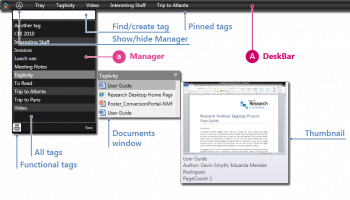
The DeskBar is located at the top of your primary screen. Its main purpose is to provide access to the complete list of your tags and their associated resources (documents, emails, web pages) as well as to host shortcuts to tags.
The menu showing your complete list of tags is called the Manager. It provides access to all the tags you have defined and is also the means for managing those tags. Clicking the triangle icon on the DeskBar will display or hide it.
When you click on each tag, a documents window will appear to the right listing documents associated with that tag. Hover over a document to see its thumbnail and some metadata. Double-clicking on the tag (or clicking the pin on the documents window) will cause the documents window to be pinned to the desktop.
When you click on a tag you also “select” it to be able to perform a subsequent operation via the right-click or context menu: the available options change slightly depending on whether you selected one or more tags or documents. You can select a group of tags by pressing the control key while clicking other tags.
On the DeskBar itself a list of pinned tags gives you quick access to selected tags. Clicking the system icon on the left end of the DeskBar pops up a short menu of system related options.
For a range of supported applications, namely Microsoft Word, Excel, PowerPoint, Outlook, Acrobat Reader and IE, we have designed a toolbar called the DocBar that sits at the bottom of the application window (note that the DeskBar component of Project Colletta has to be running for the DocBar to appear). From here you can quickly add and remove tags and access related documents.
The triangle icon is used to open the Editor, a lightweight tagging mechanism that allows you to link documents with existing or new tags or to break that link.
The Editor has two views: RECENT, which is a summary, indicating currently linked tags and a set of most recently used tags; and ALL, which provides a full view of all your tags. You toggle between these using the and button at the bottom of the Editor window.
If you start typing in the text box at the bottom of the Editor, the view switches to all tags automatically and filters the tag list based on text matching. Hitting Enter here will associate the document with the selected tag, creating a new tag with the specified name if no others match. Within the Editor, hovering over each item shows a or graphic which indicates that the tag can be linked to or unlinked from the document. Clicking on the Tray tag, a placeholder tag, or any of the icon tags, called functional tags, will attach/detach those tags from the document.
It is also recommended to install the latest drivers, particularly graphics drivers, for your PC (from the manufacturer’s site if necessary) before you start the install.
A number of applications support the addition tags to specific document types, but there is little that brings the different applications together. Project Colletta spans multiple document types (including email items and URLs as well as file system objects) and exposes the tags outside of the applications.
Project Colletta consists of two main components that enable tag creation, editing and access, called the DeskBar and the DocBar:
The DeskBar is located at the top of your primary screen. Its main purpose is to provide access to the complete list of your tags and their associated resources (documents, emails, web pages) as well as to host shortcuts to tags.
The menu showing your complete list of tags is called the Manager. It provides access to all the tags you have defined and is also the means for managing those tags. Clicking the triangle icon on the DeskBar will display or hide it.
When you click on each tag, a documents window will appear to the right listing documents associated with that tag. Hover over a document to see its thumbnail and some metadata. Double-clicking on the tag (or clicking the pin on the documents window) will cause the documents window to be pinned to the desktop.
When you click on a tag you also “select” it to be able to perform a subsequent operation via the right-click or context menu: the available options change slightly depending on whether you selected one or more tags or documents. You can select a group of tags by pressing the control key while clicking other tags.
On the DeskBar itself a list of pinned tags gives you quick access to selected tags. Clicking the system icon on the left end of the DeskBar pops up a short menu of system related options.
For a range of supported applications, namely Microsoft Word, Excel, PowerPoint, Outlook, Acrobat Reader and IE, we have designed a toolbar called the DocBar that sits at the bottom of the application window (note that the DeskBar component of Project Colletta has to be running for the DocBar to appear). From here you can quickly add and remove tags and access related documents.
The triangle icon is used to open the Editor, a lightweight tagging mechanism that allows you to link documents with existing or new tags or to break that link.
The Editor has two views: RECENT, which is a summary, indicating currently linked tags and a set of most recently used tags; and ALL, which provides a full view of all your tags. You toggle between these using the and button at the bottom of the Editor window.
If you start typing in the text box at the bottom of the Editor, the view switches to all tags automatically and filters the tag list based on text matching. Hitting Enter here will associate the document with the selected tag, creating a new tag with the specified name if no others match. Within the Editor, hovering over each item shows a or graphic which indicates that the tag can be linked to or unlinked from the document. Clicking on the Tray tag, a placeholder tag, or any of the icon tags, called functional tags, will attach/detach those tags from the document.
OS: Windows XP, Windows Vista, Windows Vista x64, Windows 7, Windows 7 x64
Add Your Review or 64-bit Compatibility Report
Top Office Suites & Tools 64-bit downloads


Quite Imposing Plus 6.0d
Effortlessly create and manage complex impositions for PDF documents.
Demo | $949.00


Seavus Project Viewer 19.0
Free to experience the best viewer for Micrsoft Project. Try our Project Viewer
Trialware | $29.50


SilentNotes 8.7.1
SilentNotes: Secure, offline note-taking app with encryption and cross-device sync.
Open Source


CZ Excel Converter 1.9.4.6366
CZ V: A powerful synth emulation with rich sounds and intuitive controls.
Demo | $149.00


callas pdfaPilot 14.2.400
Powerful tool for creating, validating, and optimizing PDF/A documents.
Trialware

mini PDF to TXT OCR Converter 3.2
PDF to TXT OCR Converter is a best OCR Converter
Shareware | $59.95
Members area
Top 64-bit Downloads
-
mbFXWords 2.80
x64 freeware download -
FontAgent Pro 10.0.15.0
x64 trialware download -
Microsoft Office 2016
x64 2405 B17628.20164
x64 trialware download -
Print to PDF Toolkit Pro 3.0
x64 shareware download -
Microsoft Office 2010
Service Pack x64 SP2
x64 freeware download -
PDFill PDF and Image
Writer x64 15.0 Build 2
x64 freeware download -
XLIFFChecker 7.5.0
x64 freeware download -
CSV2IIF Portable 5.0.060
x64 demo download -
Foxit Reader 2023.3
x64 freeware download -
Hl7Spy 24.1.227
x64 trialware download
Top Downloads
-
Quite Imposing Plus 6.0d
demo download -
Total CSV Converter 4.0
shareware download -
Active Barcode and QR
code Generator 1.24.8.15
freeware download -
mbFXWords 2.80
freeware download -
Seavus Project Viewer 19.0
trialware download -
Miro for Windows 0.11.110
shareware download -
Odoo 19.0.20260330
demo download -
Flipping Book Writer 2.6
shareware download -
SmarThru 4.04
freeware download -
SilentNotes 8.7.1
open source download -
LawTrust 5.1.1
shareware download -
HelpDesk 11.19.9557.25020
trialware download -
DeskWork Standard 4.0.2827
trialware download -
LiquiBase 5.0.2
trialware download -
4EPOS POS 12.20.48
demo download