
Quick Clipboard Editor - X 64-bit Download
Popular x64 Tags
- cpu x64 download
- performance x64 download
- windows x64 download
- driver updates x64 download
- driver update x64 download
- cleaner x64 download
- defrag x64 download
- system x64 download
- drivers update x64 download
- tune x64 download
- tweak x64 download
- registry cleaner x64 download
- security x64 download
- video driver update x64 download
- optimizer x64 download
- registry x64 download
- uninstall x64 download
- speed x64 download
- boost x64 download
- faster x64 download
- system utilities x64 download
- utility x64 download
- optimize x64 download
- driver update software x64 download
- startup x64 download
- disk cleaner x64 download
- clean disk x64 download
- clean x64 download
- vista x64 download
- disk x64 download
Quick Clipboard Editor 3.3.1.0
Sponsored links:
license: Freeware
downloads: 40
size: 4.60 MB
updated: 2026-02-05
tags: Quick Clipboard Editor, download Quick Clipboard Editor, Quick Clipboard Editor free download, clipboard editor, edit clipboard text, extract clipboard text, edit, clipboard, text, update
Add to Basket

Jean Lalonde

**Quick Clipboard Editor by Jean Lalonde: A Comprehensive Review**
In the bustling world of digital productivity, where every second counts, having a tool that seamlessly integrates into your workflow can be a game-changer. Enter Quick Clipboard Editor, a versatile and efficient clipboard management tool developed by Jean Lalonde. This software promises to elevate your clipboard experience, making it more intuitive and powerful.
**User Interface and Usability**
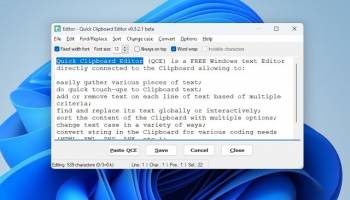
Quick Clipboard Editor boasts a clean, user-friendly interface that is both intuitive and accessible. The design is minimalistic, ensuring that users can quickly navigate through its features without a steep learning curve. The main window is well-organized, allowing you to view and manage your clipboard history with ease. The software's simplicity does not compromise its functionality, making it suitable for both novice users and seasoned professionals.
**Core Features**
1. **Clipboard History Management**: One of the standout features of Quick Clipboard Editor is its robust clipboard history management. It allows users to store and retrieve multiple clipboard entries, ensuring that no copied text or image is ever lost. This feature is particularly useful for those who frequently switch between tasks and need to access previously copied items.
2. **Text Editing Capabilities**: The software goes beyond simple clipboard management by offering built-in text editing capabilities. Users can edit clipboard content directly within the application, making it easy to tweak text snippets before pasting them into their desired location. This feature is a boon for writers, programmers, and anyone who deals with large volumes of text.
3. **Customizable Hotkeys**: Efficiency is at the heart of Quick Clipboard Editor, and customizable hotkeys are a testament to this. Users can set their preferred keyboard shortcuts to quickly access clipboard history, edit entries, or perform other actions. This level of customization ensures that the software adapts to your workflow, rather than the other way around.
4. **Multi-Format Support**: Quick Clipboard Editor supports a wide range of formats, including text, images, and HTML. This versatility ensures that the software can handle various types of content, making it a one-stop solution for all your clipboard needs.
5. **Search Functionality**: With an ever-growing clipboard history, finding specific entries could become cumbersome. However, Quick Clipboard Editor includes a powerful search functionality that allows users to quickly locate specific items. This feature enhances productivity by reducing the time spent sifting through clipboard entries.
**Performance and Reliability**
Quick Clipboard Editor is lightweight and performs efficiently without hogging system resources. It runs smoothly in the background, ensuring that your clipboard history is always up-to-date without any noticeable lag. The software is also highly reliable, with minimal reports of crashes or bugs, making it a dependable tool for daily use.
**Conclusion**
Jean Lalonde's Quick Clipboard Editor is a well-crafted tool that significantly enhances the standard clipboard functionality. Its combination of a user-friendly interface, powerful features, and reliable performance makes it an indispensable addition to any productivity toolkit. Whether you're a writer, developer, or just someone looking to streamline your workflow, Quick Clipboard Editor is a worthy investment that will undoubtedly save you time and effort.
In the bustling world of digital productivity, where every second counts, having a tool that seamlessly integrates into your workflow can be a game-changer. Enter Quick Clipboard Editor, a versatile and efficient clipboard management tool developed by Jean Lalonde. This software promises to elevate your clipboard experience, making it more intuitive and powerful.
**User Interface and Usability**
Quick Clipboard Editor boasts a clean, user-friendly interface that is both intuitive and accessible. The design is minimalistic, ensuring that users can quickly navigate through its features without a steep learning curve. The main window is well-organized, allowing you to view and manage your clipboard history with ease. The software's simplicity does not compromise its functionality, making it suitable for both novice users and seasoned professionals.
**Core Features**
1. **Clipboard History Management**: One of the standout features of Quick Clipboard Editor is its robust clipboard history management. It allows users to store and retrieve multiple clipboard entries, ensuring that no copied text or image is ever lost. This feature is particularly useful for those who frequently switch between tasks and need to access previously copied items.
2. **Text Editing Capabilities**: The software goes beyond simple clipboard management by offering built-in text editing capabilities. Users can edit clipboard content directly within the application, making it easy to tweak text snippets before pasting them into their desired location. This feature is a boon for writers, programmers, and anyone who deals with large volumes of text.
3. **Customizable Hotkeys**: Efficiency is at the heart of Quick Clipboard Editor, and customizable hotkeys are a testament to this. Users can set their preferred keyboard shortcuts to quickly access clipboard history, edit entries, or perform other actions. This level of customization ensures that the software adapts to your workflow, rather than the other way around.
4. **Multi-Format Support**: Quick Clipboard Editor supports a wide range of formats, including text, images, and HTML. This versatility ensures that the software can handle various types of content, making it a one-stop solution for all your clipboard needs.
5. **Search Functionality**: With an ever-growing clipboard history, finding specific entries could become cumbersome. However, Quick Clipboard Editor includes a powerful search functionality that allows users to quickly locate specific items. This feature enhances productivity by reducing the time spent sifting through clipboard entries.
**Performance and Reliability**
Quick Clipboard Editor is lightweight and performs efficiently without hogging system resources. It runs smoothly in the background, ensuring that your clipboard history is always up-to-date without any noticeable lag. The software is also highly reliable, with minimal reports of crashes or bugs, making it a dependable tool for daily use.
**Conclusion**
Jean Lalonde's Quick Clipboard Editor is a well-crafted tool that significantly enhances the standard clipboard functionality. Its combination of a user-friendly interface, powerful features, and reliable performance makes it an indispensable addition to any productivity toolkit. Whether you're a writer, developer, or just someone looking to streamline your workflow, Quick Clipboard Editor is a worthy investment that will undoubtedly save you time and effort.
OS: Windows 11, Windows 10 32/64 bit, Windows 8 32/64 bit, Windows 7 32/64 bit
Add Your Review or 64-bit Compatibility Report
Top System Maintenance 64-bit downloads


windows_exporter 0.31.5

Lightweight tool for exporting Windows metrics to Prometheus for monitoring.
Open Source

Windows 7 Service Pack 1 7601.17514.1011
SP1 - all previously publicly released updates for Windows 7 and Server 2008 R2
Freeware

WinToUSB 10.5 Build January 2
Easily create bootable USB drives from Windows installations with WinToUSB.
Shareware | $29.95

Microsoft Edge WebView2 Runtime 146.0.3856.78
WebView2 Runtime: Embed web content in apps with Edge's rendering engine.
Freeware

XtraTools Professional x64 26.2.1
XtraTools increases productivity and makes working with MS Windows easier.
Shareware | $29.99

TopNotify 3.1.1
TopNotify: Real-time notifications and alerts for seamless communication.
Open Source

Fortect 7.3.5.0
Fortect repairs and optimizes your PC, enhancing performance effortlessly.
Trialware | $30.95


Members area
Top 64-bit Downloads
-
HWiNFO64 6.28 B4200
x64 freeware download -
GRBackPro Server Backup
x64 11.2.0
x64 shareware download -
Windows 7 x64
x64 trialware download -
EasyTune6 B24.0119.1
x64 freeware download -
XtraTools Professional
x64 26.2.1
x64 shareware download -
DAR 2.7.14
x64 open source download -
BusDog x64 0.2
x64 freeware download -
PhotoRenamer 4.1
x64 freeware download -
Laplink DiskImage
Professional x64 10.0.71
x64 trialware download -
CIB pdf brewer 4.20.0
x64 freeware download
Top Downloads
-
FreeCommander XE
Portable 2026 Build 941
freeware download -
FURY CTRL 2.0.65.0
freeware download -
FMDiff 4.0.5
demo download -
Open Files from XLSX to
XLS 5.2
shareware download -
Shell Tools 2.0.1
freeware download -
Vim 9.2.0250
open source download -
AnyMP4 Data Recovery 1.5.12
shareware download -
PCtransfer 1.0.0.1033
freeware download -
Software to Data
Recovery 5.8.4.1
shareware download -
EaseUS Key Finder 4.1.6 Build 20240910
demo download -
HWiNFO64 6.28 B4200
freeware download -
Music Collection 3.9.7.2
freeware download -
WinFindr 1.9
shareware download -
File Compression 1.0
commercial download -
windows_exporter 0.31.5
open source download