
Siglos Karaoke Player/Recorder - X 64-bit Download
Popular x64 Tags
- ipod x64 download
- video x64 download
- avi x64 download
- software x64 download
- internet tv x64 download
- music organizer x64 download
- music x64 download
- audio x64 download
- codecs x64 download
- wma x64 download
- zip x64 download
- mpeg x64 download
- mp3 x64 download
- itunes x64 download
- organize music files x64 download
- file x64 download
- music file organizer x64 download
- fft x64 download
- organize x64 download
- organizer x64 download
- music organizer download x64 download
- mp3 organizer x64 download
- music organizer software x64 download
- tag x64 download
- files x64 download
- lite x64 download
- album x64 download
- ogg x64 download
- rename x64 download
- sort x64 download
Siglos Karaoke Player/Recorder 2.7.2.0
Sponsored links:
license: Demo ($59.00)
downloads: 86
size: 110.00 MB
updated: 2026-02-05
tags: Siglos Karaoke Player/Recorder, download Siglos Karaoke Player/Recorder, Siglos Karaoke Player/Recorder free download, karaoke player, karaoke recorder, record karaoke, karaoke, recorder, lyrics, player
Add to Basket

Doblon

**Siglos Karaoke Player/Recorder by Doblon: A Comprehensive Karaoke Experience**
Siglos Karaoke Player/Recorder, developed by Doblon, is a robust and versatile software designed to elevate your karaoke sessions to professional levels. Whether you're an amateur enthusiast or a seasoned performer, this software offers a comprehensive suite of features that cater to all your karaoke needs.
**User-Friendly Interface**
One of the standout features of Siglos Karaoke Player/Recorder is its intuitive and user-friendly interface. The software is designed to be accessible to users of all skill levels, ensuring that even those new to karaoke software can navigate it with ease. The clean layout and straightforward controls make it simple to get started, allowing you to focus on your performance rather than fumbling with complicated settings.
**Extensive File Compatibility**
Siglos supports a wide range of karaoke file formats, including MP3+G, ZIP, and BIN, ensuring that you can play virtually any karaoke track you have. This extensive compatibility means you won't have to worry about converting files or dealing with playback issues, providing a seamless karaoke experience.
**Advanced Playback Features**
The software offers a variety of advanced playback features that enhance your karaoke sessions. You can easily adjust the tempo and pitch of songs to suit your vocal range, and the dual monitor support allows you to display lyrics on an external screen while keeping the main interface on your computer. This is particularly useful for parties and professional settings where a larger display is needed.
**Recording Capabilities**
Siglos Karaoke Player/Recorder doesn't just stop at playback; it also offers robust recording capabilities. You can record your performances with high-quality audio, allowing you to review and share your singing with friends or on social media. The software also supports microphone input, so you can add vocal effects and make real-time adjustments to your recordings.
**Playlist Management**
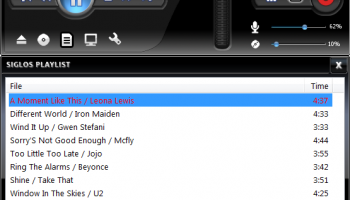
Managing your karaoke sessions is made easy with Siglos' efficient playlist management system. You can create and save multiple playlists, queue songs, and even set up a rotation for multiple singers. This feature is particularly useful for karaoke parties and events, ensuring that everyone gets a turn to sing without any hassle.
**Customization Options**
Siglos Karaoke Player/Recorder offers a range of customization options to tailor the software to your preferences. You can change the background images, customize the lyrics display, and even add your own logo or text to the screen. These options allow you to create a personalized karaoke experience that stands out.
**Support and Updates**
Doblon provides excellent customer support and regular updates to ensure that the software remains compatible with the latest operating systems and continues to offer new features. This commitment to ongoing development ensures that Siglos Karaoke Player/Recorder remains a top choice for karaoke enthusiasts.
**Conclusion**
In summary, Siglos Karaoke Player/Recorder by Doblon is a feature-rich and user-friendly software that caters to all your karaoke needs. Its extensive file compatibility, advanced playback features, robust recording capabilities, and efficient playlist management make it an excellent choice for both casual users and professional performers. Whether you're hosting a karaoke party or practicing your singing, Siglos provides a comprehensive and enjoyable karaoke experience.
Siglos Karaoke Player/Recorder, developed by Doblon, is a robust and versatile software designed to elevate your karaoke sessions to professional levels. Whether you're an amateur enthusiast or a seasoned performer, this software offers a comprehensive suite of features that cater to all your karaoke needs.
**User-Friendly Interface**
One of the standout features of Siglos Karaoke Player/Recorder is its intuitive and user-friendly interface. The software is designed to be accessible to users of all skill levels, ensuring that even those new to karaoke software can navigate it with ease. The clean layout and straightforward controls make it simple to get started, allowing you to focus on your performance rather than fumbling with complicated settings.
**Extensive File Compatibility**
Siglos supports a wide range of karaoke file formats, including MP3+G, ZIP, and BIN, ensuring that you can play virtually any karaoke track you have. This extensive compatibility means you won't have to worry about converting files or dealing with playback issues, providing a seamless karaoke experience.
**Advanced Playback Features**
The software offers a variety of advanced playback features that enhance your karaoke sessions. You can easily adjust the tempo and pitch of songs to suit your vocal range, and the dual monitor support allows you to display lyrics on an external screen while keeping the main interface on your computer. This is particularly useful for parties and professional settings where a larger display is needed.
**Recording Capabilities**
Siglos Karaoke Player/Recorder doesn't just stop at playback; it also offers robust recording capabilities. You can record your performances with high-quality audio, allowing you to review and share your singing with friends or on social media. The software also supports microphone input, so you can add vocal effects and make real-time adjustments to your recordings.
**Playlist Management**
Managing your karaoke sessions is made easy with Siglos' efficient playlist management system. You can create and save multiple playlists, queue songs, and even set up a rotation for multiple singers. This feature is particularly useful for karaoke parties and events, ensuring that everyone gets a turn to sing without any hassle.
**Customization Options**
Siglos Karaoke Player/Recorder offers a range of customization options to tailor the software to your preferences. You can change the background images, customize the lyrics display, and even add your own logo or text to the screen. These options allow you to create a personalized karaoke experience that stands out.
**Support and Updates**
Doblon provides excellent customer support and regular updates to ensure that the software remains compatible with the latest operating systems and continues to offer new features. This commitment to ongoing development ensures that Siglos Karaoke Player/Recorder remains a top choice for karaoke enthusiasts.
**Conclusion**
In summary, Siglos Karaoke Player/Recorder by Doblon is a feature-rich and user-friendly software that caters to all your karaoke needs. Its extensive file compatibility, advanced playback features, robust recording capabilities, and efficient playlist management make it an excellent choice for both casual users and professional performers. Whether you're hosting a karaoke party or practicing your singing, Siglos provides a comprehensive and enjoyable karaoke experience.
OS: Windows 11, Windows 10 32/64 bit, Windows 8 32/64 bit, Windows 7 32/64 bit
Add Your Review or 64-bit Compatibility Report
Top Other 64-bit downloads


LiveProfessor 2026.0.0
LiveProfessor: A powerful tool for live audio processing and effects.
Trialware | $99.00

VolumeShaper 3.6.2
Shape and transform your sound with ShaperBox 3's powerful effects.
Demo | $89.00

discoDSP Discovery Pro 8.15

A VST instrument that offers multiple features, such as oscillators
Demo | $199.00


MagicPods 2.0.93.0
MagicPods simplifies app testing with AI-driven automation and seamless integration.
Trialware | $1.00

HD Files Splitter 2.0
DVD Audio Files Splitter is a software designed for dividing an Audio files
Freeware
Members area
Top 64-bit Downloads
-
Media Player Classic -
HomeCinema - 64 bit 2.3.0
x64 open source download -
HandBrake 64-bit 1.8.0
x64 freeware download -
Renoise 64-bit 3.4.4
x64 demo download -
Mp4Gain 1.03
x64 shareware download -
Traktor PRO 3.10.1
x64 demo download -
PotPlayer 64bit 1.7.21397
x64 freeware download -
Fusion Field x64 4.1.0
x64 shareware download -
Voxengo Crunchessor x64 2.19
x64 demo download -
Ashampoo Cinemagraph 1.0.2
x64 shareware download -
ProgDVB (64 bit) 7.60.9
x64 freeware download
Top Downloads
-
FreeTube 0.23.13 Beta
open source download -
Nero 7 Ultra Edition 7.10.1
shareware download -
SAM Broadcaster PRO 2023.3
shareware download -
Little AlterBoy 5.4.1
trialware download -
NoteBurner Amazon Video
Downloader for Windows 2.3.9
shareware download -
Blu-Ray Reauthor
Professional 2.2
commercial download -
FilterBank3 3.4
demo download -
Free HD Video Converter
Factory 31.3
freeware download -
Tidabie Tidal Music
Converter 3.3.1
shareware download -
THX TruStudio Pro 3.5.0
freeware download -
LiveProfessor 2026.0.0
trialware download -
Audacity 3.7.5
open source download -
Reason 13.5
demo download -
ImTOO DVD Audio Ripper 6.6.0.0623
shareware download -
HandBrake 64-bit 1.8.0
freeware download