
SmartClose - X 64-bit Download
Popular x64 Tags
- freeware x64 download
- windows x64 download
- free x64 download
- web x64 download
- software x64 download
- folder x64 download
- utility x64 download
- monitor x64 download
- convert x64 download
- download x64 download
- tool x64 download
- video x64 download
- memory x64 download
- audio x64 download
- text x64 download
- password x64 download
- editor x64 download
- file x64 download
- security x64 download
- image x64 download
- database x64 download
- jpeg x64 download
- icon x64 download
- organizer x64 download
- viewer x64 download
- data x64 download
- print x64 download
- edit x64 download
- search x64 download
- pim x64 download
SmartClose 1.3
Sponsored links:

BM-productions

Many tasks that can be performed on PC's these days require you to close all currently running programs. For example, almost every installer asks you to close all other applications to minimize conflicts and to avoid replacing in-use files. Other high-end tasks, such as burning CDs and defragmenting or scanning hard drives can slow down or even fail when other processes 'kick in', like background programs, the screen saver or a scheduled task.
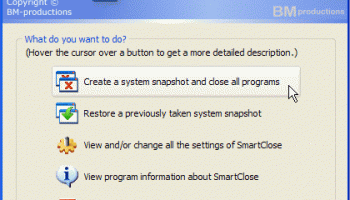
Of course, you could manually close each program one by one, disable the screen saver…, but that is where SmartClose comes in. SmartClose will automatically close all running programs, disable the screen saver and halt all other processes that can interrupt without asking.
But what when the task is finished and you want to restore everything that was disabled by SmartClose? Restart the computer? No, because before SmartClose closes or disables anything, it will save the current state of the system (running programs, screen saver…) to a 'system snapshot', that can be opened and restored again later.
Other features:
Two wizards: the Close Programs wizard, for closing all the programs, and the Restore wizard, to restore a system snapshot. Both provide an intuitive and clear interface, and assist you step by step.
Thanks to its SmartClose-technology, most programs can be properly closed, so that the program can still save its settings and return memory and resources to the system.
In the rare cases that a program can't be properly closed, SmartClose can use SmartKill to kill the program. Still, all the memory and resources used by the program will be freed.
If you don't want a program to be closed or killed by SmartClose, you can add it to a list of 'Protected Programs'.
Besides closing programs, SmartClose also closes Explorer and Internet Explorer windows and saves their current location, so they can be restored properly later.
Disables and restores the screen saver.
On modern Windows versions, SmartClose stops and restarts Windows services that can interrupt other processes, such as the Task Scheduler. On Windows 9x/Millennium, the Task Scheduler can also be disabled and re-enabled.
And finally, you get all of these features for free. SmartClose is 100% freeware without any nag screens, trial periods, ads, spyware etc.
Of course, you could manually close each program one by one, disable the screen saver…, but that is where SmartClose comes in. SmartClose will automatically close all running programs, disable the screen saver and halt all other processes that can interrupt without asking.
But what when the task is finished and you want to restore everything that was disabled by SmartClose? Restart the computer? No, because before SmartClose closes or disables anything, it will save the current state of the system (running programs, screen saver…) to a 'system snapshot', that can be opened and restored again later.
Other features:
Two wizards: the Close Programs wizard, for closing all the programs, and the Restore wizard, to restore a system snapshot. Both provide an intuitive and clear interface, and assist you step by step.
Thanks to its SmartClose-technology, most programs can be properly closed, so that the program can still save its settings and return memory and resources to the system.
In the rare cases that a program can't be properly closed, SmartClose can use SmartKill to kill the program. Still, all the memory and resources used by the program will be freed.
If you don't want a program to be closed or killed by SmartClose, you can add it to a list of 'Protected Programs'.
Besides closing programs, SmartClose also closes Explorer and Internet Explorer windows and saves their current location, so they can be restored properly later.
Disables and restores the screen saver.
On modern Windows versions, SmartClose stops and restarts Windows services that can interrupt other processes, such as the Task Scheduler. On Windows 9x/Millennium, the Task Scheduler can also be disabled and re-enabled.
And finally, you get all of these features for free. SmartClose is 100% freeware without any nag screens, trial periods, ads, spyware etc.
OS: Windows 2000, Windows 2003, Windows XP, Windows Vista, Windows Vista x64, Windows 7, Windows 7 x64, Windows 8, Windows 8 x64, Windows 10, Windows 10 x64
Add Your Review or 64-bit Compatibility Report
Top Other 64-bit downloads


Caffeine 1.98
Keep your computer awake effortlessly with Caffeine, the ultimate productivity tool.
Freeware


Chopping List 1.0.5.1
Split the content of text files into multiple new files using a custom delimiter
Freeware

Windows 7 x64
Windows 7 x64 is the next release of the Windows client operating system
Trialware | $199.99


Windows 10 x64 22H2
Windows 10 x64 demonstrates new levels of flexibility, navigation & familiarity
Trialware

Convert Document to Image 16.20
Convert DOC to Tiff, JPG, GIF, BMP etc. Fast & accurate. Batchable. Command line
Shareware | $549.95
Members area
Top 64-bit Downloads
-
HWiNFO64 6.28 B4200
x64 freeware download -
GRBackPro Server Backup
x64 11.2.0
x64 shareware download -
Windows 7 x64
x64 trialware download -
Windows 10 x64 22H2
x64 trialware download -
EasyTune6 B24.0119.1
x64 freeware download -
XtraTools Professional
x64 26.2.1
x64 shareware download -
O&O MediaRecovery
64-bit 14.0.17
x64 demo download -
DAR 2.7.14
x64 open source download -
BusDog x64 0.2
x64 freeware download -
PhotoRenamer 4.1
x64 freeware download
Top Downloads
-
FreeCommander XE
Portable 2026 Build 941
freeware download -
FURY CTRL 2.0.65.0
freeware download -
FMDiff 4.0.5
demo download -
Open Files from XLSX to
XLS 5.2
shareware download -
Vim 9.2.0260
open source download -
Shell Tools 2.0.1
freeware download -
HWiNFO64 6.28 B4200
freeware download -
AnyMP4 Data Recovery 1.5.12
shareware download -
PCtransfer 1.0.0.1033
freeware download -
Software to Data
Recovery 5.8.4.1
shareware download -
EaseUS Key Finder 4.1.6 Build 20240910
demo download -
Pitara 5.0.9581.41149
open source download -
Music Collection 3.9.7.2
freeware download -
WinFindr 1.9
shareware download -
File Compression 1.0
commercial download