
SmartSynchronize - X 64-bit Download
Popular x64 Tags
- files x64 download
- file manager x64 download
- zip x64 download
- tool x64 download
- software x64 download
- ntfs x64 download
- remove x64 download
- disk x64 download
- free x64 download
- duplicate x64 download
- copy x64 download
- folder x64 download
- utility x64 download
- data recovery software x64 download
- undelete x64 download
- erase x64 download
- directory x64 download
- backup x64 download
- file x64 download
- hard x64 download
- data recovery x64 download
- delete x64 download
- recovery x64 download
- find x64 download
- file recovery x64 download
- unerase x64 download
- recover x64 download
- mp3 x64 download
- space x64 download
- search x64 download
SmartSynchronize 4.6.1
Sponsored links:
license: Trialware
downloads: 238
size: 30.50 MB
updated: 2025-03-26
tags: SmartSynchronize, download SmartSynchronize, SmartSynchronize free download, Compare Files, Synchronize Folders, File Comparison, Synchronize, Compare, Synchronizer, Comparison
Add to Basket

syntevo GmbH

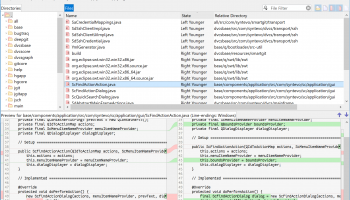
SmartSynchronize, developed by SyntEvo GmbH, is a sophisticated and intuitive multi-platform tool designed to streamline the process of file and directory comparison and synchronization. This powerful software is tailored to meet the needs of developers, system administrators, and anyone who requires a reliable solution for managing file differences and ensuring data consistency across multiple locations.
At its core, SmartSynchronize offers a robust three-way merge feature, which is indispensable for resolving conflicts in version-controlled projects. This functionality allows users to compare and merge changes from different branches, ensuring that the final output is accurate and free from discrepancies. The software's intuitive graphical interface makes it easy to visualize differences and merge changes with precision, even for complex projects.
One of the standout features of SmartSynchronize is its comprehensive directory comparison capability. Users can effortlessly compare entire directory structures, identifying differences in files and subdirectories with a high degree of accuracy. This feature is particularly useful for synchronizing large projects or maintaining consistency between backup locations.
SmartSynchronize also excels in its ability to handle various file types, including text files, images, and binary files. The software's flexible configuration options allow users to customize comparison settings to suit their specific needs, ensuring that the tool adapts to a wide range of use cases.
Performance is another area where SmartSynchronize shines. The software is optimized for speed and efficiency, capable of handling large files and directories without compromising on performance. This makes it an ideal choice for users who need to manage extensive data sets or work on resource-intensive projects.
In addition to its core features, SmartSynchronize offers a range of supplementary tools that enhance its functionality. These include a built-in text editor for making quick changes, support for various file encodings, and the ability to save and load sessions for future reference. The software also integrates seamlessly with popular version control systems, making it a versatile addition to any development workflow.
User experience is a key focus for SyntEvo GmbH, and this is evident in SmartSynchronize's clean and user-friendly interface. The software is designed to be intuitive and easy to navigate, with clear visual cues and helpful tooltips that guide users through the comparison and synchronization process. This ensures that even those new to the tool can quickly become proficient in its use.
SmartSynchronize is available for multiple operating systems, including Windows, macOS, and Linux, ensuring that it can be seamlessly integrated into diverse IT environments. The software is also regularly updated, with SyntEvo GmbH committed to providing ongoing support and enhancements based on user feedback.
In summary, SmartSynchronize by SyntEvo GmbH is a powerful, versatile, and user-friendly tool that excels in file and directory comparison and synchronization. Its robust feature set, high performance, and intuitive interface make it an invaluable asset for developers, system administrators, and anyone who needs to manage data consistency across multiple locations. Whether you're working on a complex development project or simply need to keep your files in sync, SmartSynchronize is a reliable and efficient solution that delivers on its promises.
At its core, SmartSynchronize offers a robust three-way merge feature, which is indispensable for resolving conflicts in version-controlled projects. This functionality allows users to compare and merge changes from different branches, ensuring that the final output is accurate and free from discrepancies. The software's intuitive graphical interface makes it easy to visualize differences and merge changes with precision, even for complex projects.
One of the standout features of SmartSynchronize is its comprehensive directory comparison capability. Users can effortlessly compare entire directory structures, identifying differences in files and subdirectories with a high degree of accuracy. This feature is particularly useful for synchronizing large projects or maintaining consistency between backup locations.
SmartSynchronize also excels in its ability to handle various file types, including text files, images, and binary files. The software's flexible configuration options allow users to customize comparison settings to suit their specific needs, ensuring that the tool adapts to a wide range of use cases.
Performance is another area where SmartSynchronize shines. The software is optimized for speed and efficiency, capable of handling large files and directories without compromising on performance. This makes it an ideal choice for users who need to manage extensive data sets or work on resource-intensive projects.
In addition to its core features, SmartSynchronize offers a range of supplementary tools that enhance its functionality. These include a built-in text editor for making quick changes, support for various file encodings, and the ability to save and load sessions for future reference. The software also integrates seamlessly with popular version control systems, making it a versatile addition to any development workflow.
User experience is a key focus for SyntEvo GmbH, and this is evident in SmartSynchronize's clean and user-friendly interface. The software is designed to be intuitive and easy to navigate, with clear visual cues and helpful tooltips that guide users through the comparison and synchronization process. This ensures that even those new to the tool can quickly become proficient in its use.
SmartSynchronize is available for multiple operating systems, including Windows, macOS, and Linux, ensuring that it can be seamlessly integrated into diverse IT environments. The software is also regularly updated, with SyntEvo GmbH committed to providing ongoing support and enhancements based on user feedback.
In summary, SmartSynchronize by SyntEvo GmbH is a powerful, versatile, and user-friendly tool that excels in file and directory comparison and synchronization. Its robust feature set, high performance, and intuitive interface make it an invaluable asset for developers, system administrators, and anyone who needs to manage data consistency across multiple locations. Whether you're working on a complex development project or simply need to keep your files in sync, SmartSynchronize is a reliable and efficient solution that delivers on its promises.
OS: Windows 11, Windows 10 64 bit
Add Your Review or 64-bit Compatibility Report
Top File & Disk Management 64-bit downloads


FreeCommander XE 2026 Build 941
FreeCommander XE is a versatile file manager with dual-pane support and tabs.
Shareware | $10.00

FreeCommander XE Portable 2026 Build 941
FreeCommander XE Portable: A versatile file manager with dual-pane interface.
Freeware


DiskSorter Pro 17.8.12
DiskSorter Pro is a powerful, fast and easy-to-use file classification utility.
Shareware | $25.00

Tablacus Explorer 26.2.2
Tablacus Explorer: A versatile, customizable file manager for Windows.
Open Source

CubexSoft Outlook Export 17.1
CubexSoft Outlook Export Tool to Convert Outlook to PDF, EML, MBOX, etc.
Shareware | $29.00

ExtraDisks 26.2.1
ExtraDisks creates Virtual disks the way you want.
Shareware | $24.99
tags: extradisks, virtual, disk, virtualdisk, encrypted, encrypteddisk, folderdisk, subst, folder, tools, utilities, tweaker, extradrive, xtradrive, software, tools, windows, utilities, utility, system, crypted, drive, file, ram

EF Commander Free 26.02.2
File manager, archiver, viewer, FTP client for the Windows desktop
Freeware

VX Search Pro 17.8.12
VX Search Pro is a fast and easy-to-use file search utility.
Shareware | $25.00
Members area
Top 64-bit Downloads
-
Windows 10 x64 22H2
x64 trialware download -
SoftPerfect RAM Disk 26.2
x64 shareware download -
Windows 7 x64
x64 trialware download -
XtraTools Professional
x64 26.2.1
x64 shareware download -
HWMonitor (64-bit) 1.53
x64 freeware download -
Windows 8 x64 RTM Build 9200
x64 trialware download -
7-Zip (x64 bit) 24.07
x64 open source download -
Lenovo Vantage 10.2001.10.0
x64 freeware download -
AkelPad (x64 bit) 4.9.8
x64 open source download -
Ashampoo WinOptimizer
FREE 26.00.12
x64 freeware download
Top Downloads
-
FreeCommander XE 2026 Build 941
shareware download -
Windows 10 x64 22H2
trialware download -
Windows 7 Service Pack 1 7601.17514.1011
freeware download -
FreeCommander XE
Portable 2026 Build 941
freeware download -
Dr. Hardware 2026 26.0.0
shareware download -
Thaiphoon Burner 17.4.1.2
freeware download -
Caffeine 1.98
freeware download -
RecoveryRobot Memory
Card Recovery 1.3.3
shareware download -
Revo Uninstaller 2.00
freeware download -
BIOS Agent Plus 2.2019.1.31
demo download -
Qemu Simple Boot 1.3
freeware download -
Unlocker 1.9.2
freeware download -
DirPrintOK 7.52
freeware download -
TweakNow WinSecret 7.9.8 Plus
trialware download -
SoftPerfect RAM Disk 26.2
shareware download