
Speccy - X 64-bit Download
Popular x64 Tags
- freeware x64 download
- windows x64 download
- free x64 download
- web x64 download
- software x64 download
- folder x64 download
- utility x64 download
- monitor x64 download
- convert x64 download
- download x64 download
- tool x64 download
- video x64 download
- memory x64 download
- audio x64 download
- text x64 download
- password x64 download
- editor x64 download
- file x64 download
- security x64 download
- image x64 download
- database x64 download
- jpeg x64 download
- icon x64 download
- organizer x64 download
- viewer x64 download
- data x64 download
- print x64 download
- edit x64 download
- search x64 download
- pim x64 download
Speccy 1.32.740
Sponsored links:

Piriform Ltd.

What's in your computer? If you're like most of us, you can probably name the processor (Intel or AMD, Celeron or Pentium), maybe how much RAM it has, and maybe how big the hard drive is.
When you go to a computer store and see all the bright shiny PCs laid out next to each other, most will have tags or stickers indicating the:
* Processor brand and model
* Hard drive size and speed
* Amount of memory (RAM)
* Graphics card
* Operating system
Two or three years later, when it comes time to upgrade your computer, that tag or sticker may be long gone. Speccy was designed as a free electronic "what's inside" sticker for your PC.
Isn't this information in Windows?
Yes and no. Some of the basic information can be found by right-clicking My Computer and then clicking Properties. The General tab lists some statistics, and the Device Manager on the Hardware tab lists all of the hardware you've got installed. But it misses out lots of information that you need.
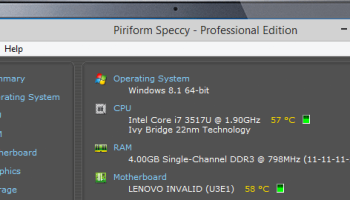
Speccy will give you detailed statistics on every piece of hardware in your computer. Including CPU, Motherboard, RAM, Graphics Cards, Hard Disks, Optical Drives, Audio support. Additionally Speccy adds the temperatures of your different components, so you can easily see if there's a problem!
Why do I need Speccy?
At first glance, Speccy may seem like an application for system administrators and power users. It certainly is, but Speccy can also help normal users, in everyday computing life.
If you need to add more memory to your system, for example, you can check how many memory slots your computer has and what memory's already installed. Then you can go out and buy the right type of memory to add on or replace what you've already got.
If you're going to be selling your PC, you can use Speccy to quickly list out the components. Or, if you're buying a PC, you can use Speccy to check that the computer has what the label says it has.
Also, Speccy comes in handy for support. If you're on the phone with technical support and they want to know what video card you have installed, there's no need to hunt around Windows. Speccy has all the information on one easy-to-understand screen.
When you go to a computer store and see all the bright shiny PCs laid out next to each other, most will have tags or stickers indicating the:
* Processor brand and model
* Hard drive size and speed
* Amount of memory (RAM)
* Graphics card
* Operating system
Two or three years later, when it comes time to upgrade your computer, that tag or sticker may be long gone. Speccy was designed as a free electronic "what's inside" sticker for your PC.
Isn't this information in Windows?
Yes and no. Some of the basic information can be found by right-clicking My Computer and then clicking Properties. The General tab lists some statistics, and the Device Manager on the Hardware tab lists all of the hardware you've got installed. But it misses out lots of information that you need.
Speccy will give you detailed statistics on every piece of hardware in your computer. Including CPU, Motherboard, RAM, Graphics Cards, Hard Disks, Optical Drives, Audio support. Additionally Speccy adds the temperatures of your different components, so you can easily see if there's a problem!
Why do I need Speccy?
At first glance, Speccy may seem like an application for system administrators and power users. It certainly is, but Speccy can also help normal users, in everyday computing life.
If you need to add more memory to your system, for example, you can check how many memory slots your computer has and what memory's already installed. Then you can go out and buy the right type of memory to add on or replace what you've already got.
If you're going to be selling your PC, you can use Speccy to quickly list out the components. Or, if you're buying a PC, you can use Speccy to check that the computer has what the label says it has.
Also, Speccy comes in handy for support. If you're on the phone with technical support and they want to know what video card you have installed, there's no need to hunt around Windows. Speccy has all the information on one easy-to-understand screen.
OS: Windows XP, Windows Vista, Windows Vista x64, Windows 7, Windows 7 x64, Windows 8, Windows 8 x64, Windows 10, Windows 10 x64
Add Your Review or 64-bit Compatibility Report
Top Other 64-bit downloads


Caffeine 1.98
Keep your computer awake effortlessly with Caffeine, the ultimate productivity tool.
Freeware

iSunshare iBypass Genius 3.1.2.1
bypass icloud activation lock and turn off FMI without password
Shareware | $19.95


Chopping List 1.0.5.1
Split the content of text files into multiple new files using a custom delimiter
Freeware

Windows 7 x64
Windows 7 x64 is the next release of the Windows client operating system
Trialware | $199.99


Windows 10 x64 22H2
Windows 10 x64 demonstrates new levels of flexibility, navigation & familiarity
Trialware
Members area
Top 64-bit Downloads
-
HWiNFO64 6.28 B4200
x64 freeware download -
GRBackPro Server Backup
x64 11.2.0
x64 shareware download -
Windows 7 x64
x64 trialware download -
Windows 10 x64 22H2
x64 trialware download -
EasyTune6 B24.0119.1
x64 freeware download -
XtraTools Professional
x64 26.2.1
x64 shareware download -
O&O MediaRecovery
64-bit 14.0.17
x64 demo download -
DAR 2.7.14
x64 open source download -
BusDog x64 0.2
x64 freeware download -
PhotoRenamer 4.1
x64 freeware download
Top Downloads
-
FreeCommander XE
Portable 2026 Build 941
freeware download -
FURY CTRL 2.0.65.0
freeware download -
FMDiff 4.0.5
demo download -
Open Files from XLSX to
XLS 5.2
shareware download -
Vim 9.2.0260
open source download -
Shell Tools 2.0.1
freeware download -
HWiNFO64 6.28 B4200
freeware download -
AnyMP4 Data Recovery 1.5.12
shareware download -
PCtransfer 1.0.0.1033
freeware download -
Software to Data
Recovery 5.8.4.1
shareware download -
EaseUS Key Finder 4.1.6 Build 20240910
demo download -
Pitara 5.0.9582.21949
open source download -
Music Collection 3.9.7.2
freeware download -
WinFindr 1.9
shareware download -
File Compression 1.0
commercial download