
sPlan - X 64-bit Download
Popular x64 Tags
- autocad x64 download
- solidworks x64 download
- intellicad x64 download
- dxf x64 download
- dwg x64 download
- architectural x64 download
- visualization x64 download
- cad x64 download
- home x64 download
- design x64 download
- hpgl x64 download
- progecad x64 download
- animation x64 download
- fence x64 download
- cam x64 download
- dwg to pdf x64 download
- architect x64 download
- viz x64 download
- vrml x64 download
- convert x64 download
- gear x64 download
- landscape x64 download
- deck x64 download
- strength check x64 download
- batch x64 download
- garden x64 download
- yard x64 download
- gardening x64 download
- landscaping x64 download
- backyard x64 download
sPlan 8.0
Sponsored links:
license: Demo
downloads: 771
size: 7.50 MB
updated: 2024-12-14
tags: schematic capture, circuit design, diagram, electronic, sPlan, electronic circuit, electric circuit, sPlan free download, designer, PCB layout, electronic software, circuit diagram, circuit, download sPlan, ABACOM
Add to Basket

ABACOM

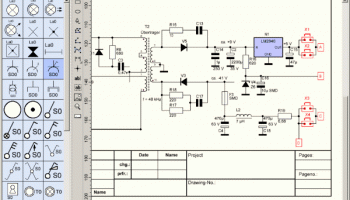
sPlan, developed by ABACOM, is a powerful yet user-friendly schematic drawing software tailored for electronics enthusiasts, hobbyists, and professionals alike. This intuitive tool is designed to simplify the process of creating electronic circuit diagrams, making it an indispensable asset for anyone involved in electronics design and documentation.
One of the standout features of sPlan is its ease of use. The software boasts a clean and intuitive interface, allowing users to quickly familiarize themselves with its functionalities. Whether you are a seasoned engineer or a beginner, sPlan’s straightforward design ensures a smooth learning curve. The drag-and-drop functionality, combined with a comprehensive library of electronic symbols, enables users to construct detailed and accurate schematics with minimal effort.
sPlan’s library is extensive, featuring a wide array of components that cater to various electronic design needs. Users can easily access and insert components such as resistors, capacitors, transistors, and more, directly into their schematics. Additionally, the software allows for the customization of components, providing the flexibility to modify existing symbols or create new ones to suit specific project requirements.
Another notable feature of sPlan is its precision and accuracy in schematic design. The software supports grid snapping and alignment tools, ensuring that components are placed accurately and neatly. This attention to detail not only enhances the visual appeal of the schematics but also minimizes errors in the design process.
sPlan also excels in its export and printing capabilities. Users can export their schematics in various formats, making it easy to share designs with colleagues or integrate them into larger projects. The software’s printing options are equally robust, allowing for high-quality printouts that are essential for presentations and documentation.
Moreover, sPlan is designed to be lightweight and efficient, ensuring that it runs smoothly on a wide range of computer systems without demanding excessive resources. This makes it an ideal choice for users who need reliable performance without the need for high-end hardware.
In terms of support and updates, ABACOM is committed to providing regular updates to sPlan, ensuring that the software remains compatible with the latest operating systems and continues to meet the evolving needs of its users. The company also offers comprehensive support, including detailed documentation and responsive customer service, to assist users in maximizing the software’s potential.
In conclusion, sPlan by ABACOM is a versatile and efficient tool for anyone involved in electronic design. Its combination of user-friendly features, extensive component library, and precision tools make it a top choice for creating professional-grade schematics. Whether you are working on simple projects or complex designs, sPlan provides the functionality and reliability needed to bring your electronic ideas to life.
One of the standout features of sPlan is its ease of use. The software boasts a clean and intuitive interface, allowing users to quickly familiarize themselves with its functionalities. Whether you are a seasoned engineer or a beginner, sPlan’s straightforward design ensures a smooth learning curve. The drag-and-drop functionality, combined with a comprehensive library of electronic symbols, enables users to construct detailed and accurate schematics with minimal effort.
sPlan’s library is extensive, featuring a wide array of components that cater to various electronic design needs. Users can easily access and insert components such as resistors, capacitors, transistors, and more, directly into their schematics. Additionally, the software allows for the customization of components, providing the flexibility to modify existing symbols or create new ones to suit specific project requirements.
Another notable feature of sPlan is its precision and accuracy in schematic design. The software supports grid snapping and alignment tools, ensuring that components are placed accurately and neatly. This attention to detail not only enhances the visual appeal of the schematics but also minimizes errors in the design process.
sPlan also excels in its export and printing capabilities. Users can export their schematics in various formats, making it easy to share designs with colleagues or integrate them into larger projects. The software’s printing options are equally robust, allowing for high-quality printouts that are essential for presentations and documentation.
Moreover, sPlan is designed to be lightweight and efficient, ensuring that it runs smoothly on a wide range of computer systems without demanding excessive resources. This makes it an ideal choice for users who need reliable performance without the need for high-end hardware.
In terms of support and updates, ABACOM is committed to providing regular updates to sPlan, ensuring that the software remains compatible with the latest operating systems and continues to meet the evolving needs of its users. The company also offers comprehensive support, including detailed documentation and responsive customer service, to assist users in maximizing the software’s potential.
In conclusion, sPlan by ABACOM is a versatile and efficient tool for anyone involved in electronic design. Its combination of user-friendly features, extensive component library, and precision tools make it a top choice for creating professional-grade schematics. Whether you are working on simple projects or complex designs, sPlan provides the functionality and reliability needed to bring your electronic ideas to life.
OS: Windows 11, Windows 10 32/64 bit, Windows 8 32/64 bit, Windows 7 32/64 bit
Add Your Review or 64-bit Compatibility Report
Top CAD 64-bit downloads


nanoCAD 5.1.2524.2017
nanoCAD - easy-to-use free CAD software delivering great user experience.
Freeware


MapInfo Professional 17.0.4
Location-based decisions: Explore, model and act with confidence
Trialware | $1 995.00

Tracfoil 4.12.07
Edit and print your ribs and airfoils templates from data
Trialware
tags: Cad, model, aircraft, plane, airfoil plotting, rib plotting, airfoil to DXF, airfoil, plot, rib

MITCalc Bevel Gear Calculation 1.20
Geometric design and strength check of bevel gear (straight, helical and curved)
Shareware | $31.00
tags: Gearing, bevel gear, gear, toothing, strength check, helical, tooth, design, strength check, tolerances, material, DIN 3971, DIN 3991, ISO 6336, DXF, CAD

MITCalc V-Belts Calculation 1.22
Geometric design and strength check of V-belt transmission
Shareware | $18.00

MITCalc Shafts Calculation 1.24
Geometrical design and complex strength check of shafts
Shareware | $24.00
Members area
Top 64-bit Downloads
-
ICO file format x64 2.1f1
x64 open source download -
Adobe SpeedGrade CC
x64 trialware download -
Archicad 64bit 27 B3001
x64 demo download -
Voxengo Span x64 3.20
x64 freeware download -
LightWave 3D 64-bit 2020.0.3
x64 trialware download -
RISAFloor 16.0.0
x64 demo download -
WellCAD x64 5.3 B625
x64 demo download -
Adobe InDesign 2024 B19.4
x64 trialware download -
XnConvert x64 1.92.0
x64 freeware download -
XnSketch x64 1.20
x64 freeware download
Top Downloads
-
LightWave 3D 64-bit 2020.0.3
trialware download -
CodeLoader 4.19.0
freeware download -
PDF to Flash Brochure
(Pro) Classical Theme:
Blessedness 1.1
freeware download -
Adobe InDesign 2024 B19.4
trialware download -
Archicad 64bit 27 B3001
demo download -
LTpowerCAD 2.7.2
freeware download -
nanoCAD 5.1.2524.2017
freeware download -
RISAFloor 16.0.0
demo download -
WellCAD x64 5.3 B625
demo download -
MapInfo Professional 17.0.4
trialware download -
Tracfoil 4.12.07
trialware download -
XnConvert x64 1.92.0
freeware download -
Mr.Contrast 1.72
shareware download -
Classic Menu for
Publisher 2010 5.00
shareware download -
Scanahand 8.0.0.320
demo download