
SQLiteSpy - X 64-bit Download
Popular x64 Tags
- server x64 download
- web server x64 download
- software x64 download
- log analysis x64 download
- raid x64 download
- analysis x64 download
- manage x64 download
- database driven x64 download
- file server x64 download
- cd rom x64 download
- mail server x64 download
- ftp server x64 download
- log x64 download
- client server x64 download
- virtualization x64 download
- network disk x64 download
- idisk x64 download
- smtp server x64 download
- iscsi target x64 download
- windows 2008 ts gateway x64 download
- live reports x64 download
- history x64 download
- disk mapping x64 download
- iscsi x64 download
- active directory management x64 download
- dscsi x64 download
- virtualized disk x64 download
- pop3 server x64 download
- ipds printing x64 download
- ipds x64 download
SQLiteSpy 1.9.25
Sponsored links:

Ralf Junker

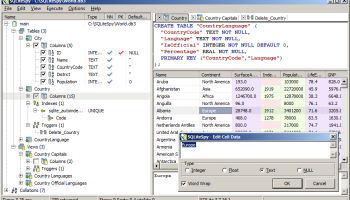
SQLiteSpy is a fast and compact GUI database manager for SQLite. It reads SQLite3 files and executes SQL against them. Its graphical user interface makes it very easy to explore, analyze, and manipulate SQLite3 databases
Database at a Glance – The schema treeview displays all items contained in a database, including tables, columns, indexes and triggers. Press F5 to update the schema tree, double-click a table or view to display its data, use the context menu for frequently used commands.
Grid Cell Editing – Table cells are editable in the grid: Display a table via the schema treeview, select a cell and press F2 to invoke the editor. Then modify and confirm to write your changes back to the table.
Data Type Display – The native SQL data types are displayed with different background colors to help detect type errors. Type errors can cause performance degradation or wrong SELECT result sets if NULL values are confused with empty strings.
Full Unicode – SQLiteSpy fully supports SQLite's Unicode capabilities. Data display and entry is completely realized as Unicode, including SQL commands.
Multiple SQL Edits – Modern tabs are used to edit and display multiple SQL queries for easy comparison of query statements and results. SQL queries are executed by typing or loading them into the SQL edit. Then press F9 to run the query, or CTRL+F9 to run the current line or selection only.
Time Measurement – SQL execution time is automatically measured and displayed to help optimize queries.
Regular Expressions – The SQL keyword REGEXP is supported and adds the complete regular expression syntax of Perl 5.10 to SQLiteSpy. The implementation was realized using the DIRegEx library.
Mathematical SQL Functions – The following mathematical SQL functions are available in addition to the SQLite default: ACOS(), ASIN(), ATAN(), ATAN(), ATAN2(), CEIL(), CEILING(), COS(), COT(), DEGREES(), EXP(), FLOOR(), LN(), LOG(), LOG(), LOG2(), LOG10(), MOD(), PI(), POW(), RADIANS(), SIGN(), SIN(), SQRT(), TAN(), TRUNCATE().
Data Compression – The SQL functions COMPRESS() applies zlib's deflate to any text or BLOB value. The raw deflate data stream is returned. UNCOMPRESS() inflates this stream back to the original. Integers, Doubles, and Nulls are returned unchanged.
Compact Result Storage – The internal data storage mechanism uses SQLite's native data types for optimal compatibility. As a result, SQLiteSpy uses far less memory than other SQLite managers and handles large tables much more efficiently.
Built-in SQLite Engine – SQLiteSpy comes as a single file executable with the SQLite database engine already build into the application. There is no need to distribute any DLLs, which makes SQLiteSpy easy to deploy with customers.
Encryption Support – SQLiteSpy can read and modify encrypted database files generated by DISQLite3. DISQLite3 implements its own native AES encryption which is not compatible with the commercial SQLite Encryption Extension (SSE) or any such implementation offered by other 3rd parties.
Easy Install & Uninstall – To run SQLiteSpy, just extract the SQLiteSpy.exe file to any directory and execute the file. No installation is needed – when first started, the program creates a single file SQLiteSpy.db3 (a SQLite3 database) to store options and settings. It does not write any other files or to the registry. Uninstalling is as simple as deleting two files only: The application's executable and its options database file.
Freeware – SQLiteSpy is Freeware for personal and educational use. If you are using SQLiteSpy commercially, your donation is welcome to promote the ongoing development of this software. Thank you!
Database at a Glance – The schema treeview displays all items contained in a database, including tables, columns, indexes and triggers. Press F5 to update the schema tree, double-click a table or view to display its data, use the context menu for frequently used commands.
Grid Cell Editing – Table cells are editable in the grid: Display a table via the schema treeview, select a cell and press F2 to invoke the editor. Then modify and confirm to write your changes back to the table.
Data Type Display – The native SQL data types are displayed with different background colors to help detect type errors. Type errors can cause performance degradation or wrong SELECT result sets if NULL values are confused with empty strings.
Full Unicode – SQLiteSpy fully supports SQLite's Unicode capabilities. Data display and entry is completely realized as Unicode, including SQL commands.
Multiple SQL Edits – Modern tabs are used to edit and display multiple SQL queries for easy comparison of query statements and results. SQL queries are executed by typing or loading them into the SQL edit. Then press F9 to run the query, or CTRL+F9 to run the current line or selection only.
Time Measurement – SQL execution time is automatically measured and displayed to help optimize queries.
Regular Expressions – The SQL keyword REGEXP is supported and adds the complete regular expression syntax of Perl 5.10 to SQLiteSpy. The implementation was realized using the DIRegEx library.
Mathematical SQL Functions – The following mathematical SQL functions are available in addition to the SQLite default: ACOS(), ASIN(), ATAN(), ATAN(), ATAN2(), CEIL(), CEILING(), COS(), COT(), DEGREES(), EXP(), FLOOR(), LN(), LOG(), LOG(), LOG2(), LOG10(), MOD(), PI(), POW(), RADIANS(), SIGN(), SIN(), SQRT(), TAN(), TRUNCATE().
Data Compression – The SQL functions COMPRESS() applies zlib's deflate to any text or BLOB value. The raw deflate data stream is returned. UNCOMPRESS() inflates this stream back to the original. Integers, Doubles, and Nulls are returned unchanged.
Compact Result Storage – The internal data storage mechanism uses SQLite's native data types for optimal compatibility. As a result, SQLiteSpy uses far less memory than other SQLite managers and handles large tables much more efficiently.
Built-in SQLite Engine – SQLiteSpy comes as a single file executable with the SQLite database engine already build into the application. There is no need to distribute any DLLs, which makes SQLiteSpy easy to deploy with customers.
Encryption Support – SQLiteSpy can read and modify encrypted database files generated by DISQLite3. DISQLite3 implements its own native AES encryption which is not compatible with the commercial SQLite Encryption Extension (SSE) or any such implementation offered by other 3rd parties.
Easy Install & Uninstall – To run SQLiteSpy, just extract the SQLiteSpy.exe file to any directory and execute the file. No installation is needed – when first started, the program creates a single file SQLiteSpy.db3 (a SQLite3 database) to store options and settings. It does not write any other files or to the registry. Uninstalling is as simple as deleting two files only: The application's executable and its options database file.
Freeware – SQLiteSpy is Freeware for personal and educational use. If you are using SQLiteSpy commercially, your donation is welcome to promote the ongoing development of this software. Thank you!
OS: Windows 2000, Windows 2003, Windows XP, Windows Vista, Windows Vista x64, Windows 7, Windows 7 x64, Windows 8, Windows 8 x64, Windows 10, Windows 10 x64, Windows 11
Add Your Review or 64-bit Compatibility Report
Top Other Server Applications 64-bit downloads


ServersCheck Monitoring Software 16.4.10
A tool running on Windows based systems for monitoring, reporting
Trialware | $199.00

Sawmill Enterprise 8.8.1
An application that shows you all the details of your server's traffic patterns
Trialware | $699.00

Marshal Repository 1.0.3741.29745
A windows application for administration of your Marshal Repository
Shareware


InterBase XE3 ToGo 11.0.0.356
A full-featured embeddable database that can run in a stand-alone environment
Trialware | $60.00

Netoscope 2.75 Build 24221
Netoscope: Advanced network monitoring for seamless performance insights.
Trialware


SharePoint Text Size Zoom 1.4.508.0
Helps make lengthy SharePoint lists more accessible and easier
Trialware | $449.00

Members area
Top 64-bit Downloads
-
TFTP Turbo 64-bit 4.4
x64 trialware download -
VueMinder Server x64 1.0.5
x64 freeware download -
Jana Server 64-bit 2.6.0.225
x64 trialware download -
Microsoft® SQL Server®
2012 x64 SP1
x64 freeware download -
SQLyog Community Edition
x64 13.2.1
x64 open source download -
TOra x64 3.2.186
x64 open source download -
Tableau Server 2023.3.6
x64 trialware download -
Lavasoft Personal
Firewall (64-bit) 3.0.2293
x64 trialware download -
iStorage Server x64 3.0
x64 shareware download -
Titan FTP Server x64 19.00 B3676
x64 trialware download
Top Downloads
-
ServersCheck Monitoring
Software 16.4.10
trialware download -
QT SQL Monitor 1.3.7
open source download -
Sawmill Enterprise 8.8.1
trialware download -
Netoscope 2.75 Build 24221
trialware download -
Marshal Repository 1.0.3741.29745
shareware download -
InterBase XE3 ToGo 11.0.0.356
trialware download -
Webmin 1.690
open source download -
HFS - HTTP File Server 3.0.7
open source download -
smtp4dev 3.15.0
open source download -
URL Plus Field 1.1.3
trialware download -
SharePoint Text Size
Zoom 1.4.508.0
trialware download -
ArchiveUsers 3.2.0
demo download -
IP2Location HTTP Module Oct.2016
shareware download -
VPSrobots 1.0.1
freeware download -
freeFTPd 1.0.13
freeware download