
StartIsBack - X 64-bit Download
Popular x64 Tags
- freeware x64 download
- windows x64 download
- free x64 download
- web x64 download
- software x64 download
- folder x64 download
- utility x64 download
- monitor x64 download
- convert x64 download
- download x64 download
- tool x64 download
- video x64 download
- memory x64 download
- audio x64 download
- text x64 download
- password x64 download
- editor x64 download
- file x64 download
- security x64 download
- image x64 download
- database x64 download
- jpeg x64 download
- icon x64 download
- organizer x64 download
- viewer x64 download
- data x64 download
- print x64 download
- edit x64 download
- search x64 download
- pim x64 download
StartIsBack 2.9.1
Sponsored links:

StartIsBack

StartIsBack returns Windows 8 a real fully featured start menu and start button, behaving exactly like the ones in Windows 7.
StartIsBack radically improves desktop usability and makes new Start screen clutter-free.
StartIsBack is fully native lightweight zero-privileges program, cheap and fair, fast, stable and secure.
Boot to desktop
Your session would start with the desktop. Always!
Unlike other solutions, StartIsBack goes directly to desktop every time without flashing Start Screen even for a millisecond.
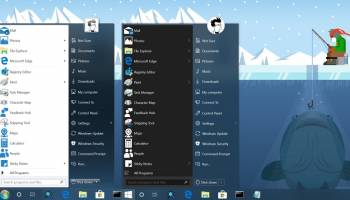
Restore original fully-featured Windows 7 start menu - with new styles
StartIsBack restores original Windows 7 start menu with all its features: search, jump lists, drag&drop, pinned and recently used apps, fully customizable settings.
Start button and Start menu look and behave exactly as they used to in Windows 7.
StartIsBack includes fine-tuned visual styles and start button images that will fit your style and Windows 8 style.
Achieve the balance between Desktop and Modern UI
Lot of troubles bug long time users in Windows 8: overly active screen corners; Start screen jumping in your face; hotkeys not behaving the way they're expected to. StartIsBack allows you to fix many of those issues without breaking any usage scenarios, increasing your productivity with both Desktop and Modern interfaces.
Separate Desktop and Modern UI and make Start Screen clutter-free
StartIsBack is the only tool which is able to provide consistency in Windows 8 by separating desktop and modern programs.
Real work is done on desktop while new Start screen turns into launcher for modern apps only.
Windows 8 forces you to organize new Start screen which can quickly become a long list of mess with automatically pinned programs.
This is no longer the case with StartIsBack! If you turn Start screen into Apps screen, you won't have the pain to manage two Start places.
Totally native; fully localized
StartIsBack does not run any additional services or programs. It integrates into your computer smoothly.
It does not require any other tools or frameworks to install and can be installed without administrative privileges.
Start menu is fully localized into your language with same metrics and names Windows 7 had.
Rich customization and configuration
StartIsBack allows you to configure all aspects of appearance and behavior of Start menu.
This is done in most reliable way, within attractive and easy configuration UI.
You can even configure Start menu to work like Windows XP one!
StartIsBack radically improves desktop usability and makes new Start screen clutter-free.
StartIsBack is fully native lightweight zero-privileges program, cheap and fair, fast, stable and secure.
Boot to desktop
Your session would start with the desktop. Always!
Unlike other solutions, StartIsBack goes directly to desktop every time without flashing Start Screen even for a millisecond.
Restore original fully-featured Windows 7 start menu - with new styles
StartIsBack restores original Windows 7 start menu with all its features: search, jump lists, drag&drop, pinned and recently used apps, fully customizable settings.
Start button and Start menu look and behave exactly as they used to in Windows 7.
StartIsBack includes fine-tuned visual styles and start button images that will fit your style and Windows 8 style.
Achieve the balance between Desktop and Modern UI
Lot of troubles bug long time users in Windows 8: overly active screen corners; Start screen jumping in your face; hotkeys not behaving the way they're expected to. StartIsBack allows you to fix many of those issues without breaking any usage scenarios, increasing your productivity with both Desktop and Modern interfaces.
Separate Desktop and Modern UI and make Start Screen clutter-free
StartIsBack is the only tool which is able to provide consistency in Windows 8 by separating desktop and modern programs.
Real work is done on desktop while new Start screen turns into launcher for modern apps only.
Windows 8 forces you to organize new Start screen which can quickly become a long list of mess with automatically pinned programs.
This is no longer the case with StartIsBack! If you turn Start screen into Apps screen, you won't have the pain to manage two Start places.
Totally native; fully localized
StartIsBack does not run any additional services or programs. It integrates into your computer smoothly.
It does not require any other tools or frameworks to install and can be installed without administrative privileges.
Start menu is fully localized into your language with same metrics and names Windows 7 had.
Rich customization and configuration
StartIsBack allows you to configure all aspects of appearance and behavior of Start menu.
This is done in most reliable way, within attractive and easy configuration UI.
You can even configure Start menu to work like Windows XP one!
OS: Windows 8, Windows 8 x64, Windows 10, Windows 10 x64
Add Your Review or 64-bit Compatibility Report
Top Other 64-bit downloads


iSunshare iBypass Genius 3.1.2.1
bypass icloud activation lock and turn off FMI without password
Shareware | $19.95

Caffeine 1.98
Keep your computer awake effortlessly with Caffeine, the ultimate productivity tool.
Freeware

Windows 7 x64
Windows 7 x64 is the next release of the Windows client operating system
Trialware | $199.99


Chopping List 1.0.5.1
Split the content of text files into multiple new files using a custom delimiter
Freeware


Windows 10 x64 22H2
Windows 10 x64 demonstrates new levels of flexibility, navigation & familiarity
Trialware
Members area
Top 64-bit Downloads
-
HWiNFO64 6.28 B4200
x64 freeware download -
Windows 7 x64
x64 trialware download -
GRBackPro Server Backup
x64 11.2.0
x64 shareware download -
Windows 10 x64 22H2
x64 trialware download -
EasyTune6 B24.0119.1
x64 freeware download -
XtraTools Professional
x64 26.2.1
x64 shareware download -
O&O MediaRecovery
64-bit 14.0.17
x64 demo download -
DAR 2.7.14
x64 open source download -
BusDog x64 0.2
x64 freeware download -
PhotoRenamer 4.1
x64 freeware download
Top Downloads
-
FreeCommander XE
Portable 2026 Build 941
freeware download -
FURY CTRL 2.0.65.0
freeware download -
FMDiff 4.0.5
demo download -
Open Files from XLSX to
XLS 5.2
shareware download -
Vim 9.2.0261
open source download -
Shell Tools 2.0.1
freeware download -
HWiNFO64 6.28 B4200
freeware download -
Pitara 5.0.9582.21949
open source download -
iSunshare iBypass Genius 3.1.2.1
shareware download -
AnyMP4 Data Recovery 1.5.12
shareware download -
PCtransfer 1.0.0.1033
freeware download -
Software to Data
Recovery 5.8.4.1
shareware download -
EaseUS Key Finder 4.1.6 Build 20240910
demo download -
Music Collection 3.9.7.2
freeware download -
WinFindr 1.9
shareware download