
Swift To-Do List Profesional - X 64-bit Download
Popular x64 Tags
- office x64 download
- microsoft x64 download
- importing x64 download
- exporting x64 download
- acrobat x64 download
- xls x64 download
- printer x64 download
- pdf x64 download
- pdf converter x64 download
- software x64 download
- word x64 download
- outlook x64 download
- excel x64 download
- powerpoint x64 download
- tool x64 download
- ppt x64 download
- adobe x64 download
- convert x64 download
- spreadsheet x64 download
- text x64 download
- create x64 download
- doc x64 download
- printing x64 download
- files x64 download
- add in x64 download
- open x64 download
- document x64 download
- data x64 download
- export x64 download
- saving x64 download
Swift To-Do List Profesional 10.3
Sponsored links:

Dextronet

Swift To-Do List is very feature-rich. It is also very flexible and customizable - whatever you need, Swift To-Do List can probably do it. We've also put a lot of effort into making the program really simple, clean, and easy to use.
It is simple yet powerful, and also easy to use. Swift To-Do List has literally hundreds of features but it is not complex! How is that possible? Great design is what makes it the task/notes management software that you would actually want to use.
It is suitable both for personal and business use, and it is being used by thousands of users around the whole world in all imaginable professions. There are also some "hidden" features, like great and fast technical support for free, frequent updates, or unconditional 90-day money back guarantee.
FEATURES:
Manage both tasks and notes.
Each task has its own notes, and you can also create separate full note pages right in the to-do list tree ("memos").
Import
(CSV/TSV/TXT). Import tasks from Outlook, Lotus Notes, Excel, Task Merlin, VIP Organizer, and many other programs. You can also import tasks from some web-apps like Toodledo.
To-Do List Tree with icons to organize your to-do lists and memos (notes).
Choose from more than 140 icons in 4 sizes.
Easily reorder to-do lists using mouse (drag & drop).
Clean and simple design.
Intuitive and very easy to use, yet powerful and efficient.
No learning curve. Start using Swift To-Do List immediately.
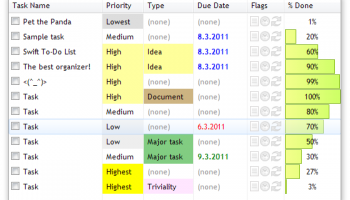
All the columns you need: Name, Priority, Type, Due Date.
The Professional edition also supports: Start Date, Completion Date, Context, Assigned To, Time Estimate, Time Spent, Percent Done, Status. Swift To-Do List also automatically records Creation Date, Last Changed Date and Task ID for each of your tasks. There are 20+ different columns to choose from.
Reminders can be easily set for any of your tasks with just a few clicks.
Swift To-Do List has great reminder support. The snoozing of reminders is really easy and flexible. You can even receive email reminders and task recurrence notifications sent to you directly from the program.
Recurring tasks support.
Very flexible setup, many patterns to choose from: Hourly, daily, weekly, monthly, monthly on day of week, yearly, yearly on day of week, X days after completion. It is possible to setup recurrences like: The last Friday of every month, or the first Monday in January, or every Tuesday and Thursday, or 5 days after the task is completed or any other pattern. Unique feature: You can even preview the next 10 times the task is going to recur.
Rich notes formatting and editing, including styles (bold, italic, underline, strike through), paragraphs, colors, bullets, fonts and images. Export, import and print notes. Insert date/time or separators with hotkey. And much more.
It is simple yet powerful, and also easy to use. Swift To-Do List has literally hundreds of features but it is not complex! How is that possible? Great design is what makes it the task/notes management software that you would actually want to use.
It is suitable both for personal and business use, and it is being used by thousands of users around the whole world in all imaginable professions. There are also some "hidden" features, like great and fast technical support for free, frequent updates, or unconditional 90-day money back guarantee.
FEATURES:
Manage both tasks and notes.
Each task has its own notes, and you can also create separate full note pages right in the to-do list tree ("memos").
Import
(CSV/TSV/TXT). Import tasks from Outlook, Lotus Notes, Excel, Task Merlin, VIP Organizer, and many other programs. You can also import tasks from some web-apps like Toodledo.
To-Do List Tree with icons to organize your to-do lists and memos (notes).
Choose from more than 140 icons in 4 sizes.
Easily reorder to-do lists using mouse (drag & drop).
Clean and simple design.
Intuitive and very easy to use, yet powerful and efficient.
No learning curve. Start using Swift To-Do List immediately.
All the columns you need: Name, Priority, Type, Due Date.
The Professional edition also supports: Start Date, Completion Date, Context, Assigned To, Time Estimate, Time Spent, Percent Done, Status. Swift To-Do List also automatically records Creation Date, Last Changed Date and Task ID for each of your tasks. There are 20+ different columns to choose from.
Reminders can be easily set for any of your tasks with just a few clicks.
Swift To-Do List has great reminder support. The snoozing of reminders is really easy and flexible. You can even receive email reminders and task recurrence notifications sent to you directly from the program.
Recurring tasks support.
Very flexible setup, many patterns to choose from: Hourly, daily, weekly, monthly, monthly on day of week, yearly, yearly on day of week, X days after completion. It is possible to setup recurrences like: The last Friday of every month, or the first Monday in January, or every Tuesday and Thursday, or 5 days after the task is completed or any other pattern. Unique feature: You can even preview the next 10 times the task is going to recur.
Rich notes formatting and editing, including styles (bold, italic, underline, strike through), paragraphs, colors, bullets, fonts and images. Export, import and print notes. Insert date/time or separators with hotkey. And much more.
Homepage: Swift To-Do List Profesional
OS: Windows XP, Windows Vista, Windows Vista x64, Windows 7, Windows 7 x64
Add Your Review or 64-bit Compatibility Report
Top Office Suites & Tools 64-bit downloads


Quite Imposing Plus 6.0c
Effortlessly create and manage complex impositions for PDF documents.
Demo | $949.00


Imposition Wizard 3.6.8
Streamline your print layout with Imposition Wizard's intuitive tools.
Demo | $264.00

CZ Excel Converter 1.9.4.6366
CZ V: A powerful synth emulation with rich sounds and intuitive controls.
Demo | $149.00


WinCalendar 4.43
Integrated Desktop Calendar, Calendar Creator & Pop-up Calendar for Windows
Demo | $32.00

callas pdfaPilot 14.2.400
Powerful tool for creating, validating, and optimizing PDF/A documents.
Trialware

mini PDF to TXT OCR Converter 3.2
PDF to TXT OCR Converter is a best OCR Converter
Shareware | $59.95

Florencesoft DiffEngineX 3.18.0.0
Reports on the differences between two Microsoft Excel workbooks
Trialware | $85.00
Members area
Top 64-bit Downloads
-
mbFXWords 2.80
x64 freeware download -
FontAgent Pro 10.0.15.0
x64 trialware download -
Microsoft Office 2016
x64 2405 B17628.20164
x64 trialware download -
Print to PDF Toolkit Pro 3.0
x64 shareware download -
Microsoft Office 2010
Service Pack x64 SP2
x64 freeware download -
Logizian Analyst
Portable x64 11.0 B20141203
x64 trialware download -
Zed Axis 64bit 10.0
x64 trialware download -
Microsoft Deployment
Toolkit x64 6.3.8456.1000
x64 freeware download -
iNFekt 1.3.0
x64 open source download -
Microsoft OneNote 2013
x64 15.0.4641.1001
x64 freeware download
Top Downloads
-
Active Barcode and QR
code Generator 1.24.8.15
freeware download -
Quite Imposing Plus 6.0c
demo download -
Flipping Book Writer 2.6
shareware download -
DeskWork Standard 4.0.2827
trialware download -
Forex Strategy Trader 3.6.0.0
freeware download -
mbFXWords 2.80
freeware download -
SmarThru 4.04
freeware download -
Imposition Wizard 3.6.8
demo download -
Miro for Windows 0.11.110
shareware download -
FileMaker Pro 22.0.5.500
trialware download -
CZ Excel Converter 1.9.4.6366
demo download -
FontAgent Pro 10.0.15.0
trialware download -
WinCalendar 4.43
demo download -
Total CSV Converter 1.8
shareware download -
Age Calculator .Net 1.0
freeware download