
SysInfoTools Google Workspace Backup Tool - X 64-bit Download
Popular x64 Tags
- windows x64 download
- backup x64 download
- files x64 download
- data x64 download
- file recovery x64 download
- file backup x64 download
- file x64 download
- zip x64 download
- transfer x64 download
- restore x64 download
- outlook x64 download
- mail x64 download
- ftp x64 download
- office x64 download
- address x64 download
- data recovery x64 download
- backup software x64 download
- disk x64 download
- data backup x64 download
- contacts x64 download
- synchronize x64 download
- bookmarks x64 download
- storage x64 download
- save x64 download
- offsite backup x64 download
- express x64 download
- book x64 download
- outlook backup x64 download
- online backup x64 download
- remote backup x64 download
You are here: X-64-bit Download
\ System Utilities
\ Backup & Restore \ SysInfoTools Google Workspace Backup Tool
SysInfoTools Google Workspace Backup Tool 26.01
Sponsored links:
license: Demo ($59.00)
downloads: 35
size: 233.00 MB
updated: 2026-02-02
tags: SysInfoTools Google Workspace Backup Tool, download SysInfoTools Google Workspace Backup Tool, SysInfoTools Google Workspace Backup Tool free download, G Suite Backup, Backup Google, Google Mail, GSuite, Backup, Workspace, Restore
Add to Basket

SysInfoTools

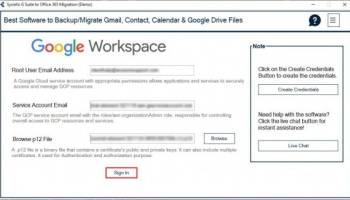
SysInfoTools Google Workspace Backup Tool is a robust and versatile software solution designed to safeguard your valuable Google Workspace data. Developed by SysInfoTools, this tool offers a comprehensive suite of features aimed at ensuring the security and accessibility of your emails, contacts, calendars, and drive data.
One of the standout features of the SysInfoTools Google Workspace Backup Tool is its user-friendly interface, which makes it accessible to both technical and non-technical users. The intuitive design ensures that users can easily navigate through the backup process without requiring extensive technical knowledge.
The software supports a wide range of backup formats, including PST, EML, MSG, MBOX, and PDF, allowing users to choose the format that best suits their needs. This flexibility ensures that your data can be accessed and restored across various platforms and email clients.
SysInfoTools Google Workspace Backup Tool also offers selective backup options, enabling users to choose specific items or folders for backup. This feature is particularly useful for users who need to prioritize certain data or manage storage space efficiently. Additionally, the tool supports incremental backup, which saves time and storage space by only backing up new or modified data since the last backup.
Security is a top priority for SysInfoTools, and the Google Workspace Backup Tool reflects this with its advanced encryption features. Users can encrypt their backup files with a password, ensuring that sensitive information remains protected from unauthorized access.
Another noteworthy feature is the software's ability to maintain the integrity and structure of the original data. During the backup process, the tool preserves the metadata, folder hierarchy, and attachments, ensuring that the restored data mirrors the original content accurately.
The SysInfoTools Google Workspace Backup Tool is also designed to handle large volumes of data efficiently. Its high-performance algorithms ensure that the backup process is swift and reliable, even for extensive Google Workspace accounts. Moreover, the tool supports concurrent backups, allowing multiple accounts to be backed up simultaneously, which is a significant advantage for businesses and organizations.
For added convenience, the software includes a scheduling feature, enabling users to automate the backup process. This ensures that backups are performed regularly without manual intervention, providing continuous data protection.
In summary, SysInfoTools Google Workspace Backup Tool is a powerful and reliable solution for anyone looking to secure their Google Workspace data. Its combination of user-friendly design, flexible backup options, advanced security features, and efficient performance makes it an excellent choice for both individual users and organizations. Whether you need to back up emails, contacts, calendars, or drive data, this tool provides a comprehensive and dependable solution to meet your needs.
One of the standout features of the SysInfoTools Google Workspace Backup Tool is its user-friendly interface, which makes it accessible to both technical and non-technical users. The intuitive design ensures that users can easily navigate through the backup process without requiring extensive technical knowledge.
The software supports a wide range of backup formats, including PST, EML, MSG, MBOX, and PDF, allowing users to choose the format that best suits their needs. This flexibility ensures that your data can be accessed and restored across various platforms and email clients.
SysInfoTools Google Workspace Backup Tool also offers selective backup options, enabling users to choose specific items or folders for backup. This feature is particularly useful for users who need to prioritize certain data or manage storage space efficiently. Additionally, the tool supports incremental backup, which saves time and storage space by only backing up new or modified data since the last backup.
Security is a top priority for SysInfoTools, and the Google Workspace Backup Tool reflects this with its advanced encryption features. Users can encrypt their backup files with a password, ensuring that sensitive information remains protected from unauthorized access.
Another noteworthy feature is the software's ability to maintain the integrity and structure of the original data. During the backup process, the tool preserves the metadata, folder hierarchy, and attachments, ensuring that the restored data mirrors the original content accurately.
The SysInfoTools Google Workspace Backup Tool is also designed to handle large volumes of data efficiently. Its high-performance algorithms ensure that the backup process is swift and reliable, even for extensive Google Workspace accounts. Moreover, the tool supports concurrent backups, allowing multiple accounts to be backed up simultaneously, which is a significant advantage for businesses and organizations.
For added convenience, the software includes a scheduling feature, enabling users to automate the backup process. This ensures that backups are performed regularly without manual intervention, providing continuous data protection.
In summary, SysInfoTools Google Workspace Backup Tool is a powerful and reliable solution for anyone looking to secure their Google Workspace data. Its combination of user-friendly design, flexible backup options, advanced security features, and efficient performance makes it an excellent choice for both individual users and organizations. Whether you need to back up emails, contacts, calendars, or drive data, this tool provides a comprehensive and dependable solution to meet your needs.
OS: Windows 11, Windows 10 32/64 bit, Windows Server 2012, Windows 2008, Windows 8 32/64 bit, Windows 7 32/64 bit
Add Your Review or 64-bit Compatibility Report
Top Backup & Restore 64-bit downloads


RecoveryRobot Memory Card Recovery 1.3.3
Memory card SD card recovery software to recover photo, video, audio, and more
Shareware | $49.95

PanFone WhatsApp Transfer 2.5.0
PanFone WhatsApp Transfer can backup and restore WhatsApp messages with ease.
Shareware | $29.95

Syncios WhatsApp Transfer 2.5.0
Transfer WhatsApp from phone to phone, backup and restore WhatsApp data.
Shareware | $29.95


Captain Nemo Pro 5.30
Captain Nemo mounts NTFS, Novell, EXT2FS, EXT3FS, XFS file systems
Shareware | $90.00
tags: mount file system, data recovery, recover, files, drive, NTFS, XFS, Linux, EXT2FS, EXT3FS, deleted, tool, restore, partition table, boot record, MFT, disk, FAT, recovery, drive recovery, drive lost, data loss, lost data, partition, novell

TeraByte Drive Image Backup and Restore 3.64
Affordable and reliable Windows drive image backup and restore solution.
Shareware | $49.98

Backup Key Recovery 2.2.7
Backup Key Recovery retrieves product keys from old hard disk drive.
Shareware | $29.50

iBeesoft DBackup 2.0
Easily backup software to protects your important data, and Windows system.
Shareware | $19.95

iMyFone Fixppo for Android 7.8.0
iMyFone Fixppo for Android can repaire various Android system issues
Shareware | $39.95
Members area
Top 64-bit Downloads
-
Windows 10 x64 22H2
x64 trialware download -
SoftPerfect RAM Disk 26.2
x64 shareware download -
HWMonitor (64-bit) 1.53
x64 freeware download -
Windows 7 x64
x64 trialware download -
XtraTools Professional
x64 26.2.1
x64 shareware download -
Lenovo Vantage 10.2001.10.0
x64 freeware download -
Windows 8 x64 RTM Build 9200
x64 trialware download -
Ashampoo WinOptimizer
FREE 26.00.12
x64 freeware download -
7-Zip (x64 bit) 24.07
x64 open source download -
BestSync Portable x64 2024 (19.0.1.5)
x64 trialware download
Top Downloads
-
FreeCommander XE 2026 Build 941
shareware download -
Windows 10 x64 22H2
trialware download -
Windows 7 Service Pack 1 7601.17514.1011
freeware download -
FreeCommander XE
Portable 2026 Build 941
freeware download -
Dr. Hardware 2026 26.0.0
shareware download -
Thaiphoon Burner 17.4.1.2
freeware download -
RecoveryRobot Memory
Card Recovery 1.3.3
shareware download -
BIOS Agent Plus 2.2019.1.31
demo download -
Caffeine 1.98
freeware download -
Qemu Simple Boot 1.3
freeware download -
DirPrintOK 7.52
freeware download -
TweakNow WinSecret 7.9.8 Plus
trialware download -
SoftPerfect RAM Disk 26.2
shareware download -
Don't Sleep 9.99
freeware download -
PanFone WhatsApp
Transfer 2.5.0
shareware download