
Sysinternals Suite - X 64-bit Download
Popular x64 Tags
- cpu x64 download
- performance x64 download
- windows x64 download
- driver updates x64 download
- driver update x64 download
- cleaner x64 download
- defrag x64 download
- system x64 download
- drivers update x64 download
- tune x64 download
- tweak x64 download
- registry cleaner x64 download
- security x64 download
- video driver update x64 download
- optimizer x64 download
- registry x64 download
- uninstall x64 download
- speed x64 download
- boost x64 download
- faster x64 download
- system utilities x64 download
- utility x64 download
- optimize x64 download
- driver update software x64 download
- startup x64 download
- disk cleaner x64 download
- clean x64 download
- clean disk x64 download
- vista x64 download
- disk x64 download
Sysinternals Suite Build 6.02.2026
Sponsored links:
license: Freeware
downloads: 7974
size: 168.70 MB
updated: 2026-02-06
tags: Sysinternals Suite, download Sysinternals Suite, Sysinternals Suite free download, troubleshoot utility, process viewer, CPU usage, troubleshoot, troubleshooter, process, explore
Add to Basket

Sysinternals

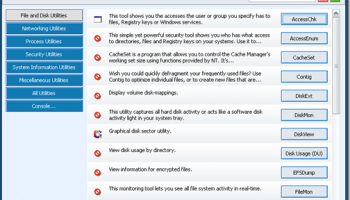
The Sysinternals Suite, developed by Sysinternals, is a comprehensive collection of advanced system utilities designed to help IT professionals and developers troubleshoot, diagnose, and manage Windows systems with precision and efficiency. This suite is a treasure trove of powerful tools that delve deep into the intricacies of Windows operating systems, offering unparalleled insights and control.
At the heart of the Sysinternals Suite are its flagship tools, such as Process Explorer, Autoruns, and Process Monitor. Process Explorer provides an in-depth view of active processes, allowing users to identify resource hogs, track down malware, and understand system behavior in real-time. Autoruns offers a detailed overview of all startup programs, services, and drivers, giving users the ability to optimize boot times and enhance system performance. Process Monitor combines the capabilities of two legacy utilities, Filemon and Regmon, to deliver real-time file system, registry, and process/thread activity monitoring.
Beyond these core utilities, the suite includes a plethora of specialized tools catering to various aspects of system management. For instance, TCPView offers a detailed view of all TCP and UDP endpoints on the system, making it invaluable for network troubleshooting. Disk2vhd simplifies the process of creating Virtual Hard Disks (VHDs) from physical disks, facilitating system migrations and backups. BgInfo allows administrators to display critical system information on the desktop background, ensuring that vital details are always at hand.
One of the standout features of the Sysinternals Suite is its portability. The entire suite can be run from a USB drive without the need for installation, making it an ideal companion for on-the-go IT professionals. This portability ensures that users can quickly deploy the tools on any system, whether it's a personal workstation or a server in a data center.
The suite's user interface is designed with functionality in mind. While it may not boast the sleek aesthetics of modern software, its straightforward and utilitarian design ensures that users can access the information they need without unnecessary distractions. Each tool is meticulously documented, with detailed help files and online resources available to guide users through even the most complex tasks.
Sysinternals Suite is continually updated to keep pace with the latest developments in Windows operating systems. This commitment to ongoing improvement ensures that users always have access to the most current and effective tools for their needs.
In summary, the Sysinternals Suite is an indispensable asset for anyone tasked with managing, troubleshooting, or optimizing Windows systems. Its comprehensive array of utilities, combined with its portability and robust documentation, make it a go-to resource for IT professionals and developers alike. Whether you're diagnosing a stubborn system issue, optimizing performance, or ensuring security, the Sysinternals Suite provides the tools you need to get the job done efficiently and effectively.
At the heart of the Sysinternals Suite are its flagship tools, such as Process Explorer, Autoruns, and Process Monitor. Process Explorer provides an in-depth view of active processes, allowing users to identify resource hogs, track down malware, and understand system behavior in real-time. Autoruns offers a detailed overview of all startup programs, services, and drivers, giving users the ability to optimize boot times and enhance system performance. Process Monitor combines the capabilities of two legacy utilities, Filemon and Regmon, to deliver real-time file system, registry, and process/thread activity monitoring.
Beyond these core utilities, the suite includes a plethora of specialized tools catering to various aspects of system management. For instance, TCPView offers a detailed view of all TCP and UDP endpoints on the system, making it invaluable for network troubleshooting. Disk2vhd simplifies the process of creating Virtual Hard Disks (VHDs) from physical disks, facilitating system migrations and backups. BgInfo allows administrators to display critical system information on the desktop background, ensuring that vital details are always at hand.
One of the standout features of the Sysinternals Suite is its portability. The entire suite can be run from a USB drive without the need for installation, making it an ideal companion for on-the-go IT professionals. This portability ensures that users can quickly deploy the tools on any system, whether it's a personal workstation or a server in a data center.
The suite's user interface is designed with functionality in mind. While it may not boast the sleek aesthetics of modern software, its straightforward and utilitarian design ensures that users can access the information they need without unnecessary distractions. Each tool is meticulously documented, with detailed help files and online resources available to guide users through even the most complex tasks.
Sysinternals Suite is continually updated to keep pace with the latest developments in Windows operating systems. This commitment to ongoing improvement ensures that users always have access to the most current and effective tools for their needs.
In summary, the Sysinternals Suite is an indispensable asset for anyone tasked with managing, troubleshooting, or optimizing Windows systems. Its comprehensive array of utilities, combined with its portability and robust documentation, make it a go-to resource for IT professionals and developers alike. Whether you're diagnosing a stubborn system issue, optimizing performance, or ensuring security, the Sysinternals Suite provides the tools you need to get the job done efficiently and effectively.
OS: Windows 11, Windows 10 32/64 bit, Windows 8 32/64 bit, Windows 7 32/64 bit
Sysinternals Suite Reviews
| Software: | Sysinternals Suite 1.0 B06.12.2 |
| Reviewed by: | S.T.Randall (Dec 16, 2012) |
| Rating: |   |
| Review: | Not everything works on Vista 64, for example, the one thing I was trying to get, i.e. Diskmon. So, there's some feedback. |
Add Your Review or 64-bit Compatibility Report
Top System Maintenance 64-bit downloads

WinToUSB 10.5 Build January 2
Easily create bootable USB drives from Windows installations with WinToUSB.
Shareware | $29.95


windows_exporter 0.30.8
Lightweight tool for exporting Windows metrics to Prometheus for monitoring.
Open Source

Windows 7 Service Pack 1 7601.17514.1011
SP1 - all previously publicly released updates for Windows 7 and Server 2008 R2
Freeware


TopNotify 3.1.1
TopNotify: Real-time notifications and alerts for seamless communication.
Open Source

Portable Glary Utilities 6.39.0.43

Optimize and enhance your PC's performance with this versatile utility suite.
Demo | $24.16

Boost 1.0.2
Boost helps you gain back control of your PC by improving performance.
Shareware | $19.95


Members area
Top 64-bit Downloads
-
EasyTune6 B24.0119.1
x64 freeware download -
HWiNFO64 6.28 B4200
x64 freeware download -
HWMonitor (64-bit) 1.53
x64 freeware download -
Windows 7 x64
x64 trialware download -
SoftPerfect RAM Disk 26.2
x64 shareware download -
Disk Pulse Pro x64 16.1.28
x64 trialware download -
FixWin for Win 10 10.2.2.0
x64 freeware download -
7z SFX Builder x64 2.1
x64 freeware download -
BusDog x64 0.2
x64 freeware download -
PhotoRenamer 4.1
x64 freeware download
Top Downloads
-
Open Files from XLSX to
XLS 5.2
shareware download -
Shell Tools 2.0.1
freeware download -
Caffeine 1.98
freeware download -
FMDiff 4.0.5
demo download -
Nomad.NET 3.2.0.2890
freeware download -
File Compression 1.0
commercial download -
FastKeys 6.05
demo download -
WinToUSB 10.5 Build January 2
shareware download -
FURY CTRL 2.0.65.0
freeware download -
Vim 9.2.0148
open source download -
novelWriter 2.8.2
open source download -
Thaiphoon Burner 17.4.1.2
freeware download -
GoodSync 12.9.26
freeware download -
AnyMP4 Data Recovery 1.5.12
shareware download -
PCtransfer 1.0.0.1033
freeware download