
SysResources Manager - X 64-bit Download
Popular x64 Tags
- freeware x64 download
- windows x64 download
- free x64 download
- web x64 download
- software x64 download
- folder x64 download
- utility x64 download
- convert x64 download
- monitor x64 download
- download x64 download
- tool x64 download
- memory x64 download
- video x64 download
- audio x64 download
- text x64 download
- password x64 download
- editor x64 download
- file x64 download
- security x64 download
- image x64 download
- database x64 download
- jpeg x64 download
- icon x64 download
- organizer x64 download
- viewer x64 download
- data x64 download
- print x64 download
- edit x64 download
- search x64 download
- pim x64 download
SysResources Manager 13.0
Sponsored links:

OptWin Software

SysResources Manager is a system utility for monitoring the current state of important system resources, such as CPU usage, RAM and Virtual RAM availability, Hard Disk Health and Performance, Active Processes and Processes accessing Internet, Monitoring Bandwidth Traffic (Download-Upload speed), Services, StartUp Programs.
SysResources Manager is an application designed to conduct a detailed analysis of your computer and provide information on both the hardware and the software sides.
First of all, the program is very easy to use and is addressed to both beginners and more experienced users. Plus, novice users can always have a look in the help menu and get more information on its features, so it's pretty easy to fully enjoy the goodies hidden underneath SysResources Manager's hood.
Features are organized on tabs, so we have “System”, “Bandwidth Monitor”, “Drives”, “Task Manager”, “Network Connections”, “Services”, “Startup Manager”, “Program Launcher”, “Special Folders”, “Options” and “Lock Computer”.
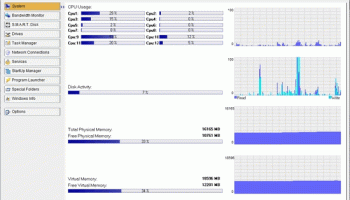
Just as expected, the first tab provides an overview of your system, displaying info such as CPU usage, disk activity, total and free physical memory, available and free virtual memory.
The “Bandwidth Monitor” keeps an eye on the network connections and shows the download and the upload speed, together with network speed, adapter address, IP address and received and sent packets.
Features:
· Watch CPU Usage per core and average (Support 4 CPU cores).
· Watch RAM and Virtual Memory Availability. Defrag Physical Memory when Memory reaches a limit. (Option to show Free RAM and CPU usage in an icon to System Tray, in graphic and numeric mode).
· Show information for all system disks and drives.
· Watch Active Processes and Programs (Show detailed information about Modules and Registry Keys used by each Process).
· Watch Network Bandwidth Traffic (Support all Network types e.g Internet(ADSL)/Ethernet/Wireless Speed and Traffic).
· Watch Processes accessing Internet (TCP Protocol).
· Manage Windows Services (Start, Stop, Pause, Restart, Remove, Change StartMode)
· StartUp Manager. (Manage Programs that are automatically executed when windows start.). See Internet Explorer Add-Ons and System Drivers.
· Program Launcher. Easily run your Favorites Programs and open your Files from System Tray.
· Show and explore Special Folders of Windows.Access hidden commands of Windows, like hide/show desktop, taskbar, enable/disable Start button
· Run installed Screen Savers, enable/disable Screen Saver.
· Change Screen resolution.
· Empty Recycle Bin, Clean Recent Documents, Run Menu Commands, Search Files, Internet Explorer typed URL's.Access Control Panel items.
· Lock PC.
· Easy access from an icon to System Tray. Hot Keys for defraging RAM and appear Main Window Program.
SysResources Manager is an application designed to conduct a detailed analysis of your computer and provide information on both the hardware and the software sides.
First of all, the program is very easy to use and is addressed to both beginners and more experienced users. Plus, novice users can always have a look in the help menu and get more information on its features, so it's pretty easy to fully enjoy the goodies hidden underneath SysResources Manager's hood.
Features are organized on tabs, so we have “System”, “Bandwidth Monitor”, “Drives”, “Task Manager”, “Network Connections”, “Services”, “Startup Manager”, “Program Launcher”, “Special Folders”, “Options” and “Lock Computer”.
Just as expected, the first tab provides an overview of your system, displaying info such as CPU usage, disk activity, total and free physical memory, available and free virtual memory.
The “Bandwidth Monitor” keeps an eye on the network connections and shows the download and the upload speed, together with network speed, adapter address, IP address and received and sent packets.
Features:
· Watch CPU Usage per core and average (Support 4 CPU cores).
· Watch RAM and Virtual Memory Availability. Defrag Physical Memory when Memory reaches a limit. (Option to show Free RAM and CPU usage in an icon to System Tray, in graphic and numeric mode).
· Show information for all system disks and drives.
· Watch Active Processes and Programs (Show detailed information about Modules and Registry Keys used by each Process).
· Watch Network Bandwidth Traffic (Support all Network types e.g Internet(ADSL)/Ethernet/Wireless Speed and Traffic).
· Watch Processes accessing Internet (TCP Protocol).
· Manage Windows Services (Start, Stop, Pause, Restart, Remove, Change StartMode)
· StartUp Manager. (Manage Programs that are automatically executed when windows start.). See Internet Explorer Add-Ons and System Drivers.
· Program Launcher. Easily run your Favorites Programs and open your Files from System Tray.
· Show and explore Special Folders of Windows.Access hidden commands of Windows, like hide/show desktop, taskbar, enable/disable Start button
· Run installed Screen Savers, enable/disable Screen Saver.
· Change Screen resolution.
· Empty Recycle Bin, Clean Recent Documents, Run Menu Commands, Search Files, Internet Explorer typed URL's.Access Control Panel items.
· Lock PC.
· Easy access from an icon to System Tray. Hot Keys for defraging RAM and appear Main Window Program.
OS: Windows 7, Windows 7 x64, Windows 8, Windows 8 x64, Windows 10, Windows 10 x64, Windows 11
Add Your Review or 64-bit Compatibility Report
Top Other 64-bit downloads


Caffeine 1.98
Keep your computer awake effortlessly with Caffeine, the ultimate productivity tool.
Freeware


Thaiphoon Burner 17.4.1.2
Designed for those who are in need of getting all available information
Freeware


Portable Don't Panic 3.1.0 Build 30
Aplication that can close and open multiple programs with the click of a button
Open Source

Download Master 7.3
Most effective acceleration, resuming, and management of your downloads.
Freeware

HWMonitor (64-bit) 1.53
Hardware monitoring program that reads PC systems main health sensors
Freeware
Members area
Top 64-bit Downloads
-
EasyTune6 B24.0119.1
x64 freeware download -
HWMonitor (64-bit) 1.53
x64 freeware download -
7z SFX Builder x64 2.1
x64 freeware download -
PhotoRenamer 4.1
x64 freeware download -
XtraTools Professional
x64 26.2.1
x64 shareware download -
Windows 7 x64
x64 trialware download -
Disk Pulse Pro x64 16.1.28
x64 trialware download -
HWiNFO64 6.28 B4200
x64 freeware download -
PKZIP 64-bit 14.40.0028
x64 trialware download -
CIB pdf brewer 4.20.0
x64 freeware download
Top Downloads
-
Open Files from XLSX to
XLS 5.2
shareware download -
AnyMP4 Data Recovery 1.5.12
shareware download -
EaseUS Key Finder 4.1.6 Build 20240910
demo download -
Office 365 Backup 3.0
shareware download -
DRevitalize 4.10
demo download -
Cursor 0.45.12
demo download -
WriterClassic 10.8.0
open source download -
Caffeine 1.98
freeware download -
FMDiff 4.0.5
demo download -
SyncBreeze 17.8.26
freeware download -
GoodSync 12.9.26
freeware download -
Pitara 4.0.9566.34157
open source download -
AnyMP4 DVD Creator 7.3.28
trialware download -
tail for Windows 2.1
shareware download -
Nomad.NET 3.2.0.2890
freeware download