
System Restore Manager - X 64-bit Download
Popular x64 Tags
- windows x64 download
- backup x64 download
- files x64 download
- data x64 download
- file backup x64 download
- file recovery x64 download
- file x64 download
- zip x64 download
- transfer x64 download
- restore x64 download
- outlook x64 download
- mail x64 download
- ftp x64 download
- office x64 download
- address x64 download
- data recovery x64 download
- backup software x64 download
- disk x64 download
- data backup x64 download
- contacts x64 download
- synchronize x64 download
- bookmarks x64 download
- storage x64 download
- save x64 download
- offsite backup x64 download
- express x64 download
- book x64 download
- outlook backup x64 download
- online backup x64 download
- remote backup x64 download
System Restore Manager 2.0
Sponsored links:
license: Freeware
downloads: 41
size: 236 kB
updated: 2011-02-18
tags: Manage restore point, View restore point, Restore point creator, Generate, Organize, View, Restore point
Add to Basket

The Windows Club

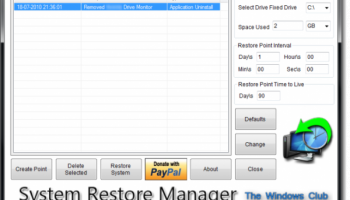
System Restore Manager is a freeware portable utility which allows you to completely manage your Windows system restore points and customize its options.
Using System Restore Manager, you can:
1. Create a Restore Point on the fly, by clicking the Create Button
2. Restore your Windows PC to a prior restore point. Just select a Restore Point from the list and click the Restore Button. This will Restart your computer and launch the Restore Process
3. See all the available restore points
4. Selectively remove Restore Points you don’t want and save the one’s you want. Just select a Restore Point from the list and click the Delete Button
5. Select a Drive and change the maximum amount of disk space to use, System Restore can use. On Windows 7, the default is 5% of available disk space.
6. Change the System Restore Point Creation Interval. On Windows 7, the default is 24 Hours
7. Change the Restore Point Time to Live. The default is 90 days,on Windows 7.
Using System Restore Manager, you can:
1. Create a Restore Point on the fly, by clicking the Create Button
2. Restore your Windows PC to a prior restore point. Just select a Restore Point from the list and click the Restore Button. This will Restart your computer and launch the Restore Process
3. See all the available restore points
4. Selectively remove Restore Points you don’t want and save the one’s you want. Just select a Restore Point from the list and click the Delete Button
5. Select a Drive and change the maximum amount of disk space to use, System Restore can use. On Windows 7, the default is 5% of available disk space.
6. Change the System Restore Point Creation Interval. On Windows 7, the default is 24 Hours
7. Change the Restore Point Time to Live. The default is 90 days,on Windows 7.
OS: Windows 7, Windows 7 x64
Add Your Review or 64-bit Compatibility Report
Top Backup & Restore 64-bit downloads


GoodSync 12.9.26
Backup and synchronization software for all your important files and folders
Freeware

AnyMP4 Data Recovery 1.5.12
Recover or rescue data from computer, flash media drive and other devices
Shareware | $24.50

PCtransfer 1.0.0.1033
the best free, secure and portable transfer assistant for Windows XP/Vista/7/8
Freeware

EaseUS Key Finder 4.1.6 Build 20240910
Effortlessly recover lost product keys for software and operating systems.
Demo


Drive Snapshot 1.51 - March 03 2025
Drive Snapshot: Effortless disk imaging and backup solution for Windows systems.
Trialware | $39.00

SyncBreeze 17.8.26
SyncBreeze is a free, easy-to-use and fast file synchronization utility.
Freeware
tags: File Synchronization, Backup

Software to Data Recovery 5.8.4.1
Download Software to Data Recovery for instant salvage of lost memorable snaps
Shareware | $79.00

Backup4all Monitor 1.2.292
Realtime and historical monitoring for Backup4all backups and other actions.
Shareware | $4.99

Wondershare Recoverit 14.0.21

Wondershare Recoverit: Reliable data recovery for lost or deleted files.
Demo | $64.99
Members area
Top 64-bit Downloads
-
EasyTune6 B24.0119.1
x64 freeware download -
HWiNFO64 6.28 B4200
x64 freeware download -
BusDog x64 0.2
x64 freeware download -
HWMonitor (64-bit) 1.53
x64 freeware download -
Windows 7 x64
x64 trialware download -
SoftPerfect RAM Disk 26.2
x64 shareware download -
Disk Pulse Pro x64 16.1.28
x64 trialware download -
FixWin for Win 10 10.2.2.0
x64 freeware download -
7z SFX Builder x64 2.1
x64 freeware download -
PhotoRenamer 4.1
x64 freeware download
Top Downloads
-
Open Files from XLSX to
XLS 5.2
shareware download -
File Compression 1.0
commercial download -
Shell Tools 2.0.1
freeware download -
Caffeine 1.98
freeware download -
FMDiff 4.0.5
demo download -
Nomad.NET 3.2.0.2890
freeware download -
Music Collection 3.9.6.0
freeware download -
Hotkeycontrol 8.3
shareware download -
FastKeys 6.05
demo download -
WinToUSB 10.5 Build January 2
shareware download -
FURY CTRL 2.0.65.0
freeware download -
Vim 9.2.0167
open source download -
novelWriter 2.8.2
open source download -
Thaiphoon Burner 17.4.1.2
freeware download -
GoodSync 12.9.26
freeware download