
System Scheduler Professional - X 64-bit Download
Popular x64 Tags
- cpu x64 download
- performance x64 download
- windows x64 download
- driver updates x64 download
- driver update x64 download
- cleaner x64 download
- defrag x64 download
- system x64 download
- drivers update x64 download
- tune x64 download
- tweak x64 download
- registry cleaner x64 download
- security x64 download
- video driver update x64 download
- optimizer x64 download
- registry x64 download
- uninstall x64 download
- speed x64 download
- boost x64 download
- faster x64 download
- system utilities x64 download
- utility x64 download
- optimize x64 download
- driver update software x64 download
- startup x64 download
- disk cleaner x64 download
- clean disk x64 download
- clean x64 download
- vista x64 download
- disk x64 download
You are here: X-64-bit Download
\ System Utilities
\ System Maintenance \ System Scheduler Professional
System Scheduler Professional 5.64
Sponsored links:
license: Shareware ($30.00)
downloads: 351
size: 3.90 MB
updated: 2026-01-25
tags: System Scheduler, download System Scheduler, System Scheduler free download, schedule task, schedule launch, reminder scheduler, schedule, launcher, launch, scheduler
Add to Basket

Splinterware Software Solutions

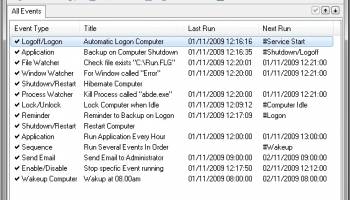
System Scheduler is an excellent tool to schedule unattended running of applications, batch files, scripts and much more. For anyone used to using MS Windows own Task Scheduler, or the older AT or WinAT commands, System Scheduler is an ideal and easy to use replacement, with more flexibility and features. System Scheduler runs totally independently of the MS Windows Task Scheduler and has no dependencies on it.
Also, you can schedule popup reminders so you'll never forget those important appointments and things to do. Reminders, tasks and other events can be set to run once or every minute, hour, day, week, month or year and several variations on these. Popup Reminders can be snoozed as required.
System Scheduler not only allows you to launch programs at scheduled times but also to send keypresses and mouseclicks to those programs. This allows you to not only schedule programs to run overnight or at the weekend but also get those programs to do useful things while unattended. A really powerful feature.
Finally, the Free vesion of System Scheduler also includes a Window Watcher feature. The program will check for the existence of a particular window and send keypresses or send the window a close signal to terminate running applications. Useful for triggering actions or handling error messages while you are away.
The Professional version contains all the great features of the free version plus more:
Works with MS Windows 2000, XP, 2003, 2008, Vista, 7
Runs as a system Service (run jobs while logged off)
Shutdown/Reboot local and REMOTE computers
Auto-Logon/Logoff Computer
Auto-Lock/Unlock Console (no Auto-Unlock on Vista/7)
Process Watcher
File Watcher
Run Programs/Tasks on Logon and Logoff/Shutdown
Schedule Missed Events to run on Startup/Logon
Send Scheduled Emails
Wake Up Local (Standby/Hibernate) and Remote Computers (Wake On LAN)
Run Sequence of Events
Extra Scheduling Options such as 'On Idle', 'On Cease Idle', 'On Wakeup'
Advanced credentials control using 'Run As...'
Terminal Services/Remote Desktop support
Support for MS Windows own Auto Logon feature
On Vista/7 can automatically use highest credentials
Create desktop shortcut to run events immediately
Priority Email Support from Splinterware
Also, you can schedule popup reminders so you'll never forget those important appointments and things to do. Reminders, tasks and other events can be set to run once or every minute, hour, day, week, month or year and several variations on these. Popup Reminders can be snoozed as required.
System Scheduler not only allows you to launch programs at scheduled times but also to send keypresses and mouseclicks to those programs. This allows you to not only schedule programs to run overnight or at the weekend but also get those programs to do useful things while unattended. A really powerful feature.
Finally, the Free vesion of System Scheduler also includes a Window Watcher feature. The program will check for the existence of a particular window and send keypresses or send the window a close signal to terminate running applications. Useful for triggering actions or handling error messages while you are away.
The Professional version contains all the great features of the free version plus more:
Works with MS Windows 2000, XP, 2003, 2008, Vista, 7
Runs as a system Service (run jobs while logged off)
Shutdown/Reboot local and REMOTE computers
Auto-Logon/Logoff Computer
Auto-Lock/Unlock Console (no Auto-Unlock on Vista/7)
Process Watcher
File Watcher
Run Programs/Tasks on Logon and Logoff/Shutdown
Schedule Missed Events to run on Startup/Logon
Send Scheduled Emails
Wake Up Local (Standby/Hibernate) and Remote Computers (Wake On LAN)
Run Sequence of Events
Extra Scheduling Options such as 'On Idle', 'On Cease Idle', 'On Wakeup'
Advanced credentials control using 'Run As...'
Terminal Services/Remote Desktop support
Support for MS Windows own Auto Logon feature
On Vista/7 can automatically use highest credentials
Create desktop shortcut to run events immediately
Priority Email Support from Splinterware
OS: Windows Server 2025, Windows 11, Windows Server 2022, Windows Server 2019, Windows Server 2016, Windows 10 32/64 bit, Windows Server 2012, Windows 2008 32/64 bit, Windows 8 32/64 bit, Windows 7 32/64 bit
Add Your Review or 64-bit Compatibility Report
Top System Maintenance 64-bit downloads


WinToUSB 10.5 Build January 2
Easily create bootable USB drives from Windows installations with WinToUSB.
Shareware | $29.95


Windows 7 Service Pack 1 7601.17514.1011
SP1 - all previously publicly released updates for Windows 7 and Server 2008 R2
Freeware

Fortect 7.3.4.6
Fortect repairs and optimizes your PC, enhancing performance effortlessly.
Trialware | $30.95

windows_exporter 0.30.8
Lightweight tool for exporting Windows metrics to Prometheus for monitoring.
Open Source


Boost 1.0.2
Boost helps you gain back control of your PC by improving performance.
Shareware | $19.95


Members area
Top 64-bit Downloads
-
GRBackPro Server Backup
x64 11.2.0
x64 shareware download -
Windows 7 x64
x64 trialware download -
EasyTune6 B24.0119.1
x64 freeware download -
HWiNFO64 6.28 B4200
x64 freeware download -
SoftPerfect RAM Disk 26.2
x64 shareware download -
BusDog x64 0.2
x64 freeware download -
XtraTools Professional
x64 26.2.1
x64 shareware download -
HWMonitor (64-bit) 1.53
x64 freeware download -
Microsoft Security
Essentials Definition
Updates x64 1.67.7.0
x64 freeware download -
Disk Pulse Pro x64 16.1.28
x64 trialware download
Top Downloads
-
Open Files from XLSX to
XLS 5.2
shareware download -
FMDiff 4.0.5
demo download -
Shell Tools 2.0.1
freeware download -
Music Collection 3.9.7.0
freeware download -
File Compression 1.0
commercial download -
WriterClassic 10.8.0
open source download -
Caffeine 1.98
freeware download -
AnyMP4 Data Recovery 1.5.12
shareware download -
Software to Data
Recovery 5.8.4.1
shareware download -
EaseUS Key Finder 4.1.6 Build 20240910
demo download -
DiskCopy 1.4.2.0
freeware download -
Nomad.NET 3.2.0.2890
freeware download -
FileAnt 2024.05.018
freeware download -
WinFindr 1.8
shareware download -
Hotkeycontrol 8.3
shareware download