
Terminal Password Manager - X 64-bit Download
Popular x64 Tags
- encryption software x64 download
- privacy x64 download
- blowfish x64 download
- twofish x64 download
- encrypt x64 download
- lock x64 download
- folder x64 download
- decryption x64 download
- decrypt x64 download
- software x64 download
- file encryption x64 download
- data security x64 download
- security x64 download
- aes x64 download
- rijndael x64 download
- protection x64 download
- password x64 download
- protect x64 download
- encryption x64 download
- encrypt file x64 download
- drive x64 download
- pdf x64 download
- disk x64 download
- data encryption x64 download
- hide x64 download
- file x64 download
- disk encryption x64 download
- des x64 download
- free x64 download
- secure x64 download
Terminal Password Manager 0.14.23b
Sponsored links:
license: Freeware
downloads: 37
size: 2.20 MB
updated: 2024-09-01
tags: 2FA Key, download Terminal Password Manager, 2FA, open source, security software, Password Manager, Terminal Password Manager, Password, password management, Terminal Password Manager free download, Manager, Rick Scorpio, download, Security, Store Passwor
Add to Basket

Rick Scorpio

**Terminal Password Manager: A Robust Solution for Command Line Enthusiasts**
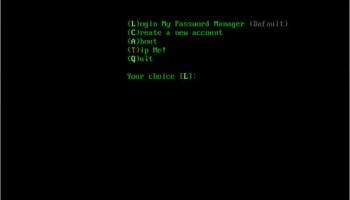
Developed by Rick Scorpio, Terminal Password Manager (TPM) is a streamlined, command-line based password management tool designed for users who prefer the efficiency and simplicity of terminal interfaces. This software stands out in a crowded market by offering a no-frills, highly secure, and customizable experience for managing sensitive information.
**User Interface and Experience**
TPM’s interface is minimalistic, catering to those who are comfortable navigating through command-line environments. The absence of a graphical user interface (GUI) might be a drawback for some, but for terminal aficionados, it’s a breath of fresh air. The commands are intuitive and well-documented, ensuring a smooth learning curve even for those who are new to terminal-based applications.
**Security Features**
Security is at the forefront of TPM’s design. It employs AES-256 encryption to safeguard your passwords, ensuring that your data remains secure from unauthorized access. Additionally, TPM supports multi-factor authentication (MFA), adding an extra layer of protection. The software also includes a built-in password generator, which creates strong, random passwords to enhance your security posture.
**Customization and Flexibility**
One of TPM’s standout features is its high degree of customization. Users can tailor the software to their specific needs through a variety of configuration options. Whether it’s setting up custom commands, integrating with other terminal tools, or automating routine tasks, TPM offers the flexibility to adapt to diverse workflows.
**Performance and Reliability**
TPM is lightweight and performs efficiently, even on older hardware. Its low resource footprint makes it an ideal choice for users who need a reliable password manager without compromising system performance. The software is also regularly updated by Rick Scorpio, ensuring that any bugs are swiftly addressed and new features are consistently rolled out.
**Integration and Compatibility**
TPM seamlessly integrates with a wide range of terminal environments, including popular shells like Bash, Zsh, and Fish. It also supports various operating systems, including Linux, macOS, and Windows (via WSL). This cross-platform compatibility ensures that users can manage their passwords consistently across different systems.
**Community and Support**
Rick Scorpio has fostered a vibrant community around TPM, with active forums and a comprehensive knowledge base. Users can find extensive documentation, tutorials, and troubleshooting guides, making it easier to get the most out of the software. Additionally, the developer is known for being responsive to user feedback, often incorporating community suggestions into updates.
**Conclusion**
Terminal Password Manager is a powerful, secure, and flexible tool tailored for users who prefer the command-line interface. Its robust security features, customization options, and efficient performance make it a standout choice for managing passwords in a terminal environment. While it may not appeal to those who prefer graphical interfaces, its strengths lie in its simplicity, reliability, and the strong community support backing it. If you’re a terminal enthusiast looking for a no-nonsense password management solution, TPM by Rick Scorpio is certainly worth considering.
Developed by Rick Scorpio, Terminal Password Manager (TPM) is a streamlined, command-line based password management tool designed for users who prefer the efficiency and simplicity of terminal interfaces. This software stands out in a crowded market by offering a no-frills, highly secure, and customizable experience for managing sensitive information.
**User Interface and Experience**
TPM’s interface is minimalistic, catering to those who are comfortable navigating through command-line environments. The absence of a graphical user interface (GUI) might be a drawback for some, but for terminal aficionados, it’s a breath of fresh air. The commands are intuitive and well-documented, ensuring a smooth learning curve even for those who are new to terminal-based applications.
**Security Features**
Security is at the forefront of TPM’s design. It employs AES-256 encryption to safeguard your passwords, ensuring that your data remains secure from unauthorized access. Additionally, TPM supports multi-factor authentication (MFA), adding an extra layer of protection. The software also includes a built-in password generator, which creates strong, random passwords to enhance your security posture.
**Customization and Flexibility**
One of TPM’s standout features is its high degree of customization. Users can tailor the software to their specific needs through a variety of configuration options. Whether it’s setting up custom commands, integrating with other terminal tools, or automating routine tasks, TPM offers the flexibility to adapt to diverse workflows.
**Performance and Reliability**
TPM is lightweight and performs efficiently, even on older hardware. Its low resource footprint makes it an ideal choice for users who need a reliable password manager without compromising system performance. The software is also regularly updated by Rick Scorpio, ensuring that any bugs are swiftly addressed and new features are consistently rolled out.
**Integration and Compatibility**
TPM seamlessly integrates with a wide range of terminal environments, including popular shells like Bash, Zsh, and Fish. It also supports various operating systems, including Linux, macOS, and Windows (via WSL). This cross-platform compatibility ensures that users can manage their passwords consistently across different systems.
**Community and Support**
Rick Scorpio has fostered a vibrant community around TPM, with active forums and a comprehensive knowledge base. Users can find extensive documentation, tutorials, and troubleshooting guides, making it easier to get the most out of the software. Additionally, the developer is known for being responsive to user feedback, often incorporating community suggestions into updates.
**Conclusion**
Terminal Password Manager is a powerful, secure, and flexible tool tailored for users who prefer the command-line interface. Its robust security features, customization options, and efficient performance make it a standout choice for managing passwords in a terminal environment. While it may not appeal to those who prefer graphical interfaces, its strengths lie in its simplicity, reliability, and the strong community support backing it. If you’re a terminal enthusiast looking for a no-nonsense password management solution, TPM by Rick Scorpio is certainly worth considering.
OS: Windows 11, Windows 10 32/64 bit
Add Your Review or 64-bit Compatibility Report
Top Encryption Tools 64-bit downloads


NordVPN 7.56.2.0
Secure your online privacy with NordVPN's fast, reliable VPN service.
Demo | $12.99


GhostVolt 1.3.3.0
GhostVolt: powerful data encryption, privacy, and security tool built for teams
Demo | $40.00

OpenVPN 2.7.0-I017
OpenVPN: Secure, flexible, and open-source VPN solution for privacy and remote access.
Trialware | $7.00

PenProtect 1.45
The encryption solution to secure your USB Flash Drive with AES 256 and Password
Demo | $19.00
tags: flash drive, USB, password, flash memory, pen drive, crypt, encrypt, decrypt, software, key, file, folder, AES, AES 256, security, cryptography, secure, stick, device, lock, guard flash drive, guard pen drive, penprotect

SurfEasy VPN for Windows 3.3
Use the SurfEasy VPN to protect your privacy, security and online identity
Freeware

Twingate 2026.7.2078
Zero Trust Network Access solution for secure remote access and management.
Trialware | $5.00
Members area
Top 64-bit Downloads
-
OpenVPN x64 2.6.11
x64 open source download -
O&O SafeErase Server
x64 18.4.611
x64 trialware download -
Microsoft Standalone
System Sweeper (x64 bit) 1.0.856.0 Beta
x64 freeware download -
VSCryptoHash 64-bit 2.5.3.509
x64 freeware download -
Trend Micro Internet
Security Pro 2010 (x64
bit)
x64 trialware download -
Prevent Restore 119.00
x64 freeware download -
Secret Disk 320.00
x64 freeware download -
Romaco Timeout x64 3.1.4.0
x64 freeware download -
Trend Micro HouseCall
64bit 1.62.1.1162
x64 freeware download -
ThinkVantage Password
Manager 64-bit 4.0
x64 freeware download
Top Downloads
-
OpenVPN x64 2.6.11
open source download -
Aiseesoft Android
Unlocker 1.1.8
shareware download -
CmosPwd 5.0
freeware download -
OSV-Scanner 2.3.3
open source download -
ClamWin Portable 0.103.2.1
open source download -
NordVPN 7.56.2.0
demo download -
CRYPTO! Build 9695
freeware download -
Portable SafeInCloud 24.14.1
freeware download -
Mime Tool 2.2.8.11
freeware download -
abylon KEYSAFE 23.60.1
shareware download -
IPVanish 4.3.9.1
shareware download -
DigiVault 1.0.006
freeware download -
Gpg4win 5.0.2
open source download -
GhostVolt 1.3.3.0
demo download -
OpenVPN 2.7.0-I017
trialware download