
ThinkingRock - X 64-bit Download
Popular x64 Tags
- software x64 download
- file x64 download
- analysis x64 download
- free x64 download
- model x64 download
- extracting x64 download
- pdf x64 download
- document management x64 download
- files x64 download
- marketing x64 download
- pdfs x64 download
- windows x64 download
- management x64 download
- office x64 download
- business x64 download
- printing x64 download
- development x64 download
- print x64 download
- strategy x64 download
- acrobat x64 download
- converter x64 download
- framework x64 download
- mba x64 download
- converting x64 download
- strategic management x64 download
- conversion x64 download
- sharepoint x64 download
- advertising wizard x64 download
- shareware x64 download
- moss x64 download
ThinkingRock 3.7.0
Sponsored links:

Avente

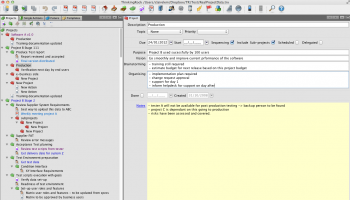
Thinking Rock is a cross platform Java program designed to supplement David Allen’s “Getting Things Done” Methodology. It is released under the Common Development and Distribution License (CDDL) and can be used for free.
The first time you start ThinkingRock, you are presented an Overview of the steps involved in using the program.
As you can see in the image above, the Thinking Rock overview is broadly divided into 4 main sections – Setup, Collect, Process,and finally “Organize,Review & Do”. The labels are click-able and clicking on each section will take you to the corresponding section.
You can also navigate through the different sections in Thinking Rock via its toolbar icons.
Before you start using Thinking Rock, you have to set up a few things.
First create a new database where you will store all your data. This is easily done by clicking on the “Create data file” label in the “Overview” page.
Next add some Contexts. Relevant ones can be @Work,@Home, @Club, @Meeting etc. Don’t limit to these contexts alone. Each person’s context will be different according to his work and life outside work.
Now you add Criteria. In Thinking Rock, Criteria are broadly classified into amount of Time, amount of Energy, and Priority. You can optionally add a new Criteria if needed, though rarely will you be needing a different criteria other than the 3 default ones created for you.
Next you add the Topics. These are used to classify your thoughts and are kept as the thoughts become an item, an action or a project. Examples of topics are: Personal, Financial, Health, House, Work, Kids, Book, CDs.
Thinking Rock is NOT another to-do list. Its process flow allows you to:
collect your thoughts, also called dump your mind;
process them into actions, projects, sub-projects, reference items, someday/maybe items or goals;
actions can be done by you, delegated to someone else or scheduled for a particular date;
projects can be planned into ordered list of actions and sub-projects;
you can review all your actions, projects and other information quickly and easily to see what you need to do or to choose what you want to do under your current context at a particular time. These views can be easily modified by you to tailor for your needs;
get motivated by reviewing your 6-Level model and link projects to your goals;
take the information with you on your iPhone, Android, paper (pocketmod, Jasper or PDF reports).
Why is Thinking Rock different:
Multi-platform without having your data on the web: use it at home and at work, written in Java thus run on Linux, Macintosh, or Windows (see platform requirements). The data file is separate so you just need to transfer the small data file between computers;
Project Structure: unlike many task management applications, ThinkingRock lets you group your actions in projects and sub-projects. Two views are available to display your tasks: a project tree or a list of actions. Even auto-sequencing!
to review your actions, you can create your own tabs and set-up teh filtering;
Stop procrastination: it gets you moving on your thoughts by encouraging you to think of the next physical action to do;
Documentation and support available: full screen help provided, documentation on this website, free customer support through our forum or email (use contact page).
it is a high quality software.
The first time you start ThinkingRock, you are presented an Overview of the steps involved in using the program.
As you can see in the image above, the Thinking Rock overview is broadly divided into 4 main sections – Setup, Collect, Process,and finally “Organize,Review & Do”. The labels are click-able and clicking on each section will take you to the corresponding section.
You can also navigate through the different sections in Thinking Rock via its toolbar icons.
Before you start using Thinking Rock, you have to set up a few things.
First create a new database where you will store all your data. This is easily done by clicking on the “Create data file” label in the “Overview” page.
Next add some Contexts. Relevant ones can be @Work,@Home, @Club, @Meeting etc. Don’t limit to these contexts alone. Each person’s context will be different according to his work and life outside work.
Now you add Criteria. In Thinking Rock, Criteria are broadly classified into amount of Time, amount of Energy, and Priority. You can optionally add a new Criteria if needed, though rarely will you be needing a different criteria other than the 3 default ones created for you.
Next you add the Topics. These are used to classify your thoughts and are kept as the thoughts become an item, an action or a project. Examples of topics are: Personal, Financial, Health, House, Work, Kids, Book, CDs.
Thinking Rock is NOT another to-do list. Its process flow allows you to:
collect your thoughts, also called dump your mind;
process them into actions, projects, sub-projects, reference items, someday/maybe items or goals;
actions can be done by you, delegated to someone else or scheduled for a particular date;
projects can be planned into ordered list of actions and sub-projects;
you can review all your actions, projects and other information quickly and easily to see what you need to do or to choose what you want to do under your current context at a particular time. These views can be easily modified by you to tailor for your needs;
get motivated by reviewing your 6-Level model and link projects to your goals;
take the information with you on your iPhone, Android, paper (pocketmod, Jasper or PDF reports).
Why is Thinking Rock different:
Multi-platform without having your data on the web: use it at home and at work, written in Java thus run on Linux, Macintosh, or Windows (see platform requirements). The data file is separate so you just need to transfer the small data file between computers;
Project Structure: unlike many task management applications, ThinkingRock lets you group your actions in projects and sub-projects. Two views are available to display your tasks: a project tree or a list of actions. Even auto-sequencing!
to review your actions, you can create your own tabs and set-up teh filtering;
Stop procrastination: it gets you moving on your thoughts by encouraging you to think of the next physical action to do;
Documentation and support available: full screen help provided, documentation on this website, free customer support through our forum or email (use contact page).
it is a high quality software.
OS: Windows XP, Windows Vista, Windows Vista x64, Windows 7, Windows 7 x64, Windows 8, Windows 8 x64, Windows 10, Windows 10 x64
Add Your Review or 64-bit Compatibility Report
Top Other 64-bit downloads


LawTrust 5.1.1
Used primarily by lawyers, it is also used by real estate agents, landlords
Shareware | $79.95

HelpDesk 11.19.9557.25020
Streamline customer support with HelpDesk's intuitive ticketing system.
Trialware | $2 199.00

Odoo 19.0.20260327

All-in-one business management software with integrated apps for various needs.
Demo | $14.80

DeskWork Standard 4.0.2827
ECM software can help to optimize the workflow in your company
Trialware | $3 200.00
Village Tracker for Instruments 1.2
Keep track of the musical instruments from your collection
Demo | $49.95


Net Tracker For Lab Equipment 1.05
Helps you manage the equipment that you use in your lab
Trialware | $499.95


Vladovsoft Hotel 17.1.0
Effortlessly manage hotel operations with intuitive features and tools.
Trialware | $99.00
Members area
Top 64-bit Downloads
-
mbFXWords 2.80
x64 freeware download -
FontAgent Pro 10.0.15.0
x64 trialware download -
Microsoft Office 2016
x64 2405 B17628.20164
x64 trialware download -
Print to PDF Toolkit Pro 3.0
x64 shareware download -
Microsoft Office 2010
Service Pack x64 SP2
x64 freeware download -
CSV2IIF Portable 5.0.060
x64 demo download -
Foxit Reader 2023.3
x64 freeware download -
Hl7Spy 24.1.227
x64 trialware download -
ABBYY FineReader
Professional 16.0.13
x64 trialware download -
Microsoft Office 2010
x64 14.0.6023.1000
x64 trialware download
Top Downloads
-
Quite Imposing Plus 6.0d
demo download -
Total CSV Converter 4.0
shareware download -
Active Barcode and QR
code Generator 1.24.8.15
freeware download -
Seavus Project Viewer 19.0
trialware download -
Miro for Windows 0.11.110
shareware download -
Flipping Book Writer 2.6
shareware download -
mbFXWords 2.80
freeware download -
SmarThru 4.04
freeware download -
SilentNotes 8.7.1
open source download -
LawTrust 5.1.1
shareware download -
HelpDesk 11.19.9557.25020
trialware download -
Odoo 19.0.20260327
demo download -
DeskWork Standard 4.0.2827
trialware download -
LiquiBase 5.0.2
trialware download -
Smart Phone Recorder 3.6.5
demo download