
Ultra PDF Merger - X 64-bit Download
Popular x64 Tags
- office x64 download
- microsoft x64 download
- importing x64 download
- exporting x64 download
- acrobat x64 download
- xls x64 download
- printer x64 download
- pdf x64 download
- pdf converter x64 download
- software x64 download
- word x64 download
- outlook x64 download
- excel x64 download
- powerpoint x64 download
- tool x64 download
- ppt x64 download
- adobe x64 download
- convert x64 download
- spreadsheet x64 download
- text x64 download
- create x64 download
- doc x64 download
- printing x64 download
- files x64 download
- add in x64 download
- open x64 download
- document x64 download
- data x64 download
- export x64 download
- saving x64 download
Ultra PDF Merger 1.3.9
Sponsored links:

Michalis Nicolaides

Ultra PDF Merger is a freeware PDF utility that joins your PDF files, or part of them, together. It is a windows application and it runs on both 32bit and 64bit systems. Ultra PDF Merger is portable which means you don’t have to install anything, just download it, extract its content and run it. In this way you can put it in your USB drive and use it anywhere. It runs on every system that has .NET Framework 4.0 including Windows 8.
How to use it:
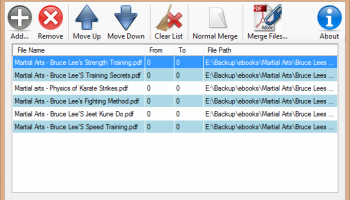
Add files: You can add the file(s) you want to merge using the Add button. You can select multiple files to add if they are in the same folder. Do not add locked or password protected files because merging will fail. You can also add the same file more than once.
Remove files: Select the file you want to remove from the list and press the Remove button.
Change file order: Select the file you want to move and move it by pressing the Move Up (Up arrow) or Move Down (Down arrow) buttons.
Select specific pages to merge: If you want to merge specific pages from the file change the from and to numbers. If you leave 0 the program will ignore it.
Examples:
From 0 To 0 will merge all the pages of the file
From 0 To 10 will merge the first 10 pages
From 3 To 5 will merge pages 3, 4 and 5
From 3 to 0 will merge all pages except the first 2
Select merge type: You can select either normal merge or chapter mode merging which will put each file to start from an odd page number by inserting an empty page if needed.
Merge files: Press Merge Files… button to merge selected files.
Merge files to first PDF: Press Merge to First button to merge selected files to the first PDF file.
View program info: Press About button to view program info such as the version number.
How to use it:
Add files: You can add the file(s) you want to merge using the Add button. You can select multiple files to add if they are in the same folder. Do not add locked or password protected files because merging will fail. You can also add the same file more than once.
Remove files: Select the file you want to remove from the list and press the Remove button.
Change file order: Select the file you want to move and move it by pressing the Move Up (Up arrow) or Move Down (Down arrow) buttons.
Select specific pages to merge: If you want to merge specific pages from the file change the from and to numbers. If you leave 0 the program will ignore it.
Examples:
From 0 To 0 will merge all the pages of the file
From 0 To 10 will merge the first 10 pages
From 3 To 5 will merge pages 3, 4 and 5
From 3 to 0 will merge all pages except the first 2
Select merge type: You can select either normal merge or chapter mode merging which will put each file to start from an odd page number by inserting an empty page if needed.
Merge files: Press Merge Files… button to merge selected files.
Merge files to first PDF: Press Merge to First button to merge selected files to the first PDF file.
View program info: Press About button to view program info such as the version number.
OS: Windows XP, Windows Vista, Windows Vista x64, Windows 7, Windows 7 x64, Windows 8, Windows 8 x64, Windows 10, Windows 10 x64
Requirements: .NET Framework 4.0
Add Your Review or 64-bit Compatibility Report
Top Office Suites & Tools 64-bit downloads


Quite Imposing Plus 6.0d
Effortlessly create and manage complex impositions for PDF documents.
Demo | $949.00

Seavus Project Viewer 19.0
Free to experience the best viewer for Micrsoft Project. Try our Project Viewer
Trialware | $29.50


SilentNotes 8.7.1
SilentNotes: Secure, offline note-taking app with encryption and cross-device sync.
Open Source


CZ Excel Converter 1.9.4.6366
CZ V: A powerful synth emulation with rich sounds and intuitive controls.
Demo | $149.00


callas pdfaPilot 14.2.400
Powerful tool for creating, validating, and optimizing PDF/A documents.
Trialware

mini PDF to TXT OCR Converter 3.2
PDF to TXT OCR Converter is a best OCR Converter
Shareware | $59.95
Members area
Top 64-bit Downloads
-
mbFXWords 2.80
x64 freeware download -
FontAgent Pro 10.0.15.0
x64 trialware download -
Microsoft Office 2016
x64 2405 B17628.20164
x64 trialware download -
Print to PDF Toolkit Pro 3.0
x64 shareware download -
XLIFFChecker 7.5.0
x64 freeware download -
Microsoft Office 2010
Service Pack x64 SP2
x64 freeware download -
PDFill PDF and Image
Writer x64 15.0 Build 2
x64 freeware download -
CSV2IIF Portable 5.0.060
x64 demo download -
Foxit Reader 2023.3
x64 freeware download -
Hl7Spy 24.1.227
x64 trialware download
Top Downloads
-
Quite Imposing Plus 6.0d
demo download -
Odoo 19.0.20260330
demo download -
Total CSV Converter 4.0
shareware download -
Active Barcode and QR
code Generator 1.24.8.15
freeware download -
Seavus Project Viewer 19.0
trialware download -
Miro for Windows 0.11.110
shareware download -
Flipping Book Writer 2.6
shareware download -
mbFXWords 2.80
freeware download -
SmarThru 4.04
freeware download -
SilentNotes 8.7.1
open source download -
LawTrust 5.1.1
shareware download -
HelpDesk 11.19.9557.25020
trialware download -
DeskWork Standard 4.0.2827
trialware download -
LiquiBase 5.0.2
trialware download -
4EPOS POS 12.20.48
demo download