
USB Image Tool - X 64-bit Download
Popular x64 Tags
- windows x64 download
- backup x64 download
- files x64 download
- data x64 download
- file backup x64 download
- file recovery x64 download
- file x64 download
- zip x64 download
- transfer x64 download
- restore x64 download
- outlook x64 download
- mail x64 download
- ftp x64 download
- office x64 download
- address x64 download
- data recovery x64 download
- backup software x64 download
- disk x64 download
- data backup x64 download
- contacts x64 download
- synchronize x64 download
- bookmarks x64 download
- storage x64 download
- save x64 download
- offsite backup x64 download
- express x64 download
- book x64 download
- outlook backup x64 download
- online backup x64 download
- remote backup x64 download
USB Image Tool 1.9.1.0
Sponsored links:
license: Freeware
downloads: 2736
size: 819 kB
updated: 2025-03-06
tags: Backup USB, USB 2 IMG, restore, disk imaging, backup, download USB Image Tool, portable software, USB Image Tool, USB Image Tool free download, USB2IMG, Alexander Beug, recover, USB to IMG
Add to Basket

Alexander Beug

**USB Image Tool: A Comprehensive Solution for USB Drive Management**
USB Image Tool, developed by Alexander Beug, is a versatile and robust software designed to streamline the management of USB drives. This lightweight yet powerful tool offers a range of features that cater to both casual users and IT professionals who require efficient handling of USB storage devices.
**Key Features:**
1. **Image Creation and Restoration:**
USB Image Tool allows users to create exact images of USB drives, capturing every byte of data. This feature is invaluable for backing up important files, creating bootable drives, or duplicating USB drives for distribution. The restoration process is equally straightforward, ensuring that your data can be easily recovered or transferred to another device.
2. **Support for Various Formats:**
The software supports a wide array of USB drive formats, including FAT, FAT32, NTFS, and exFAT. This compatibility ensures that users can work with virtually any USB drive without worrying about format restrictions.
3. **User-Friendly Interface:**
The intuitive interface of USB Image Tool makes it accessible to users of all skill levels. The clean layout and straightforward navigation allow users to perform tasks with minimal effort, reducing the learning curve typically associated with more complex software.
4. **Batch Processing:**
For users managing multiple USB drives, the batch processing feature is a significant time-saver. This functionality allows for the simultaneous creation or restoration of images across several devices, streamlining workflows and increasing productivity.
5. **Portable Application:**
USB Image Tool is a portable application, meaning it does not require installation. Users can run the software directly from a USB drive, making it an ideal solution for technicians and IT professionals who need a reliable tool on the go.
6. **Detailed Information and Logs:**
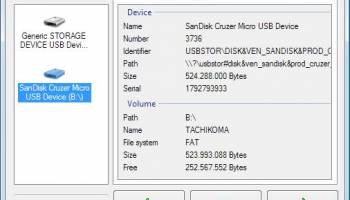
The software provides comprehensive information about connected USB drives, including device name, size, and file system. Additionally, detailed logs of operations are maintained, allowing users to track their activities and troubleshoot any issues that may arise.
**Performance and Reliability:**
USB Image Tool is renowned for its stability and reliability. It performs tasks efficiently without compromising the integrity of the data. The software's ability to handle large volumes of data swiftly makes it a preferred choice for users who require dependable performance.
**Conclusion:**
In summary, USB Image Tool by Alexander Beug is an essential utility for anyone who frequently works with USB drives. Its combination of powerful features, ease of use, and portability makes it a standout choice in the realm of USB management software. Whether you're a casual user looking to back up personal files or a professional needing to manage multiple devices, USB Image Tool offers a comprehensive solution that meets a wide range of needs.
USB Image Tool, developed by Alexander Beug, is a versatile and robust software designed to streamline the management of USB drives. This lightweight yet powerful tool offers a range of features that cater to both casual users and IT professionals who require efficient handling of USB storage devices.
**Key Features:**
1. **Image Creation and Restoration:**
USB Image Tool allows users to create exact images of USB drives, capturing every byte of data. This feature is invaluable for backing up important files, creating bootable drives, or duplicating USB drives for distribution. The restoration process is equally straightforward, ensuring that your data can be easily recovered or transferred to another device.
2. **Support for Various Formats:**
The software supports a wide array of USB drive formats, including FAT, FAT32, NTFS, and exFAT. This compatibility ensures that users can work with virtually any USB drive without worrying about format restrictions.
3. **User-Friendly Interface:**
The intuitive interface of USB Image Tool makes it accessible to users of all skill levels. The clean layout and straightforward navigation allow users to perform tasks with minimal effort, reducing the learning curve typically associated with more complex software.
4. **Batch Processing:**
For users managing multiple USB drives, the batch processing feature is a significant time-saver. This functionality allows for the simultaneous creation or restoration of images across several devices, streamlining workflows and increasing productivity.
5. **Portable Application:**
USB Image Tool is a portable application, meaning it does not require installation. Users can run the software directly from a USB drive, making it an ideal solution for technicians and IT professionals who need a reliable tool on the go.
6. **Detailed Information and Logs:**
The software provides comprehensive information about connected USB drives, including device name, size, and file system. Additionally, detailed logs of operations are maintained, allowing users to track their activities and troubleshoot any issues that may arise.
**Performance and Reliability:**
USB Image Tool is renowned for its stability and reliability. It performs tasks efficiently without compromising the integrity of the data. The software's ability to handle large volumes of data swiftly makes it a preferred choice for users who require dependable performance.
**Conclusion:**
In summary, USB Image Tool by Alexander Beug is an essential utility for anyone who frequently works with USB drives. Its combination of powerful features, ease of use, and portability makes it a standout choice in the realm of USB management software. Whether you're a casual user looking to back up personal files or a professional needing to manage multiple devices, USB Image Tool offers a comprehensive solution that meets a wide range of needs.
OS: Windows 11, Windows 10 32/64 bit, Windows 8 32/64 bit, Windows 7 32/64 bit
Add Your Review or 64-bit Compatibility Report
Top Backup & Restore 64-bit downloads


AnyMP4 Data Recovery 1.5.12
Recover or rescue data from computer, flash media drive and other devices
Shareware | $24.50

PCtransfer 1.0.0.1033
the best free, secure and portable transfer assistant for Windows XP/Vista/7/8
Freeware

Software to Data Recovery 5.8.4.1
Download Software to Data Recovery for instant salvage of lost memorable snaps
Shareware | $79.00

EaseUS Key Finder 4.1.6 Build 20240910
Effortlessly recover lost product keys for software and operating systems.
Demo

Wondershare Recoverit 14.0.22

Wondershare Recoverit: Reliable data recovery for lost or deleted files.
Demo | $64.99


GRBackPro Server Backup x64 11.2.0
Server Backup Software, fast data back-up for Windows Server 2022/2019/2016/2012/2008 x64
Shareware | $199.00

QuickMirror 1.71
QuickMirror provides quick updating of backups, synchronization, and mirroring.
Shareware | $25.00

Free Android Mobile Manager for Windows 1.0.4
The free software to sync android mobile's data while android connected with PC.
Freeware

Backup4all Monitor 1.2.292
Realtime and historical monitoring for Backup4all backups and other actions.
Shareware | $4.99
Members area
Top 64-bit Downloads
-
HWiNFO64 6.28 B4200
x64 freeware download -
Windows 7 x64
x64 trialware download -
GRBackPro Server Backup
x64 11.2.0
x64 shareware download -
EasyTune6 B24.0119.1
x64 freeware download -
XtraTools Professional
x64 26.2.1
x64 shareware download -
BusDog x64 0.2
x64 freeware download -
PhotoRenamer 4.1
x64 freeware download -
Laplink DiskImage
Professional x64 10.0.71
x64 trialware download -
CIB pdf brewer 4.20.0
x64 freeware download -
Windows 10 x64 22H2
x64 trialware download
Top Downloads
-
FreeCommander XE
Portable 2026 Build 941
freeware download -
FMDiff 4.0.5
demo download -
Open Files from XLSX to
XLS 5.2
shareware download -
FURY CTRL 2.0.65.0
freeware download -
Shell Tools 2.0.1
freeware download -
Vim 9.2.0235
open source download -
AnyMP4 Data Recovery 1.5.12
shareware download -
PCtransfer 1.0.0.1033
freeware download -
Software to Data
Recovery 5.8.4.1
shareware download -
EaseUS Key Finder 4.1.6 Build 20240910
demo download -
Music Collection 3.9.7.1
freeware download -
WinFindr 1.9
shareware download -
File Compression 1.0
commercial download -
windows_exporter 0.31.5
open source download -
Caffeine 1.98
freeware download