
WebTemp - X 64-bit Download
Popular x64 Tags
- freeware x64 download
- windows x64 download
- free x64 download
- web x64 download
- software x64 download
- folder x64 download
- utility x64 download
- monitor x64 download
- convert x64 download
- download x64 download
- tool x64 download
- memory x64 download
- video x64 download
- audio x64 download
- text x64 download
- password x64 download
- editor x64 download
- file x64 download
- security x64 download
- image x64 download
- database x64 download
- jpeg x64 download
- icon x64 download
- organizer x64 download
- viewer x64 download
- data x64 download
- print x64 download
- edit x64 download
- search x64 download
- pim x64 download
WebTemp 3.38
Sponsored links:

Daniel Karsubka

The WebTemp application was designed to be a tool that will help you create statistics from CPU temperature meter readings measured by SpeedFan and other tools.
WebTemp provides (server) hardware remote monitoring features. WebTemp displays temperatures like CPU temperature as well as voltages and fan speeds measured by SpeedFan or other hardware.
Monitoring tools and together with CPU and memory load, network traffic and notebook battery status it creates statistics which can be saved, uploaded to FTP servers or emailed at any time. WebTemp can also set off an alarm on high CPU temperature or low fan speeds by sending emails and/or powering off the system.
To provide CPU temperature, voltage and fan speed readings WebTemp needs an external hardware monitoring tool like SpeedFan. Other tools are possible, please see the FAQ. On its own, WebTemp reads out all other data and provides the statistical features.
FEATURES:
· WebTemp reads temperatures, voltages and fan speeds from several hardware monitoring tools,
· it can read RAM and CPU usage, CPU frequency, network traffic, hard disk memory and battery capacity on its own,
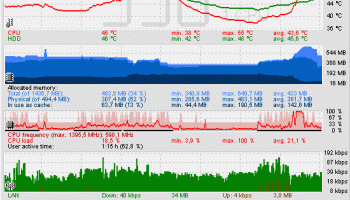
· it creates an image which enables you getting an overview of all the values and their condition in the past few hours,
· furthermore there is a display mode for the past 24 hours,
· a banner-style display which only displays temperatures or network traffic over time,
· another small display called "Light" which just shows you current temperatures and fan speeds,
· both of these images can be displayed transparently on top of your desktop,
· additionally they can be uploaded to any FTP server of yours,
· it is possible to customize the colors and names of statistics and sensors,
· there is an extra window which provides you with system information like real time CPU frequency,
· WebTemp consumes very little processor time and memory, beyond that the setup package fits on one(!) old floppy disk,
· you can choose to get notifications when new versions become available,
· setup does not copy any files into your windows or system directory nor does uninstall leave behind any of WebTemp's registry settings.
WebTemp provides (server) hardware remote monitoring features. WebTemp displays temperatures like CPU temperature as well as voltages and fan speeds measured by SpeedFan or other hardware.
Monitoring tools and together with CPU and memory load, network traffic and notebook battery status it creates statistics which can be saved, uploaded to FTP servers or emailed at any time. WebTemp can also set off an alarm on high CPU temperature or low fan speeds by sending emails and/or powering off the system.
To provide CPU temperature, voltage and fan speed readings WebTemp needs an external hardware monitoring tool like SpeedFan. Other tools are possible, please see the FAQ. On its own, WebTemp reads out all other data and provides the statistical features.
FEATURES:
· WebTemp reads temperatures, voltages and fan speeds from several hardware monitoring tools,
· it can read RAM and CPU usage, CPU frequency, network traffic, hard disk memory and battery capacity on its own,
· it creates an image which enables you getting an overview of all the values and their condition in the past few hours,
· furthermore there is a display mode for the past 24 hours,
· a banner-style display which only displays temperatures or network traffic over time,
· another small display called "Light" which just shows you current temperatures and fan speeds,
· both of these images can be displayed transparently on top of your desktop,
· additionally they can be uploaded to any FTP server of yours,
· it is possible to customize the colors and names of statistics and sensors,
· there is an extra window which provides you with system information like real time CPU frequency,
· WebTemp consumes very little processor time and memory, beyond that the setup package fits on one(!) old floppy disk,
· you can choose to get notifications when new versions become available,
· setup does not copy any files into your windows or system directory nor does uninstall leave behind any of WebTemp's registry settings.
OS: Windows XP, Windows Vista, Windows Vista x64, Windows 7, Windows 7 x64, Windows 8, Windows 8 x64, Windows 10, Windows 10 x64
Add Your Review or 64-bit Compatibility Report
Top Other 64-bit downloads


Caffeine 1.98
Keep your computer awake effortlessly with Caffeine, the ultimate productivity tool.
Freeware


Chopping List 1.0.5.1
Split the content of text files into multiple new files using a custom delimiter
Freeware

Windows 7 x64
Windows 7 x64 is the next release of the Windows client operating system
Trialware | $199.99


Convert Document to Image 16.20
Convert DOC to Tiff, JPG, GIF, BMP etc. Fast & accurate. Batchable. Command line
Shareware | $549.95

iSunshare iBypass Genius 3.1.2.1
bypass icloud activation lock and turn off FMI without password
Shareware | $19.95
Members area
Top 64-bit Downloads
-
HWiNFO64 6.28 B4200
x64 freeware download -
Windows 7 x64
x64 trialware download -
GRBackPro Server Backup
x64 11.2.0
x64 shareware download -
XtraTools Professional
x64 26.2.1
x64 shareware download -
EasyTune6 B24.0119.1
x64 freeware download -
BusDog x64 0.2
x64 freeware download -
PhotoRenamer 4.1
x64 freeware download -
Laplink DiskImage
Professional x64 10.0.71
x64 trialware download -
CIB pdf brewer 4.20.0
x64 freeware download -
Windows 10 x64 22H2
x64 trialware download
Top Downloads
-
FreeCommander XE
Portable 2026 Build 941
freeware download -
FMDiff 4.0.5
demo download -
Open Files from XLSX to
XLS 5.2
shareware download -
FURY CTRL 2.0.65.0
freeware download -
Shell Tools 2.0.1
freeware download -
Vim 9.2.0235
open source download -
AnyMP4 Data Recovery 1.5.12
shareware download -
PCtransfer 1.0.0.1033
freeware download -
Software to Data
Recovery 5.8.4.1
shareware download -
EaseUS Key Finder 4.1.6 Build 20240910
demo download -
Music Collection 3.9.7.1
freeware download -
WinFindr 1.9
shareware download -
File Compression 1.0
commercial download -
windows_exporter 0.31.5
open source download -
Caffeine 1.98
freeware download