
Windows 7 Start Button Changer - X 64-bit Download
Popular x64 Tags
- freeware x64 download
- windows x64 download
- free x64 download
- web x64 download
- software x64 download
- folder x64 download
- utility x64 download
- monitor x64 download
- convert x64 download
- download x64 download
- tool x64 download
- memory x64 download
- video x64 download
- audio x64 download
- text x64 download
- password x64 download
- editor x64 download
- file x64 download
- security x64 download
- image x64 download
- database x64 download
- jpeg x64 download
- icon x64 download
- organizer x64 download
- viewer x64 download
- data x64 download
- print x64 download
- edit x64 download
- search x64 download
- pim x64 download
Windows 7 Start Button Changer 2.6
license: Freeware
downloads: 38
size: 604 kB
updated: 2012-04-16
tags: Start Button Changer, Change Start Button, Modify Start Button, Start Button, Change, Changer, Modify, Button
Add to Basket

The Windows Club

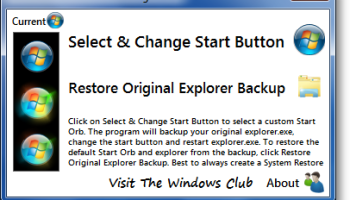
If you are bored of the look at the same old Windows 7 Start Orb, you can now change it easily. Click on Select & Change Start Button to select a custom Start Orb. The program will backup you original explorer.exe, change the start button and restart explorer.exe. To restore the default Start Orb and explorer from the backup, click Restore Original Explorer Backup.
NOTES:
1. Before changing from one custom orb to another custom orb, I’d suggest you first Restore Original Explorer Backup and go back to the defaults and then change over to another custom orb.
2. The program, must be run from its own Program Folder.
3. Best to always create a System Restore point first. Should you face any issue, you can always restore back to a good point. Alternatively, copy-paste sfc /scannow in an elevated cmd. This will run the System File Checker and replace all corrupted system files with original system files.
4. In the rare eventuality that you lose your explorer.exe, then from your desktop, press CTRL-SHIFT-ESC to bring up the Task Manager. Click File tab > New Task > Type cmd > Click Run. In the command prompt which opens, type sfc /scannow and hit enter. Restart when asked to.
5. IF in x64 version, you receive an ‘unhandled exception‘ error, please click on Continue or try running it again ‘As an Admin‘.
6. If the Start Button does not get changed, you may have to follow these steps:
– Make sure that the program is closed.
– Manually take ownership of “C:Windowsexplorer.exe” – or you can use our UWT to do so easily.
– Run the program and select the orb. It should now work.
NOTES:
1. Before changing from one custom orb to another custom orb, I’d suggest you first Restore Original Explorer Backup and go back to the defaults and then change over to another custom orb.
2. The program, must be run from its own Program Folder.
3. Best to always create a System Restore point first. Should you face any issue, you can always restore back to a good point. Alternatively, copy-paste sfc /scannow in an elevated cmd. This will run the System File Checker and replace all corrupted system files with original system files.
4. In the rare eventuality that you lose your explorer.exe, then from your desktop, press CTRL-SHIFT-ESC to bring up the Task Manager. Click File tab > New Task > Type cmd > Click Run. In the command prompt which opens, type sfc /scannow and hit enter. Restart when asked to.
5. IF in x64 version, you receive an ‘unhandled exception‘ error, please click on Continue or try running it again ‘As an Admin‘.
6. If the Start Button does not get changed, you may have to follow these steps:
– Make sure that the program is closed.
– Manually take ownership of “C:Windowsexplorer.exe” – or you can use our UWT to do so easily.
– Run the program and select the orb. It should now work.
OS: Windows 7, Windows 7 x64
Add Your Review or 64-bit Compatibility Report
Top Other 64-bit downloads


Caffeine 1.98
Keep your computer awake effortlessly with Caffeine, the ultimate productivity tool.
Freeware


Chopping List 1.0.5.1
Split the content of text files into multiple new files using a custom delimiter
Freeware

Windows 7 x64
Windows 7 x64 is the next release of the Windows client operating system
Trialware | $199.99


Convert Document to Image 16.20
Convert DOC to Tiff, JPG, GIF, BMP etc. Fast & accurate. Batchable. Command line
Shareware | $549.95

iSunshare iBypass Genius 3.1.2.1
bypass icloud activation lock and turn off FMI without password
Shareware | $19.95
Members area
Top 64-bit Downloads
-
HWiNFO64 6.28 B4200
x64 freeware download -
Windows 7 x64
x64 trialware download -
GRBackPro Server Backup
x64 11.2.0
x64 shareware download -
XtraTools Professional
x64 26.2.1
x64 shareware download -
EasyTune6 B24.0119.1
x64 freeware download -
BusDog x64 0.2
x64 freeware download -
PhotoRenamer 4.1
x64 freeware download -
Laplink DiskImage
Professional x64 10.0.71
x64 trialware download -
CIB pdf brewer 4.20.0
x64 freeware download -
Windows 10 x64 22H2
x64 trialware download
Top Downloads
-
FreeCommander XE
Portable 2026 Build 941
freeware download -
FMDiff 4.0.5
demo download -
Open Files from XLSX to
XLS 5.2
shareware download -
FURY CTRL 2.0.65.0
freeware download -
Shell Tools 2.0.1
freeware download -
Vim 9.2.0231
open source download -
AnyMP4 Data Recovery 1.5.12
shareware download -
PCtransfer 1.0.0.1033
freeware download -
Software to Data
Recovery 5.8.4.1
shareware download -
EaseUS Key Finder 4.1.6 Build 20240910
demo download -
Music Collection 3.9.7.1
freeware download -
WinFindr 1.9
shareware download -
File Compression 1.0
commercial download -
windows_exporter 0.31.5
open source download -
Caffeine 1.98
freeware download