
Windows Defender Uninstaller - X 64-bit Download
Popular x64 Tags
- cpu x64 download
- performance x64 download
- windows x64 download
- driver updates x64 download
- driver update x64 download
- cleaner x64 download
- defrag x64 download
- system x64 download
- drivers update x64 download
- tune x64 download
- tweak x64 download
- registry cleaner x64 download
- security x64 download
- video driver update x64 download
- optimizer x64 download
- registry x64 download
- uninstall x64 download
- speed x64 download
- boost x64 download
- faster x64 download
- system utilities x64 download
- utility x64 download
- optimize x64 download
- driver update software x64 download
- startup x64 download
- disk cleaner x64 download
- clean disk x64 download
- clean x64 download
- vista x64 download
- disk x64 download
You are here: X-64-bit Download
\ System Utilities
\ System Maintenance \ Windows Defender Uninstaller
Windows Defender Uninstaller
Sponsored links:

RAYMONDCC TECH

For most users, simply turning off Windows Defender or disabling it via the Services Control Panel should be enough to stop it running. If for whatever reason you’re still having some sort of issue or are determined to remove Defender completely from the system, unfortunately is isn’t possible using Programs and Features or the Turn Windows features on or off window.
Although there is no official way to cleanly uninstall Defender, it is possible to remove the service, Control Panel entry, other related registry entries and all the files and folders manually so Defender is unofficially removed from the system. This does present its own set of problems though as the registry keys, files and folders are all protected with enhanced permissions and you have to take ownership of them all. Also, once removed, you can’t re-install Defender again because it isn’t a separate package.
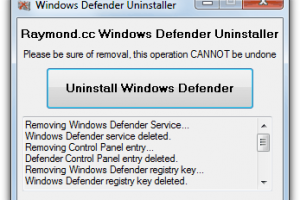
As there seems to be no tool around to do it for you, we’ve decided to create our own little utility that can delete all the necessary protected registry keys, files and folders at the click of a button. Currently the program works great on Windows Vista and 7?s Defender, we may include full Windows 8 Defender support in future if people request it. The problem with all Defender versions in Windows Vista and above is it’s integrated into the operating system and installs by default with no visible or hidden option to uninstall. Many people are looking for ways to disable, uninstall or remove it from their system as they prefer to use other software. Windows XP users at least have the luxury of choosing whether they want to download and install Defender in the first place as it’s a separate package, and then have the option to uninstall again through Add or Remove Programs. Luckily most of the time when you install a new anti spyware program or antivirus application that includes anti spyware, it should be smart enough to disable Windows Defender as your new software takes care of it from now on. However, if Defender is still running or causing other issues, you need to know how to turn it off manually or in more extreme cases remove it from the system completely. Here we show you how to do both
Read More: homepage
Defender in Windows Vista is slightly more integrated into the operating system as opposed to Windows 7 with added options for protecting Internet Explorer, startup items and services/drivers etc. It also includes a tray icon for the program which is started with Windows that needs to be removed.
Although there is no official way to cleanly uninstall Defender, it is possible to remove the service, Control Panel entry, other related registry entries and all the files and folders manually so Defender is unofficially removed from the system. This does present its own set of problems though as the registry keys, files and folders are all protected with enhanced permissions and you have to take ownership of them all. Also, once removed, you can’t re-install Defender again because it isn’t a separate package.
As there seems to be no tool around to do it for you, we’ve decided to create our own little utility that can delete all the necessary protected registry keys, files and folders at the click of a button. Currently the program works great on Windows Vista and 7?s Defender, we may include full Windows 8 Defender support in future if people request it. The problem with all Defender versions in Windows Vista and above is it’s integrated into the operating system and installs by default with no visible or hidden option to uninstall. Many people are looking for ways to disable, uninstall or remove it from their system as they prefer to use other software. Windows XP users at least have the luxury of choosing whether they want to download and install Defender in the first place as it’s a separate package, and then have the option to uninstall again through Add or Remove Programs. Luckily most of the time when you install a new anti spyware program or antivirus application that includes anti spyware, it should be smart enough to disable Windows Defender as your new software takes care of it from now on. However, if Defender is still running or causing other issues, you need to know how to turn it off manually or in more extreme cases remove it from the system completely. Here we show you how to do both
Read More: homepage
Defender in Windows Vista is slightly more integrated into the operating system as opposed to Windows 7 with added options for protecting Internet Explorer, startup items and services/drivers etc. It also includes a tray icon for the program which is started with Windows that needs to be removed.
OS: Windows Vista, Windows Vista x64, Windows 7, Windows 7 x64
Add Your Review or 64-bit Compatibility Report
Top System Maintenance 64-bit downloads


Windows 7 Service Pack 1 7601.17514.1011
SP1 - all previously publicly released updates for Windows 7 and Server 2008 R2
Freeware

windows_exporter 0.31.5
Lightweight tool for exporting Windows metrics to Prometheus for monitoring.
Open Source

WinToUSB 10.5 Build January 2
Easily create bootable USB drives from Windows installations with WinToUSB.
Shareware | $29.95

XtraTools Professional x64 26.3.1

XtraTools increases productivity and makes working with MS Windows easier.
Shareware | $29.99

Microsoft Edge WebView2 Runtime 146.0.3856.78
WebView2 Runtime: Embed web content in apps with Edge's rendering engine.
Freeware


Argus Monitor 7.3.5 Build 3156
Monitor system health and performance with Argus Monitor's intuitive tools.
Trialware | $14.95

TopNotify 3.1.1
TopNotify: Real-time notifications and alerts for seamless communication.
Open Source

Fortect 7.3.5.0
Fortect repairs and optimizes your PC, enhancing performance effortlessly.
Trialware | $30.95

Members area
Top 64-bit Downloads
-
HWiNFO64 6.28 B4200
x64 freeware download -
Windows 10 x64 22H2
x64 trialware download -
Windows 7 x64
x64 trialware download -
GRBackPro Server Backup
x64 11.2.0
x64 shareware download -
XtraTools Professional
x64 26.3.1
x64 shareware download -
DAR 2.7.14
x64 open source download -
3DMark 2.29.8282
x64 freeware download -
Processor X32 or X64 1.5
x64 freeware download -
EasyTune6 B24.0119.1
x64 freeware download -
O&O MediaRecovery
64-bit 14.0.17
x64 demo download
Top Downloads
-
FreeCommander XE
Portable 2026 Build 941
freeware download -
FURY CTRL 2.0.65.0
freeware download -
FMDiff 4.0.5
demo download -
Vim 9.2.0271
open source download -
iSunshare iBypass Genius 3.1.2.1
shareware download -
Shell Tools 2.0.1
freeware download -
HWiNFO64 6.28 B4200
freeware download -
Open Files from XLSX to
XLS 5.2
shareware download -
EaseUS Key Finder 4.1.6 Build 20240910
demo download -
AnyMP4 Data Recovery 1.5.12
shareware download -
PCtransfer 1.0.0.1033
freeware download -
Software to Data
Recovery 5.8.4.1
shareware download -
Pitara 5.0.9583.34420
open source download -
Music Collection 3.9.7.3
freeware download -
WinFindr 1.9
shareware download