
WinEmPower - X 64-bit Download
Popular x64 Tags
- freeware x64 download
- windows x64 download
- free x64 download
- web x64 download
- software x64 download
- folder x64 download
- utility x64 download
- monitor x64 download
- convert x64 download
- download x64 download
- tool x64 download
- video x64 download
- memory x64 download
- audio x64 download
- text x64 download
- password x64 download
- editor x64 download
- file x64 download
- security x64 download
- image x64 download
- database x64 download
- jpeg x64 download
- icon x64 download
- organizer x64 download
- viewer x64 download
- data x64 download
- print x64 download
- edit x64 download
- search x64 download
- pim x64 download
WinEmPower 1.0.0
Sponsored links:

Tevfik Binen


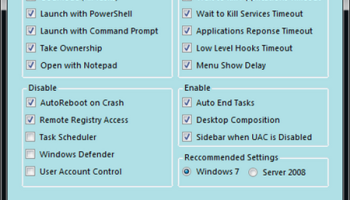
WinEmPower is a freeware tool that can "EmPower" you and help you to optimize and solve problems in some fields of Windows 7 and Windows Server 2008 easily, instead of navigating on registry & services which causes time loss and invites you to make some mistakes.
When you run the application, it will detect your operating system and it will suggest the settings for Windows 7 or Windows Server 2008. In addition, WinEmPower displays tooltips that will help you understand the consequences of the selection.
FEATURES:
Empower:
· GodMode (All Tasks) : Creates a 'GoodMode (All Tasks)' link on the Desktop
· Launch with PowerShell: Adds 'Launch with PowerShell' option to context menu for the folders
· Launch with Command Prompt: Adds 'Launch with Command Prompt' option to context menu for the folders
· Take Ownership: Adds 'Take Ownership' option to context menu for the folders
· Open with Notepad: Adds 'Open with Notepad' option to context menu for all file types
Optimize:
· Wait to Kill Applications Timeout : Sets its value to 1000 in order to shorten shutdown/restart duration of applications.
· Wait to Kill Services Timeout: Sets its value to 1000 in order to shorten shutdown/restart duration of services.
· Applications Response Timeout: Shortens Application Hung Timeout when an application is not responding in order to restart or end it faster.
· Low Level Hooks Timeout: Shortens Low Level Hooks Timeout.
· Menu show Delay: Sets the delay value of menus to 0 in order to have an os navigation faster.
Enable:
· Auto End Tasks: Enables closing the applications all together when a shutdown/logoff/restart signal has been sent.
· Desktop Composition: Enables Windows Aero interface even the Windows Experience Index could not be started / completed or probably is not high enough to enable it.
· Sidebar when UAC is disabled: Enables the Sidebar even if User Account Conrtol is disabled.
Disable:
· AutoReboot on Crash: Disables AutoReboot feature on Crashes, It may be possible to carry on the work if the problem is not stopping windows. Even if it is stopping, at least the error would be seen easily.
· Remote Registry Access: It can be useful to protect the registry disabling the access remotely if it is not needed to use. A reboot is needed.
· Task Scheduler: Disables the Task Scheduler. A reboot is needed.
· Windows Defender: Disables Windows Defender if you prefer not to use it to have a faster system as disabling default security options. It will decrease the security level. A reboot is needed.
· User Account Control: Disables UAC as configuring it to level 0. it will increase the system performance and probably compatibility of older applications while launching them as disabling default security option, will decrease security level. A reboot is needed.
When you run the application, it will detect your operating system and it will suggest the settings for Windows 7 or Windows Server 2008. In addition, WinEmPower displays tooltips that will help you understand the consequences of the selection.
FEATURES:
Empower:
· GodMode (All Tasks) : Creates a 'GoodMode (All Tasks)' link on the Desktop
· Launch with PowerShell: Adds 'Launch with PowerShell' option to context menu for the folders
· Launch with Command Prompt: Adds 'Launch with Command Prompt' option to context menu for the folders
· Take Ownership: Adds 'Take Ownership' option to context menu for the folders
· Open with Notepad: Adds 'Open with Notepad' option to context menu for all file types
Optimize:
· Wait to Kill Applications Timeout : Sets its value to 1000 in order to shorten shutdown/restart duration of applications.
· Wait to Kill Services Timeout: Sets its value to 1000 in order to shorten shutdown/restart duration of services.
· Applications Response Timeout: Shortens Application Hung Timeout when an application is not responding in order to restart or end it faster.
· Low Level Hooks Timeout: Shortens Low Level Hooks Timeout.
· Menu show Delay: Sets the delay value of menus to 0 in order to have an os navigation faster.
Enable:
· Auto End Tasks: Enables closing the applications all together when a shutdown/logoff/restart signal has been sent.
· Desktop Composition: Enables Windows Aero interface even the Windows Experience Index could not be started / completed or probably is not high enough to enable it.
· Sidebar when UAC is disabled: Enables the Sidebar even if User Account Conrtol is disabled.
Disable:
· AutoReboot on Crash: Disables AutoReboot feature on Crashes, It may be possible to carry on the work if the problem is not stopping windows. Even if it is stopping, at least the error would be seen easily.
· Remote Registry Access: It can be useful to protect the registry disabling the access remotely if it is not needed to use. A reboot is needed.
· Task Scheduler: Disables the Task Scheduler. A reboot is needed.
· Windows Defender: Disables Windows Defender if you prefer not to use it to have a faster system as disabling default security options. It will decrease the security level. A reboot is needed.
· User Account Control: Disables UAC as configuring it to level 0. it will increase the system performance and probably compatibility of older applications while launching them as disabling default security option, will decrease security level. A reboot is needed.
OS: Windows XP, Windows Vista, Windows Vista x64, Windows 7, Windows 7 x64

Add Your Review or 64-bit Compatibility Report
Top Other 64-bit downloads


iSunshare iBypass Genius 3.1.2.1
bypass icloud activation lock and turn off FMI without password
Shareware | $19.95

Caffeine 1.98
Keep your computer awake effortlessly with Caffeine, the ultimate productivity tool.
Freeware

Windows 7 x64
Windows 7 x64 is the next release of the Windows client operating system
Trialware | $199.99


Chopping List 1.0.5.1
Split the content of text files into multiple new files using a custom delimiter
Freeware


Windows 10 x64 22H2
Windows 10 x64 demonstrates new levels of flexibility, navigation & familiarity
Trialware
Members area
Top 64-bit Downloads
-
HWiNFO64 6.28 B4200
x64 freeware download -
Windows 7 x64
x64 trialware download -
GRBackPro Server Backup
x64 11.2.0
x64 shareware download -
Windows 10 x64 22H2
x64 trialware download -
XtraTools Professional
x64 26.3.1
x64 shareware download -
EasyTune6 B24.0119.1
x64 freeware download -
DAR 2.7.14
x64 open source download -
Processor X32 or X64 1.5
x64 freeware download -
O&O MediaRecovery
64-bit 14.0.17
x64 demo download -
BusDog x64 0.2
x64 freeware download
Top Downloads
-
FreeCommander XE
Portable 2026 Build 941
freeware download -
FURY CTRL 2.0.65.0
freeware download -
FMDiff 4.0.5
demo download -
Open Files from XLSX to
XLS 5.2
shareware download -
Vim 9.2.0265
open source download -
Shell Tools 2.0.1
freeware download -
HWiNFO64 6.28 B4200
freeware download -
EaseUS Key Finder 4.1.6 Build 20240910
demo download -
Pitara 5.0.9583.34420
open source download -
iSunshare iBypass Genius 3.1.2.1
shareware download -
AnyMP4 Data Recovery 1.5.12
shareware download -
PCtransfer 1.0.0.1033
freeware download -
Software to Data
Recovery 5.8.4.1
shareware download -
Music Collection 3.9.7.3
freeware download -
WinFindr 1.9
shareware download