
WinHasher - X 64-bit Download
Popular x64 Tags
- windows x64 download
- tool x64 download
- software x64 download
- view x64 download
- editor x64 download
- python x64 download
- xml x64 download
- sql x64 download
- dll x64 download
- resource x64 download
- compare x64 download
- dotnet x64 download
- csv x64 download
- uml x64 download
- table x64 download
- delphi x64 download
- xls x64 download
- perl x64 download
- html x64 download
- diff x64 download
- database x64 download
- query x64 download
- convert x64 download
- sql tools x64 download
- ide x64 download
- sql tool x64 download
- activestate x64 download
- doc x64 download
- txt x64 download
- mssql x64 download
WinHasher 1.6.2.67
Sponsored links:

Jeff Darlington

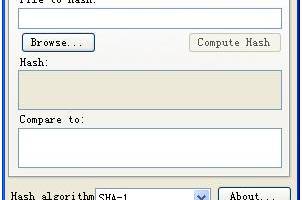
WinHasher is a free, Open Source cryptographic hash or digest generator written in C# using Microsoft's .NET 2.0 Framework. It can be used to verify file download integrity, compare two or more files for modifications, and to some degree generate strong, unique passwords.
Cryptographic hashing is readily available on many computer operating systems. It often comes built-in to the OS or as a (relatively) standard optional package. Mac OS, Linux, Free/OpenBSD, and many other OSes include OpenSSL as either a pre-installed or easily installable optional component. OpenSSL includes several command-line components for generating cryptographic hashes and there are number of graphical user interface (GUI) applications that allow point-and-click access to its capabilities.
Not so with Microsoft Windows. Windows does not include any built-in utilities for cryptographic hashes, and installing and using OpenSSL on Windows is not a trivial matter. The typical Windows user of today is much less familiar with the Windows Console (i.e. command line) let alone compiling software from source. And while cryptographic hashes are pretty much standard in programming libraries such as the Microsoft .NET Framework, the user is required to write and compile their own applications to use them.
This "hashing divide" has annoyed me for some time. While I consider myself to be an operating system agnostic and find myself equally home on both Windows and Linux, there are many times I've downloaded Windows-only software but didn't have the capability to verify the file's hash. Either I've been unable to install and run OpenSSL on a given machine, or I haven't had the time or access to a Linux box to copy the file over, generate the hash, and verify it before install. So I wanted to create a quick, simple, easy-to-use Windows app so I could get the hash of a file without waiting or moving it around. I also thought it would be a nice idea to be able to quickly compare the hashes of multiple files without having to generate each one and manually check every hexadecimal digit, so I added that functionality too. After writing the program, I thought it might be useful to others, so I decided to share.
Cryptographic hashing is readily available on many computer operating systems. It often comes built-in to the OS or as a (relatively) standard optional package. Mac OS, Linux, Free/OpenBSD, and many other OSes include OpenSSL as either a pre-installed or easily installable optional component. OpenSSL includes several command-line components for generating cryptographic hashes and there are number of graphical user interface (GUI) applications that allow point-and-click access to its capabilities.
Not so with Microsoft Windows. Windows does not include any built-in utilities for cryptographic hashes, and installing and using OpenSSL on Windows is not a trivial matter. The typical Windows user of today is much less familiar with the Windows Console (i.e. command line) let alone compiling software from source. And while cryptographic hashes are pretty much standard in programming libraries such as the Microsoft .NET Framework, the user is required to write and compile their own applications to use them.
This "hashing divide" has annoyed me for some time. While I consider myself to be an operating system agnostic and find myself equally home on both Windows and Linux, there are many times I've downloaded Windows-only software but didn't have the capability to verify the file's hash. Either I've been unable to install and run OpenSSL on a given machine, or I haven't had the time or access to a Linux box to copy the file over, generate the hash, and verify it before install. So I wanted to create a quick, simple, easy-to-use Windows app so I could get the hash of a file without waiting or moving it around. I also thought it would be a nice idea to be able to quickly compare the hashes of multiple files without having to generate each one and manually check every hexadecimal digit, so I added that functionality too. After writing the program, I thought it might be useful to others, so I decided to share.
OS: Windows XP, Windows Vista, Windows Vista x64, Windows 7, Windows 7 x64, Windows 8, Windows 8 x64
Add Your Review or 64-bit Compatibility Report
Top Other 64-bit downloads


JProfiler 16.0.0
JProfiler is a powerful Java profiler for performance tuning and memory analysis.
Trialware | $549.00

Android Studio 2025.3.2 Panda 2
Android Studio: Powerful IDE for Android app development with robust tools.
Freeware


Flyff 2.4.9
Vagrant simplifies environment setup for developers with portable, reproducible workflows.
Open Source
Members area
Top 64-bit Downloads
-
dotNet Sniffer 64-bit
x64 2.0
x64 freeware download -
DotNetBrowser 3.5.1
x64 commercial download -
Dart Editor 2.19.6
x64 open source download -
PDF Viewer SDK ActiveX
x64 8.5
x64 shareware download -
Software Ideas Modeler
Portable x64 14.55
x64 freeware download -
TortoiseSVN for 64-bit
System 1.14.7.29687
x64 freeware download -
Syncro SVN Client x64 10.1 B2015040812
x64 trialware download -
HPC Pack 2008 R2 SDK x64 3.3.3950 SP3
x64 freeware download -
Microsoft Speech SDK 11
x64 freeware download -
HDFView x64 3.3.2
x64 freeware download
Top Downloads
-
NASM 2.16.01
open source download -
Library .NET 19.8.8201
trialware download -
WebData 10.2.4.0
shareware download -
jPDFImages 2021R1
demo download -
IdleX 1.11.2
freeware download -
Python 3.14.3
open source download -
Delphi 12.0
shareware download -
OpenWire 8.0.0.156
freeware download -
GeeXLab 0.32.0
freeware download -
PHP 8.5.4
open source download -
.NET Logging Library 2.20
shareware download -
Document .Net 2026.3.5
demo download -
Swapy 0.5.4
open source download -
UtilsLib 7.2
demo download -
PythonCard 0.8.2
open source download