
Winstep Start Menu Organizer - X 64-bit Download
Popular x64 Tags
- cpu x64 download
- performance x64 download
- windows x64 download
- driver updates x64 download
- driver update x64 download
- cleaner x64 download
- defrag x64 download
- system x64 download
- drivers update x64 download
- tune x64 download
- tweak x64 download
- registry cleaner x64 download
- security x64 download
- video driver update x64 download
- optimizer x64 download
- registry x64 download
- uninstall x64 download
- speed x64 download
- boost x64 download
- faster x64 download
- system utilities x64 download
- utility x64 download
- optimize x64 download
- driver update software x64 download
- startup x64 download
- disk cleaner x64 download
- clean disk x64 download
- clean x64 download
- vista x64 download
- disk x64 download
You are here: X-64-bit Download
\ System Utilities
\ System Maintenance \ Winstep Start Menu Organizer
Winstep Start Menu Organizer 1.5
Sponsored links:

Winstep Software Technologies

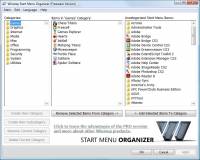
Winstep Start Menu Organizer is a freeware program designed to rapidly help you clean and organize your Microsoft Windows Start Menu. Over time, as more and more applications get installed, the Start Menu can get so cluttered that you end up spending a lot of time simply trying to find the program you want to run. When this happens, it's time to organize the Start Menu.
The shortcuts and folders displayed in your All Programs menu are actually stored in two separate folders in your hard drive: one set specific to the current logged in user and another common to all users.
This means you could use nothing but Explorer to reorganize the contents of your All Programs menu, but then you would have to know the location of both folders on your system - which is different in basically every version of Windows - and you would have to be careful in order to keep both components of the All Programs menu synchronized.
For instance, the Accessories folder exists in both the current and all users folders, however Windows only displays a single entry for it in the Start Menu - and it also automatically merges the contents of both versions.
This is where the Winstep Start Menu Organizer comes in: it allows you to quickly and effortlessly group your Start Menu shortcuts into a specific set of categories (e.g. Utilities, Internet, Office, etc...).
Differences between the Free and Pro versions
The free version of the Winstep Start Menu Organizer should be enough for most general purposes as it features ten standard categories. If this is not enough, the Pro version of the Organizer allows you to:
1. Create your own Categories.
2. Rename Categories.
3. Delete Categories.
4. Add Subcategories.
In addition, by upgrading to the Pro version you also get:
1. Ability to reorganize all items in the Start Menu, not just the items at the root.
2. Priority support.
3. Free life-time upgrades.
4. The knowledge that you are supporting future development of the Organizer.
The shortcuts and folders displayed in your All Programs menu are actually stored in two separate folders in your hard drive: one set specific to the current logged in user and another common to all users.
This means you could use nothing but Explorer to reorganize the contents of your All Programs menu, but then you would have to know the location of both folders on your system - which is different in basically every version of Windows - and you would have to be careful in order to keep both components of the All Programs menu synchronized.
For instance, the Accessories folder exists in both the current and all users folders, however Windows only displays a single entry for it in the Start Menu - and it also automatically merges the contents of both versions.
This is where the Winstep Start Menu Organizer comes in: it allows you to quickly and effortlessly group your Start Menu shortcuts into a specific set of categories (e.g. Utilities, Internet, Office, etc...).
Differences between the Free and Pro versions
The free version of the Winstep Start Menu Organizer should be enough for most general purposes as it features ten standard categories. If this is not enough, the Pro version of the Organizer allows you to:
1. Create your own Categories.
2. Rename Categories.
3. Delete Categories.
4. Add Subcategories.
In addition, by upgrading to the Pro version you also get:
1. Ability to reorganize all items in the Start Menu, not just the items at the root.
2. Priority support.
3. Free life-time upgrades.
4. The knowledge that you are supporting future development of the Organizer.
OS: Windows 2000, Windows 2003, Windows XP, Windows Vista, Windows Vista x64, Windows 7, Windows 7 x64
Add Your Review or 64-bit Compatibility Report
Top System Maintenance 64-bit downloads


Windows 7 Service Pack 1 7601.17514.1011
SP1 - all previously publicly released updates for Windows 7 and Server 2008 R2
Freeware


Revo Uninstaller 2.00
Freeware innovative uninstall utility with many cleaning tools included
Freeware

Fortect 7.3.4.6
Fortect repairs and optimizes your PC, enhancing performance effortlessly.
Trialware | $30.95

TweakNow WinSecret 8.0.2 Plus

Unlock hidden Windows features and optimize your system effortlessly.
Trialware | $14.99

XtraTools Professional x64 26.2.1
XtraTools increases productivity and makes working with MS Windows easier.
Shareware | $29.99

Outbyte PC Repair 1.1.2.58265
Outbyte PC Repair is an app that is designed to optimize Windows performance
Shareware | $29.95

Max Secure Total Security 1.0.7.1
MAX Secure total security is a most advanced enabled antivirus available.
Shareware | $49.99

TweakNow WinSecret 7.9.8 Plus
Unlock hidden Windows features and optimize your system effortlessly.
Trialware | $11.24


Cacheman 10.20
Cacheman allows the user to choose from 10 Windows auto optimization profiles.
Shareware | $28.95
Members area
Top 64-bit Downloads
-
Windows 10 x64 22H2
x64 trialware download -
SoftPerfect RAM Disk 26.2
x64 shareware download -
XtraTools Professional
x64 26.2.1
x64 shareware download -
Windows 7 x64
x64 trialware download -
Windows 8 x64 RTM Build 9200
x64 trialware download -
HWMonitor (64-bit) 1.53
x64 freeware download -
7-Zip (x64 bit) 24.07
x64 open source download -
Lenovo Vantage 10.2001.10.0
x64 freeware download -
BestSync Portable x64 2024 (19.0.1.5)
x64 trialware download -
AkelPad (x64 bit) 4.9.8
x64 open source download
Top Downloads
-
FreeCommander XE 2026 Build 941
shareware download -
Windows 10 x64 22H2
trialware download -
Windows 7 Service Pack 1 7601.17514.1011
freeware download -
Dr. Hardware 2026 26.0.0
shareware download -
FreeCommander XE
Portable 2026 Build 941
freeware download -
Thaiphoon Burner 17.4.1.2
freeware download -
Caffeine 1.98
freeware download -
BlueStacks 5 5.21.210.1023
freeware download -
RecoveryRobot Memory
Card Recovery 1.3.3
shareware download -
BIOS Agent Plus 2.2019.1.31
demo download -
Qemu Simple Boot 1.3
freeware download -
Revo Uninstaller 2.00
freeware download -
Fortect 7.3.4.6
trialware download -
Vim 9.2.0061
open source download -
SoftPerfect RAM Disk 26.2
shareware download