
WinStep Xtreme - X 64-bit Download
Popular x64 Tags
- cpu x64 download
- performance x64 download
- windows x64 download
- driver updates x64 download
- driver update x64 download
- cleaner x64 download
- defrag x64 download
- system x64 download
- drivers update x64 download
- tune x64 download
- tweak x64 download
- registry cleaner x64 download
- security x64 download
- video driver update x64 download
- optimizer x64 download
- registry x64 download
- uninstall x64 download
- speed x64 download
- boost x64 download
- faster x64 download
- system utilities x64 download
- utility x64 download
- optimize x64 download
- driver update software x64 download
- startup x64 download
- disk cleaner x64 download
- clean disk x64 download
- clean x64 download
- vista x64 download
- disk x64 download
WinStep Xtreme 26.1
Sponsored links:
license: Trialware ($44.95)
downloads: 1363
size: 47.30 MB
updated: 2026-01-27
tags: Winstep Xtreme, download Winstep Xtreme, Winstep Xtreme free download, Customize Desktop, Desktop Dock, Desktop Tweak, Dock, Tweak, Desktop, Customize
Buy Now
Add to Basket

Winstep Software Technologies

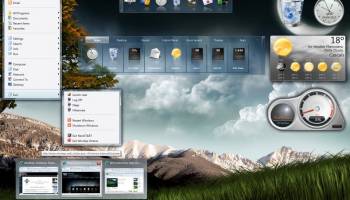
Winstep Xtreme, developed by Winstep Software Technologies, is a comprehensive suite designed to transform your Windows desktop into a more efficient and visually appealing workspace. This software package is perfect for users who crave a customizable and organized desktop environment, offering a plethora of features that enhance both functionality and aesthetics.
At the heart of Winstep Xtreme is its ability to replace the traditional Windows interface with a more dynamic and engaging experience. The software includes several key components: NextSTART, WorkShelf, Nexus, and the Winstep Start Menu Organizer. Each component serves a unique purpose, contributing to a cohesive and streamlined desktop experience.
NextSTART is a powerful menu system that allows users to create custom menus and taskbars, providing quick access to applications, files, and system commands. Its flexibility ensures that users can tailor their workflow to suit their specific needs, enhancing productivity by reducing the time spent navigating through cluttered desktops.
WorkShelf acts as a robust tabbed dock, organizing applications and files into easily accessible categories. This feature is particularly beneficial for users who juggle multiple projects or tasks, as it allows for quick switching between different workspaces. The drag-and-drop functionality ensures that organizing your digital workspace is both intuitive and efficient.
Nexus, the dock component of Winstep Xtreme, offers a visually stunning way to launch applications. With support for live icon reflections, animated icons, and a variety of themes, Nexus not only boosts productivity but also adds a touch of elegance to your desktop. The dock is highly customizable, allowing users to tailor its appearance and behavior to match their personal style.
The Winstep Start Menu Organizer is a handy tool for those who find the default Windows Start Menu cumbersome. It simplifies the process of organizing and accessing programs, making it easier to find what you need when you need it. This feature is particularly useful for users with extensive software libraries, as it reduces the time spent searching for applications.
One of the standout features of Winstep Xtreme is its extensive customization options. Users can choose from a wide array of themes, widgets, and skins to personalize their desktop environment. This level of customization ensures that your desktop not only functions well but also reflects your personal taste and style.
In addition to its core features, Winstep Xtreme is designed with performance in mind. The software is optimized to run smoothly without consuming excessive system resources, ensuring that even users with older machines can enjoy its benefits.
Overall, Winstep Xtreme is a versatile and powerful tool for anyone looking to enhance their Windows desktop experience. Whether you're a power user seeking greater efficiency or someone who simply wants a more visually appealing interface, Winstep Xtreme offers a comprehensive solution that is both practical and aesthetically pleasing. With its rich feature set and high degree of customization, it's a worthy investment for those who spend significant time at their computers.
At the heart of Winstep Xtreme is its ability to replace the traditional Windows interface with a more dynamic and engaging experience. The software includes several key components: NextSTART, WorkShelf, Nexus, and the Winstep Start Menu Organizer. Each component serves a unique purpose, contributing to a cohesive and streamlined desktop experience.
NextSTART is a powerful menu system that allows users to create custom menus and taskbars, providing quick access to applications, files, and system commands. Its flexibility ensures that users can tailor their workflow to suit their specific needs, enhancing productivity by reducing the time spent navigating through cluttered desktops.
WorkShelf acts as a robust tabbed dock, organizing applications and files into easily accessible categories. This feature is particularly beneficial for users who juggle multiple projects or tasks, as it allows for quick switching between different workspaces. The drag-and-drop functionality ensures that organizing your digital workspace is both intuitive and efficient.
Nexus, the dock component of Winstep Xtreme, offers a visually stunning way to launch applications. With support for live icon reflections, animated icons, and a variety of themes, Nexus not only boosts productivity but also adds a touch of elegance to your desktop. The dock is highly customizable, allowing users to tailor its appearance and behavior to match their personal style.
The Winstep Start Menu Organizer is a handy tool for those who find the default Windows Start Menu cumbersome. It simplifies the process of organizing and accessing programs, making it easier to find what you need when you need it. This feature is particularly useful for users with extensive software libraries, as it reduces the time spent searching for applications.
One of the standout features of Winstep Xtreme is its extensive customization options. Users can choose from a wide array of themes, widgets, and skins to personalize their desktop environment. This level of customization ensures that your desktop not only functions well but also reflects your personal taste and style.
In addition to its core features, Winstep Xtreme is designed with performance in mind. The software is optimized to run smoothly without consuming excessive system resources, ensuring that even users with older machines can enjoy its benefits.
Overall, Winstep Xtreme is a versatile and powerful tool for anyone looking to enhance their Windows desktop experience. Whether you're a power user seeking greater efficiency or someone who simply wants a more visually appealing interface, Winstep Xtreme offers a comprehensive solution that is both practical and aesthetically pleasing. With its rich feature set and high degree of customization, it's a worthy investment for those who spend significant time at their computers.
Homepage: WinStep Xtreme
OS: Windows 11, Windows 10 32/64 bit, Windows 8 32/64 bit, Windows 7 32/64 bit
Add Your Review or 64-bit Compatibility Report
Top System Maintenance 64-bit downloads


windows_exporter 0.31.5
Lightweight tool for exporting Windows metrics to Prometheus for monitoring.
Open Source

Windows 7 Service Pack 1 7601.17514.1011
SP1 - all previously publicly released updates for Windows 7 and Server 2008 R2
Freeware

WinToUSB 10.5 Build January 2
Easily create bootable USB drives from Windows installations with WinToUSB.
Shareware | $29.95

Microsoft Edge WebView2 Runtime 146.0.3856.78

WebView2 Runtime: Embed web content in apps with Edge's rendering engine.
Freeware

XtraTools Professional x64 26.3.1
XtraTools increases productivity and makes working with MS Windows easier.
Shareware | $29.99

TopNotify 3.1.1
TopNotify: Real-time notifications and alerts for seamless communication.
Open Source

Fortect 7.3.5.0
Fortect repairs and optimizes your PC, enhancing performance effortlessly.
Trialware | $30.95


Members area
Top 64-bit Downloads
-
HWiNFO64 6.28 B4200
x64 freeware download -
Windows 7 x64
x64 trialware download -
GRBackPro Server Backup
x64 11.2.0
x64 shareware download -
Windows 10 x64 22H2
x64 trialware download -
EasyTune6 B24.0119.1
x64 freeware download -
DAR 2.7.14
x64 open source download -
XtraTools Professional
x64 26.3.1
x64 shareware download -
Processor X32 or X64 1.5
x64 freeware download -
O&O MediaRecovery
64-bit 14.0.17
x64 demo download -
BusDog x64 0.2
x64 freeware download
Top Downloads
-
FreeCommander XE
Portable 2026 Build 941
freeware download -
FURY CTRL 2.0.65.0
freeware download -
FMDiff 4.0.5
demo download -
Open Files from XLSX to
XLS 5.2
shareware download -
Vim 9.2.0265
open source download -
Shell Tools 2.0.1
freeware download -
HWiNFO64 6.28 B4200
freeware download -
EaseUS Key Finder 4.1.6 Build 20240910
demo download -
Pitara 5.0.9583.34420
open source download -
iSunshare iBypass Genius 3.1.2.1
shareware download -
AnyMP4 Data Recovery 1.5.12
shareware download -
PCtransfer 1.0.0.1033
freeware download -
Software to Data
Recovery 5.8.4.1
shareware download -
Music Collection 3.9.7.3
freeware download -
WinFindr 1.9
shareware download