
WinUtil - X 64-bit Download
Popular x64 Tags
- cpu x64 download
- performance x64 download
- windows x64 download
- driver updates x64 download
- driver update x64 download
- cleaner x64 download
- defrag x64 download
- system x64 download
- drivers update x64 download
- tune x64 download
- tweak x64 download
- registry cleaner x64 download
- security x64 download
- video driver update x64 download
- optimizer x64 download
- registry x64 download
- uninstall x64 download
- speed x64 download
- boost x64 download
- faster x64 download
- system utilities x64 download
- utility x64 download
- optimize x64 download
- driver update software x64 download
- startup x64 download
- disk cleaner x64 download
- clean disk x64 download
- clean x64 download
- vista x64 download
- disk x64 download
WinUtil 26.03.13
Sponsored links:
license: Open Source
downloads: 83
size: 686 kB
updated: 2026-03-26
tags: WinUtil, download WinUtil, WinUtil free download, tweak Windows, install program, configure Windows, install, tweak, telemetry, disable
Add to Basket

Chris Titus

**WinUtil by Chris Titus: A Comprehensive Windows Optimization Tool**
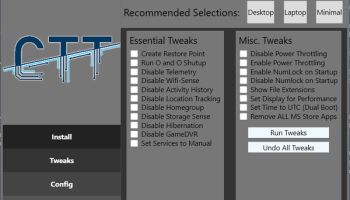
WinUtil, developed by the renowned tech enthusiast Chris Titus, is a versatile utility designed to streamline and enhance the Windows operating system experience. This powerful tool offers a suite of features aimed at optimizing system performance, improving security, and customizing the user environment to suit individual preferences.
**Key Features:**
1. **System Optimization:**
WinUtil excels in fine-tuning system performance. It provides users with options to disable unnecessary services, manage startup programs, and clean up system clutter. These features collectively contribute to a faster, more responsive Windows experience.
2. **Security Enhancements:**
Security is a critical aspect of any operating system, and WinUtil addresses this with several robust features. It includes tools to disable telemetry, enhance privacy settings, and manage Windows updates more effectively. These options help users maintain a secure and private computing environment.
3. **Customization:**
Personalization is at the heart of WinUtil. The software allows users to tweak various aspects of the Windows interface, from the Start menu to taskbar settings. This level of customization ensures that users can create a workspace that is both aesthetically pleasing and functionally efficient.
4. **Bloatware Removal:**
One of the standout features of WinUtil is its ability to remove pre-installed bloatware. By eliminating unnecessary applications that come with a fresh Windows installation, WinUtil helps users reclaim valuable system resources and storage space.
5. **User-Friendly Interface:**
Despite its extensive range of features, WinUtil boasts a clean and intuitive interface. This makes it accessible to both novice users and seasoned tech enthusiasts. The straightforward layout ensures that users can easily navigate through the various tools and options without feeling overwhelmed.
6. **Regular Updates:**
Chris Titus is known for his commitment to continuous improvement, and WinUtil is no exception. The software receives regular updates, incorporating user feedback and the latest advancements in Windows optimization techniques. This ensures that WinUtil remains a relevant and effective tool in an ever-evolving tech landscape.
**Conclusion:**
WinUtil by Chris Titus is an indispensable tool for anyone looking to optimize their Windows operating system. Its comprehensive suite of features, combined with a user-friendly interface and regular updates, makes it a standout choice for both casual users and tech-savvy individuals. Whether you're looking to boost system performance, enhance security, or customize your Windows experience, WinUtil provides the tools you need to achieve your goals efficiently and effectively.
WinUtil, developed by the renowned tech enthusiast Chris Titus, is a versatile utility designed to streamline and enhance the Windows operating system experience. This powerful tool offers a suite of features aimed at optimizing system performance, improving security, and customizing the user environment to suit individual preferences.
**Key Features:**
1. **System Optimization:**
WinUtil excels in fine-tuning system performance. It provides users with options to disable unnecessary services, manage startup programs, and clean up system clutter. These features collectively contribute to a faster, more responsive Windows experience.
2. **Security Enhancements:**
Security is a critical aspect of any operating system, and WinUtil addresses this with several robust features. It includes tools to disable telemetry, enhance privacy settings, and manage Windows updates more effectively. These options help users maintain a secure and private computing environment.
3. **Customization:**
Personalization is at the heart of WinUtil. The software allows users to tweak various aspects of the Windows interface, from the Start menu to taskbar settings. This level of customization ensures that users can create a workspace that is both aesthetically pleasing and functionally efficient.
4. **Bloatware Removal:**
One of the standout features of WinUtil is its ability to remove pre-installed bloatware. By eliminating unnecessary applications that come with a fresh Windows installation, WinUtil helps users reclaim valuable system resources and storage space.
5. **User-Friendly Interface:**
Despite its extensive range of features, WinUtil boasts a clean and intuitive interface. This makes it accessible to both novice users and seasoned tech enthusiasts. The straightforward layout ensures that users can easily navigate through the various tools and options without feeling overwhelmed.
6. **Regular Updates:**
Chris Titus is known for his commitment to continuous improvement, and WinUtil is no exception. The software receives regular updates, incorporating user feedback and the latest advancements in Windows optimization techniques. This ensures that WinUtil remains a relevant and effective tool in an ever-evolving tech landscape.
**Conclusion:**
WinUtil by Chris Titus is an indispensable tool for anyone looking to optimize their Windows operating system. Its comprehensive suite of features, combined with a user-friendly interface and regular updates, makes it a standout choice for both casual users and tech-savvy individuals. Whether you're looking to boost system performance, enhance security, or customize your Windows experience, WinUtil provides the tools you need to achieve your goals efficiently and effectively.
OS: Windows 11, Windows 10 64 bit
Add Your Review or 64-bit Compatibility Report
Top System Maintenance 64-bit downloads


Windows 7 Service Pack 1 7601.17514.1011
SP1 - all previously publicly released updates for Windows 7 and Server 2008 R2
Freeware

windows_exporter 0.31.5
Lightweight tool for exporting Windows metrics to Prometheus for monitoring.
Open Source

WinToUSB 10.5 Build January 2
Easily create bootable USB drives from Windows installations with WinToUSB.
Shareware | $29.95

XtraTools Professional x64 26.3.1

XtraTools increases productivity and makes working with MS Windows easier.
Shareware | $29.99

Microsoft Edge WebView2 Runtime 146.0.3856.78
WebView2 Runtime: Embed web content in apps with Edge's rendering engine.
Freeware

TopNotify 3.1.1
TopNotify: Real-time notifications and alerts for seamless communication.
Open Source

Fortect 7.3.5.0
Fortect repairs and optimizes your PC, enhancing performance effortlessly.
Trialware | $30.95


Argus Monitor 7.3.5 Build 3156
Monitor system health and performance with Argus Monitor's intuitive tools.
Trialware | $14.95
Members area
Top 64-bit Downloads
-
HWiNFO64 6.28 B4200
x64 freeware download -
Windows 7 x64
x64 trialware download -
GRBackPro Server Backup
x64 11.2.0
x64 shareware download -
XtraTools Professional
x64 26.3.1
x64 shareware download -
Windows 10 x64 22H2
x64 trialware download -
EasyTune6 B24.0119.1
x64 freeware download -
DAR 2.7.14
x64 open source download -
CIB pdf brewer 4.20.0
x64 freeware download -
GRBackPro Professional
Backup x64 11.2.0
x64 shareware download -
Processor X32 or X64 1.5
x64 freeware download
Top Downloads
-
FreeCommander XE
Portable 2026 Build 941
freeware download -
FURY CTRL 2.0.65.0
freeware download -
FMDiff 4.0.5
demo download -
Open Files from XLSX to
XLS 5.2
shareware download -
Vim 9.2.0271
open source download -
iSunshare iBypass Genius 3.1.2.1
shareware download -
Shell Tools 2.0.1
freeware download -
HWiNFO64 6.28 B4200
freeware download -
AnyMP4 Data Recovery 1.5.12
shareware download -
Software to Data
Recovery 5.8.4.1
shareware download -
EaseUS Key Finder 4.1.6 Build 20240910
demo download -
Pitara 5.0.9583.34420
open source download -
Windows 7 Service Pack 1 7601.17514.1011
freeware download -
WriterClassic 10.8.0
open source download -
PCtransfer 1.0.0.1033
freeware download