
XBoot - X 64-bit Download
Popular x64 Tags
- freeware x64 download
- windows x64 download
- free x64 download
- web x64 download
- software x64 download
- folder x64 download
- utility x64 download
- monitor x64 download
- convert x64 download
- download x64 download
- tool x64 download
- memory x64 download
- video x64 download
- audio x64 download
- text x64 download
- password x64 download
- editor x64 download
- file x64 download
- security x64 download
- image x64 download
- database x64 download
- jpeg x64 download
- icon x64 download
- organizer x64 download
- viewer x64 download
- data x64 download
- print x64 download
- edit x64 download
- search x64 download
- pim x64 download
XBoot 1.0.0.0 Beta 14
Sponsored links:

shamurshamur

Many developers provide ISO images of their release for free download, especially in the antivirus and security niche but also in utility and Linux. An antivirus ISO image can for instance be used to scan a PC by booting from that burned disk which may be the only possible way depending on the state of infection of the PC.
A problem that some users face is that there does not seem to be a way to combine multiple ISO images on an optical disk (like a CD or DVD) or USB device.
That’s why Xboot has been created by its developer. The free application can combine multiple ISO images into one multiboot disk or USB device.
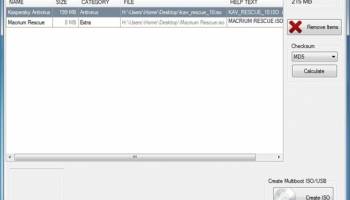
ISO images can be dragged and dropped into the main program interface. Each ISO is listed with its name, size, a category, file path and other information. The program will automatically calculate the combined file size and display it as the total size in the same program window. That’s handy to keep below the maximum storage space of CDs, DVDs or USB sticks.
An option to calculate checksums is provided which may come in handy to verify the integrity of an ISO image. ISO images can be added via the file menu as well which opens a file browser to select ISO images from connected storage devices.
The file menu contains a listing of supported ISO download locations from popular software developers. They do however link to the download page only from where the disk images have to be downloaded separately. An option to download them directly in the program would be a comfortable addition.
A click on Create ISO or Create USB creates the the multiboot ISO image or USB device. Any ISO image created this way needs to be burned to disk before it can be used.
Xboot is a helpful tool to add multiple ISO images to one multiboot ISO image or USB device. The creation process is easy to complete, only the download of the ISO images (if that is needed) is not comfortable enough. Xboot is compatible with 32-bit or 64-bit editions of Windows. The free software requires the Microsoft .NET Framework 4.0 on the computer system.
A problem that some users face is that there does not seem to be a way to combine multiple ISO images on an optical disk (like a CD or DVD) or USB device.
That’s why Xboot has been created by its developer. The free application can combine multiple ISO images into one multiboot disk or USB device.
ISO images can be dragged and dropped into the main program interface. Each ISO is listed with its name, size, a category, file path and other information. The program will automatically calculate the combined file size and display it as the total size in the same program window. That’s handy to keep below the maximum storage space of CDs, DVDs or USB sticks.
An option to calculate checksums is provided which may come in handy to verify the integrity of an ISO image. ISO images can be added via the file menu as well which opens a file browser to select ISO images from connected storage devices.
The file menu contains a listing of supported ISO download locations from popular software developers. They do however link to the download page only from where the disk images have to be downloaded separately. An option to download them directly in the program would be a comfortable addition.
A click on Create ISO or Create USB creates the the multiboot ISO image or USB device. Any ISO image created this way needs to be burned to disk before it can be used.
Xboot is a helpful tool to add multiple ISO images to one multiboot ISO image or USB device. The creation process is easy to complete, only the download of the ISO images (if that is needed) is not comfortable enough. Xboot is compatible with 32-bit or 64-bit editions of Windows. The free software requires the Microsoft .NET Framework 4.0 on the computer system.
OS: Windows XP, Windows Vista, Windows Vista x64, Windows 7, Windows 7 x64
Requirements: .NET Framework 4
Add Your Review or 64-bit Compatibility Report
Top Other 64-bit downloads


Caffeine 1.98
Keep your computer awake effortlessly with Caffeine, the ultimate productivity tool.
Freeware


Chopping List 1.0.5.1
Split the content of text files into multiple new files using a custom delimiter
Freeware

Windows 7 x64
Windows 7 x64 is the next release of the Windows client operating system
Trialware | $199.99


Convert Document to Image 16.20
Convert DOC to Tiff, JPG, GIF, BMP etc. Fast & accurate. Batchable. Command line
Shareware | $549.95
Thaiphoon Burner 17.4.1.2
Designed for those who are in need of getting all available information
Freeware
Members area
Top 64-bit Downloads
-
HWiNFO64 6.28 B4200
x64 freeware download -
Windows 7 x64
x64 trialware download -
GRBackPro Server Backup
x64 11.2.0
x64 shareware download -
XtraTools Professional
x64 26.2.1
x64 shareware download -
EasyTune6 B24.0119.1
x64 freeware download -
BusDog x64 0.2
x64 freeware download -
PhotoRenamer 4.1
x64 freeware download -
Laplink DiskImage
Professional x64 10.0.71
x64 trialware download -
CIB pdf brewer 4.20.0
x64 freeware download -
Windows 10 x64 22H2
x64 trialware download
Top Downloads
-
FreeCommander XE
Portable 2026 Build 941
freeware download -
FMDiff 4.0.5
demo download -
Open Files from XLSX to
XLS 5.2
shareware download -
FURY CTRL 2.0.65.0
freeware download -
Shell Tools 2.0.1
freeware download -
Vim 9.2.0219
open source download -
AnyMP4 Data Recovery 1.5.12
shareware download -
PCtransfer 1.0.0.1033
freeware download -
Software to Data
Recovery 5.8.4.1
shareware download -
EaseUS Key Finder 4.1.6 Build 20240910
demo download -
Music Collection 3.9.7.1
freeware download -
WinFindr 1.8
shareware download -
File Compression 1.0
commercial download -
windows_exporter 0.31.5
open source download -
Caffeine 1.98
freeware download